
@mclanea1 Welcome to the KNIME community. I agree with what has been said that the moving aggregation and ranking nodes would generally be used able to achieve this. It could also be achieved using Java Snippets and in fact Column Expressions. (possibly a sequence of column expressions… I’ll have to think about that and give it a try, or maybe somebody else will beat me to that solution!).
But since Daniel mentioned components, yes I do indeed have some components that can assist here. One component “First and Last for Group” marks the beginning and end of blocks, based on change of Product Code. This is then followed by the “Mark Blocks in Table” which allocates a sequential number to each block that has been found by the previous component, then the Rank node is used to sequentially number within the group, a further component “Cumulative Sum for Grouping” sums the “Win Status” within product/tile. The Moving Aggregator node can cumulatively sum, but there is a small complication in that the count must reset for each product.
Finally the Math Formula node can perform the calculation of Win% using the formula you described.
Here is a sample workflow
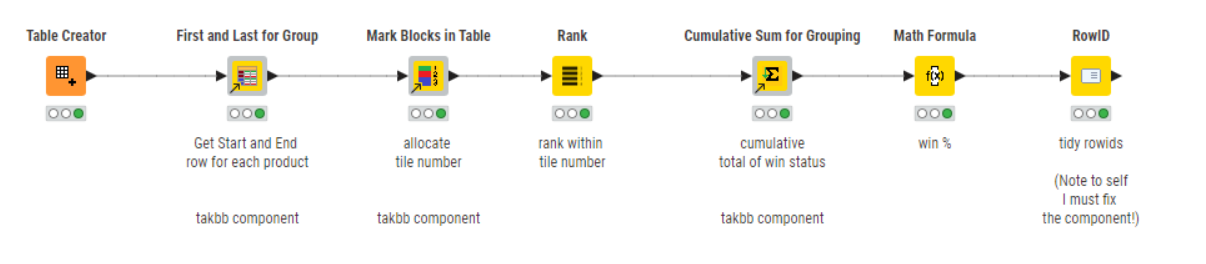
I put in the product/win status values from your example, and then added some extra product lines of my own.
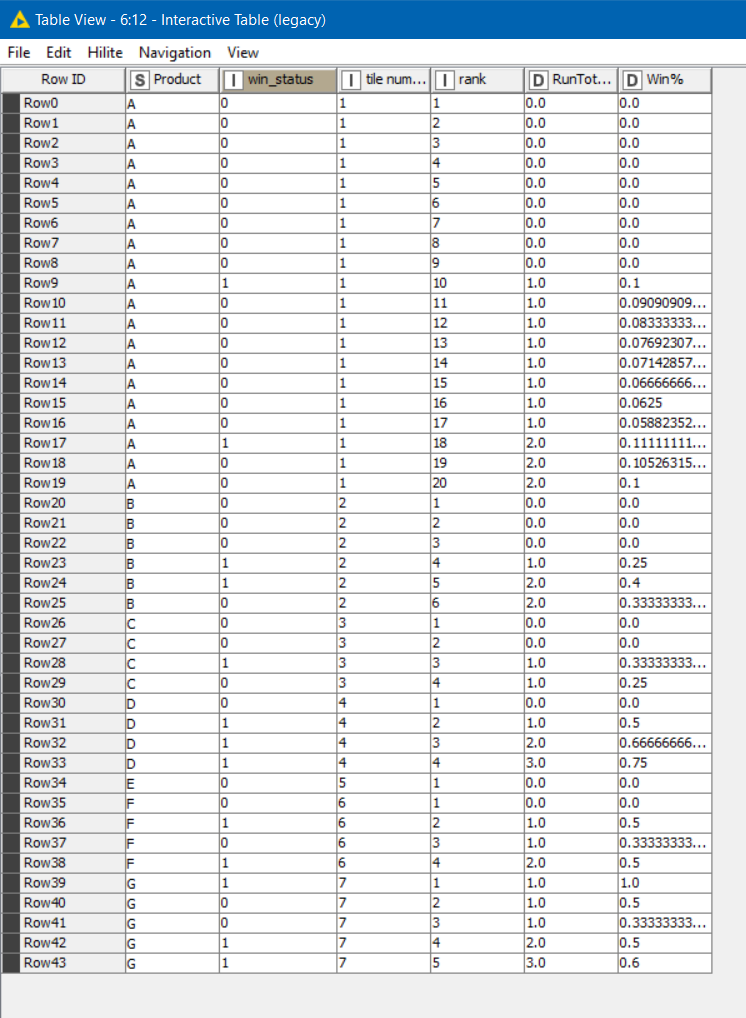
Numbering and sequencing tiles.knwf (155.6 KB)
Here are the components
If you are new to KNIME, you may not have come across how components work. Components are simply a sequence of other KNIME nodes that have been packaged up and made available, a bit like “macros”. You can copy/paste a component from one workflow into another, or you can drag and drop the icon on one of the above pages directly onto your workflow and the component will be downloaded.
