Thanks Steve
Installing the RDKit nodes got rid of the error messages.
Thanks Steve
Installing the RDKit nodes got rid of the error messages.
OK - that’s actually really useful information. I think what has happened is that the RDKit plugins that the Vernalis nodes use wasnt updated because it already set the version requirements we currently have. However, as you and others have seen, version 3.7.0 of the RDKit plugins was broken in some cases. When you installed the RDKit nodes, that has forced the bits of RDKit that Vernalis depend on to update to the newer, fixed, version. In that case, I will update our dependency so that anyone else in the same situation doesnt need to install or manually update RDKit to get rid of the error messages. (You won’t need to do anything, but it should fix this for anyone else as and when their KNIME installation updates the installed plugins)
Steve
Hello,
I am sorry, I do not completely understand the background. I now freshly installed RDKit Version 3.8.0.v201906261723.
I still recieve error messages like (I trunkated the SMILES code):
ERROR CIR 0:2 error during interpretation of OC1=XXX as https://cactus.nci.nih.gov/chemical/structure/OC1=XXX/cas#: sun.security.validator.ValidatorException: PKIX path building failed: sun.security.provider.certpath.SunCertPathBuilderException: unable to find valid certification path to requested target
I don´t know if this means that at least something was fixed?
This issue is unrelated unrelated to the RDKit issues you were seeing.
This is an SSL certificate issue accessing the CIR resource. Are you behind a proxy?
Hello swebb,
I am working from a company network with restricted user rights (no admin rights).
I’ve seen SunCertPathBuilder exceptions in the past with other nodes - in this case it was due to using an old Java Runtime in KNIME. Check in your plugins folder in the knime installation directory - you should have a folder name starting org.knime.binary.jre.
On my windows install, it is org.knime.binary.jre.win32.x86_64_1.8.0.152-01, which I corresponds to java version 1.8.0_152 - you can check this by opening a command prompt and changing the current directory e.g, on windows:
cd C:\KNIME\plugins\org.knime.binary.jre.win32.x86_64_1.8.0.152-01\jre\bin
and then running
java.exe -version
If this is a much older version then updating KNIME should fix the problem (There was a major purge of internet certificates a while back which I think caused the issue - see e.g. https://www.theregister.co.uk/2018/03/01/trustico_digicert_symantec_spat/ ). Older knime installations had a jre folder in the top level KNIME installation folder, if you cant find it in the plugins. Otherwise, I would guess it is down to a proxy server problem.
You could also try opening the URL indicated in a web browser - i.e. https://cactus.nci.nih.gov/chemical/structure/OC1=XXX/cas# - in this case you will get a ‘404 Page not found’ - because OC1=XXX is not a valid SMILES string - if you try e.g. https://cactus.nci.nih.gov/chemical/structure/O=CC=C/cas# you should get a valid response - in this case the CAS Nos for acrolein:
25314-61-8
107-02-8
25068-14-8
I just tried OC1=XXX as input for the CIR node, and got a successful execution, with the response in the ‘cas’ column error during interpretation of OC1=XXX as https://cactus.nci.nih.gov/chemical/structure/OC1=XXX/cas#, so it looks like the node itself handles broken input OK.
Steve
Hello Steve,
java.exe -version gives me
Java version “1.8.0_152”
Java™ SE Runtime Environmet (build 1.8.0_152-b16)
Java HotSpot™ 64-Bit Server VM (build 25.152-b16, mixed mode)
I installed KNIME 3.7.2 ~1 week ago. I truncated the SMILES by chance, I searched of course with valid SMILES codes. Do you think that this is then a Proxy issue?
I would guess so - what happens if you try to open the URL https://cactus.nci.nih.gov/chemical/structure/O=CC=C/cas# in your web browser?
Steve
Hello Steve,
I see:
25314-61-8
107-02-8
25068-14-8
I also see the CAS numbers when I click on the links from the error messages from the node.
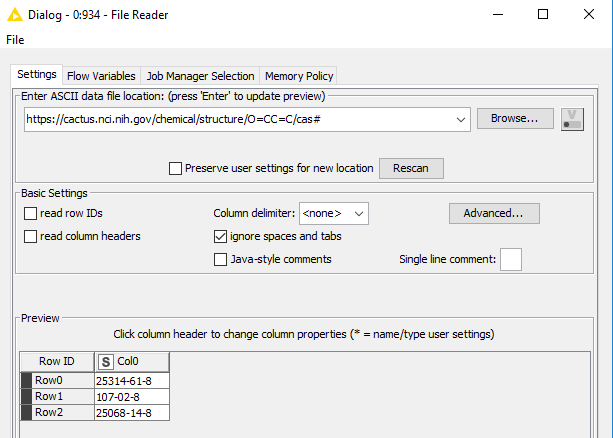
There is something a bit odd about their server configuration or certificate I think. If I try to open the same URL above in the File Reader node, then in my ‘normal’ copy of KNIME (i.e downloaded/installed from KNIME website, KNIME 3.7.2), it works OK:
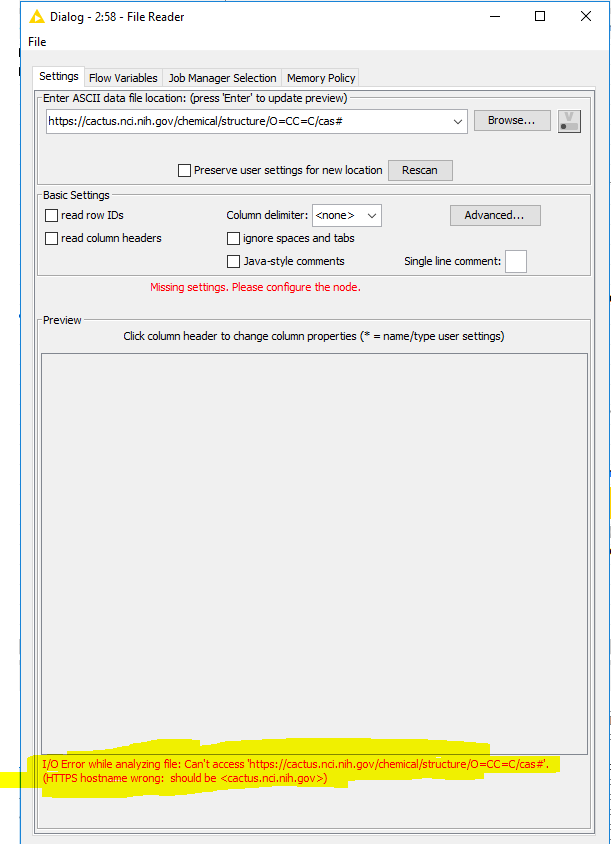
But, if I try the same thing in KNIME 3.7.2 running from my SDK for node development and testing, the URL does not work in a File Reader:
A bit more digging into the respective java jre folders in each case shows some differences. It may be worth taking a look in the \lib\security subfolder as follows:
cd C:\KNIME\plugins\org.knime.binary.jre.win32.x86_64_1.8.0.152-01\jre\lib\security
dir
In the case of my KNIME install where the file reader accesses the URL OK, the result is as follows:
12/12/2017  12:33    <DIR>          .
12/12/2017  12:33    <DIR>          ..
04/12/2017  14:39             4,054 blacklist
04/12/2017  14:38             1,253 blacklisted.certs
04/12/2017  14:39           115,314 cacerts
04/12/2017  14:38             2,466 java.policy
04/12/2017  14:39            38,397 java.security
04/12/2017  14:39                98 javaws.policy
04/12/2017  14:40             3,035 local_policy.jar
12/12/2017  12:33    <DIR>          policy
04/12/2017  14:38                 0 trusted.libraries
04/12/2017  14:40             3,023 US_export_policy.jar
           9 File(s)        167,640 bytes
           3 Dir(s)  40,361,308,160 bytes free
Whereas in the non-functional installation, the result is:
20/12/2016  17:58    <DIR>          .
20/12/2016  17:58    <DIR>          ..
23/11/2016  21:09             4,054 blacklist
23/11/2016  21:09             1,188 blacklisted.certs
30/11/2018  16:56           105,204 cacerts
23/11/2016  21:09             2,466 java.policy
23/11/2016  21:09            24,633 java.security
23/11/2016  21:09                98 javaws.policy
23/11/2016  21:09             3,035 local_policy.jar
23/11/2016  21:09                 0 trusted.libraries
23/11/2016  21:09             3,023 US_export_policy.jar
           9 File(s)        143,701 bytes
           2 Dir(s)  40,343,908,352 bytes free
Assuming your install looks similar to or the same as the first result, above, then unless your web browser if configured to used a proxy server somehow and KNIME is not, then not sure what else to suggest. Probably worth talking to your IT department to check.
Good luck!
Steve
This topic was automatically closed 7 days after the last reply. New replies are no longer allowed.