Hi @ali_aff, I haven’t worked through your flow to see where the error is, but here is an alternative flow that I think does what you require.
It works as follows:
For a given date (e.g. 23 Feb 2024):
-
calculate the date one month later than that date
Original Date=23 Feb 2024
One month later date=23 Mar 2024 -
Note the day of month for original date (23) subtract 1 from this number (22) and then find the date that many days prior to original date. This is your First DOM.
e.g 23 Feb 2024 minus 22 days= 1 Feb 2024 -
Note the day of month for “one month later” date (23) and then find the date that many days prior to “one month later” date. This is your Last DOM
e.g. 23 Mar 2024 minus 23 days = 29 Feb 2024.
Check that this works where a 31 day month is followed by a 30 day month,…e.g. the original date is 31 May 2020
Original Date=31 May 2020, Date one month later is 30 Jun 2020
Original Date less (31 - 1) days is 1 May 2020
Date next month less 30 days is 31 May 2020
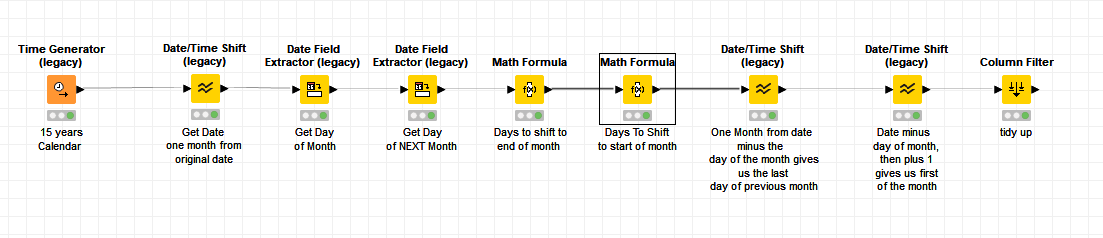
First and Last of Month.knwf (21.4 KB)
I hope that helps. I’ve continued to use the legacy nodes as these were the ones you were using, and I haven’t looked to see what the replacements/alternatives are.
Another way to achieve this might be to use a Column Expressions node, where scripts could do the entire calculation inside the one node if you are happy to hand-code it.