Hi, @havarde I’m curious, why it is hard to downgrading KNIME for your case?
I’m not aware of one, but we also run KNIME in docker - there’s a bit of hackiness involved to make sure you have all the extensions you need installed into the KNIME instance in the container
is there some guide or tutorial out there?
br
2 Likes
Not that I know of. If you drop me an email at the address in any of our (@Vernalis ) node descriptions I will see if we can share anything with you.
Steve
It’s basically just a lot of work to downgrade as we have upgraded and further developed several large workflows with v5 nodes.
Hopefully the memory and process leakage problems are solved soon, and we got a workable workaround for the process leakage caused by the POST Request node.
@havarde Thanks for the clarification, it seems that the v5 version is the most appropriate way to go.
Yes, the logs are indeed a bit confusing.
They also don’t look like they are from the workflow you showed above or at lest not the same part.
Could you share screenshot of the workflow where the memory leak occurs?
That might help us to reproduce the issue.
1 Like
The error happens only occasionally. Running the same workflow on the same data most of the times goes OK, but sometimes fail. I’ve seen this mostly on the Ubuntu machine we use for running jobs in batch mode, but just now I also got it on my Mac. The message below appeared in the console and the workflow was left in the strange state shown in the attached image.
ERROR Loop End 3:1:0:644:632:527 Caught “IllegalStateException”: Memory was leaked by query. Memory leaked: (128)
Allocator(ArrowColumnStore) 0/0/18080/2435842048 (res/actual/peak/limit)
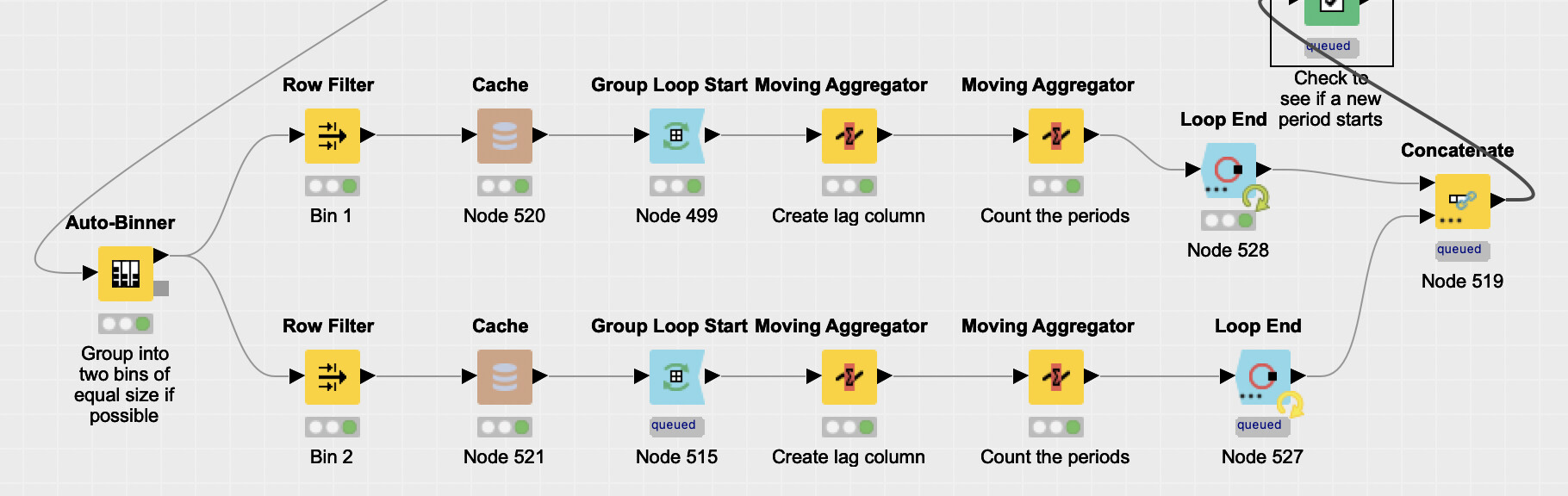
The memory leak error occurs in various workflows, but always in relationship with loops.
I never experienced this before moving to 5.1 and turning on the columnar back end (we did both at the same time and have not attempted to roll back either).
Interestingly the workflow completed without any problems before the run that failed, and also after the run that failed. Same data.
Thank you for providing the screenshot, this will hopefully help us reproduce what’s going on.
Can you maybe also provide us with the table structure, i.e. the number of rows and columns going into the loops as well as the types of the columns.
I ask because the closer we can replicate your workflow, the more likely it is that we can reproduce and consequently pin down and fix the issue.
Thank you for your help,
Adrian
1 Like
I would also be very interested in working docker for Knime or a good how to. I tried for ages to get something running under singularity and always failed. What is provided in the internet is really old stuff and not working for me.
Help is appreciated 
Lars
The -Xmx22G is only for the JVM. On top comes whatever you have configured for the columnar table backend. if they together are too much, you run out of memory. With the columnar backend giving the JVM a ton of memory isn’t really needed anymore, in my experience at least.
And as a general side-node I would really, really try to avoid looping in KNIME as much as possible either by using a different “algorithm” or going via Python if the workflow is performance critical.
One of the reasons we shifted to columnar backend was to see if we could reduce the JVM memory and also overall memory consumption, but the memory issues we encountered stopped that experiment.
There is quite a lot of KNIME functionality within our loops and rewriting this in Python is not something that we are capable of. Hopefully KNIME will figure out why their looping is less stable in version 5 than it used to be in version 4.x. We never encountered this kind of instability with the 4.x version.
We have not been able to produce a good “how to” guide for running KNIME in Docker, but if you contact me through the link on my profile we might be able to help you.
This topic was automatically closed 90 days after the last reply. New replies are no longer allowed.