Hi @jorgemartcaam , an alternative way without Regex if you are not comfortable with Regex is to just check the sub string using the substr() function:
if(substr(column("Emoji Free"), 0, 10).equals("PB_Coordi_")) {
  substr(column("Emoji Free"), 10);
} else if(substr(column("Emoji Free"), 0, 7).equals("Coordi ")){
  substr(column("Emoji Free"), 7);
} else if(substr(column("Emoji Free"), 0, 6).equals("ZH-ES_")){
  substr(column("Emoji Free"), 6);
} else if(substr(column("Emoji Free"), 0, 3).equals("PB ") || substr(column("Emoji Free"), 0, 3).equals("BS ")){
  substr(column("Emoji Free"), 3);
} else {
  column("Emoji Free");
}
Here, the order is important, as some of the strings you want to remove are a subset of another string. For example, “PB” and “Coordi” are a subset of “PB_Coordi”.
Same results:
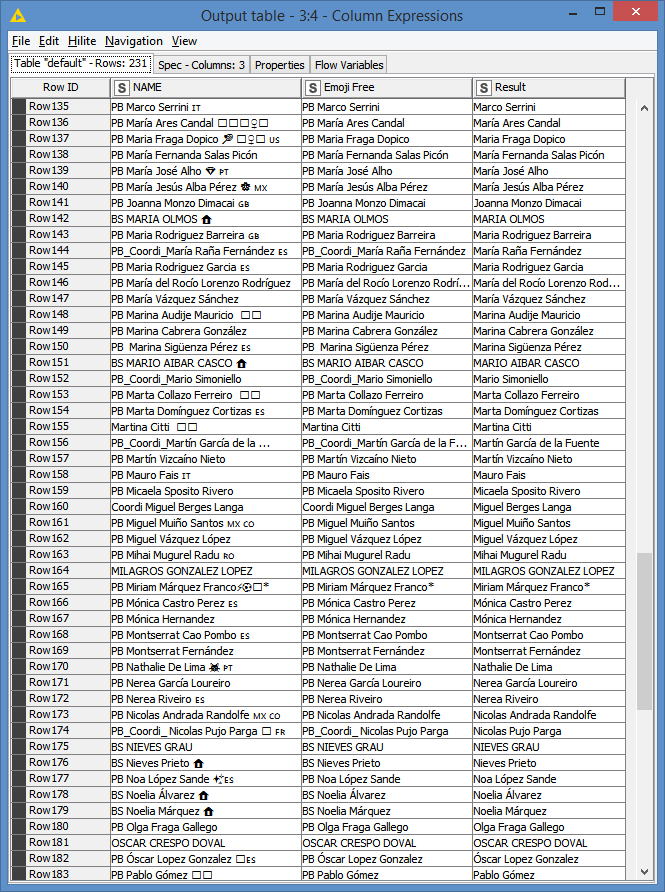
Here’s the workflow containing both solutions:
Remove some characters at the beginning of string.knwf (19.4 KB)