XML to JSON to XML

Hi,

I’m working on a specific Polish report for our organisation. I’ve mocked up some data in the attached file for sharing.

The input XML file is in the basis quite correct, but we’ll need to change certain values. That’s the easy part. I haven’t included that in the workflow for that reason.

My main problem is that I need to export the data again into an XML format. Especially creating the parent child structure I’m struggling with. For example

  <tns:FakturaWiersz>
    <tns:P_2B>2503600000311</tns:P_2B>
    <tns:P_7>RENT</tns:P_7>
    <tns:P_8A>EA</tns:P_8A>
    <tns:P_8B>1</tns:P_8B>
    <tns:P_9A>699.43</tns:P_9A>
    <tns:P_11>699.43</tns:P_11>
    <tns:P_12>23</tns:P_12>
  </tns:FakturaWiersz>

I need to create this FakturaWiersz parent tag for the actual data tags. How do I do that?

Also - as you can see in the input file - there’s also header data, which should only be present once, while the invoice data can and should occur multiple times.

Please note that now there’s only 2 invoices and 2 invoice lines included in the data, but it could be thousands.

How do I create this parent child structure. I’m using JSON as I understand that in the end it’s easier to create this parent/child structure. I tried with also with converting to XML straight away, but got stuck as well…

XML to JSON to XML JPK FA.knwf (124.0 KB)

Hi,

I’m sorry, but I cannot follow you. I checked your workflow but “FakturaWiersz” does not occur.
So you add a constant column “Faktura” with an empty string.

Is it possible to adapt your example to the very basic, lets say just two P_* columns and show the desired results for this minimal case?

1 Like

Thanks for looking into this. I understand where you get confused. I shouldn’t have used FakturaWiersz. The FakturaWiersz is part of the original XML. See row 88 if you double click on the cell of the XML reader.

If I stick to the Faktura part, it should look like this for both invoices in the final XML (so two section of the below, both with an opening and closing tag tns:Faktura).

<tns:Faktura>
    <tns:KodWaluty>PLN</tns:KodWaluty>
    <tns:P_1>2025-06-03</tns:P_1>
    <tns:P_2A>2503600000311</tns:P_2A>
    <tns:P_3A>CUSTOMER_NAME_1</tns:P_3A>
    <tns:P_3B>CUSTOMER_ADDRESS_1</tns:P_3B>
    <tns:P_3C>SUPPLIER_NAME</tns:P_3C>
    <tns:P_3D>SUPPLIER_ADDRESS</tns:P_3D>
    <tns:P_4B>123456789</tns:P_4B>
    <tns:P_5A>PL</tns:P_5A>
    <tns:P_5B>987654321</tns:P_5B>
    <tns:P_6>2025-06-30</tns:P_6>
    <tns:P_13_1>699.43</tns:P_13_1>
    <tns:P_14_1>160.87</tns:P_14_1>
    <tns:P_15>860.3</tns:P_15>
    <tns:P_16>false</tns:P_16>
    <tns:P_17>false</tns:P_17>
    <tns:P_18>false</tns:P_18>
    <tns:P_18A>true</tns:P_18A>
    <tns:P_19>false</tns:P_19>
    <tns:P_20>false</tns:P_20>
    <tns:P_21>false</tns:P_21>
    <tns:P_22>false</tns:P_22>
    <tns:P_23>false</tns:P_23>
    <tns:P_106E_2>false</tns:P_106E_2>
    <tns:P_106E_3>false</tns:P_106E_3>
    <tns:RodzajFaktury>VAT</tns:RodzajFaktury>
</tns:Faktura>


I’m basically stuck after the UNGROUP node. I have all the data elements in a tabular structure so I can manipulate some data (but I’ll leave that out for now). But how do I create a parent child structure again?

I’ve adjusted my workflow (attached) to only have a few lines to make it simpler as you suggested (as the principle is the same). The result should look as follows:

<tns:Faktura>
    <tns:KodWaluty>PLN</tns:KodWaluty>
    <tns:P_1>2025-06-03</tns:P_1>
    <tns:P_2A>2503600000311</tns:P_2A>
    <tns:P_3A>CUSTOMER_NAME_1</tns:P_3A>
    <tns:P_3B>CUSTOMER_ADDRESS_1</tns:P_3B>
</tns:Faktura>
<tns:Faktura>
    <tns:KodWaluty>PLN</tns:KodWaluty>
    <tns:P_1>2025-06-03</tns:P_1>
    <tns:P_2A>2503600000312</tns:P_2A>
    <tns:P_3A>CUSTOMER_NAME_2</tns:P_3A>
    <tns:P_3B>CUSTOMER_ADDRESS_3</tns:P_3B>
</tns:Faktura>

Also the XML namespace (tns:) I’m struggling to add. Partly because in the final bigger XML there’s also other namespaces used. But let’s ignore that for now.

I hope this helps.

XML to JSON to XML JPK FA SIMPLIFIED.knwf (77.6 KB)

Hi @robpybrobpybrobpybrobpyb, it’s quite tricky to provide assistance on a partial XML snippet like this because it is not “well formed”, so attempts to generate just this part in isolation using the XML nodes will cause difficulties, as they are a bit “purist” :wink: and complain as soon as the document is not well-formed. You already alluded to this in mentioning problems with namespaces.
A well-formed XML document must have exactly one root element, and be complete in terms of any namespace definitions.

So the following would be well-formed, but just producing the separate groupings without a root, and namespace declaration as per you requirement would not be, and this will cause the KNIME generation nodes to complain.

e.g. this would be a valid well-formed piece of XML to create, which of course includes the namespace definition and a grouping of your invoices.

<tns:Faktury xmlns:tns="http://jpk.mf.gov.pl/wzor/2022/02/17/02171/">
  <tns:Faktura>
    <tns:KodWaluty>PLN</tns:KodWaluty>
    <tns:P_1>2025-06-03</tns:P_1>
    <tns:P_2A>2503600000311</tns:P_2A>
    <tns:P_3A>CUSTOMER_NAME_1</tns:P_3A>
    <tns:P_3B>CUSTOMER_ADDRESS_1</tns:P_3B>
  </tns:Faktura>
  <tns:Faktura>
    <tns:KodWaluty>PLN</tns:KodWaluty>
    <tns:P_1>2025-06-03</tns:P_1>
    <tns:P_2A>2503600000312</tns:P_2A>
    <tns:P_3A>CUSTOMER_NAME_2</tns:P_3A>
    <tns:P_3B>CUSTOMER_ADDRESS_3</tns:P_3B>
  </tns:Faktura>
</tns:Faktury>

However, I think that this is not what you are after, and I can fully understand why, because you want to just do this small part, I think and then slot it back in (somehow). But it may be that actually producing the above would be easier to subsequently work with. I don’t know without having a fuller picture of the final result.

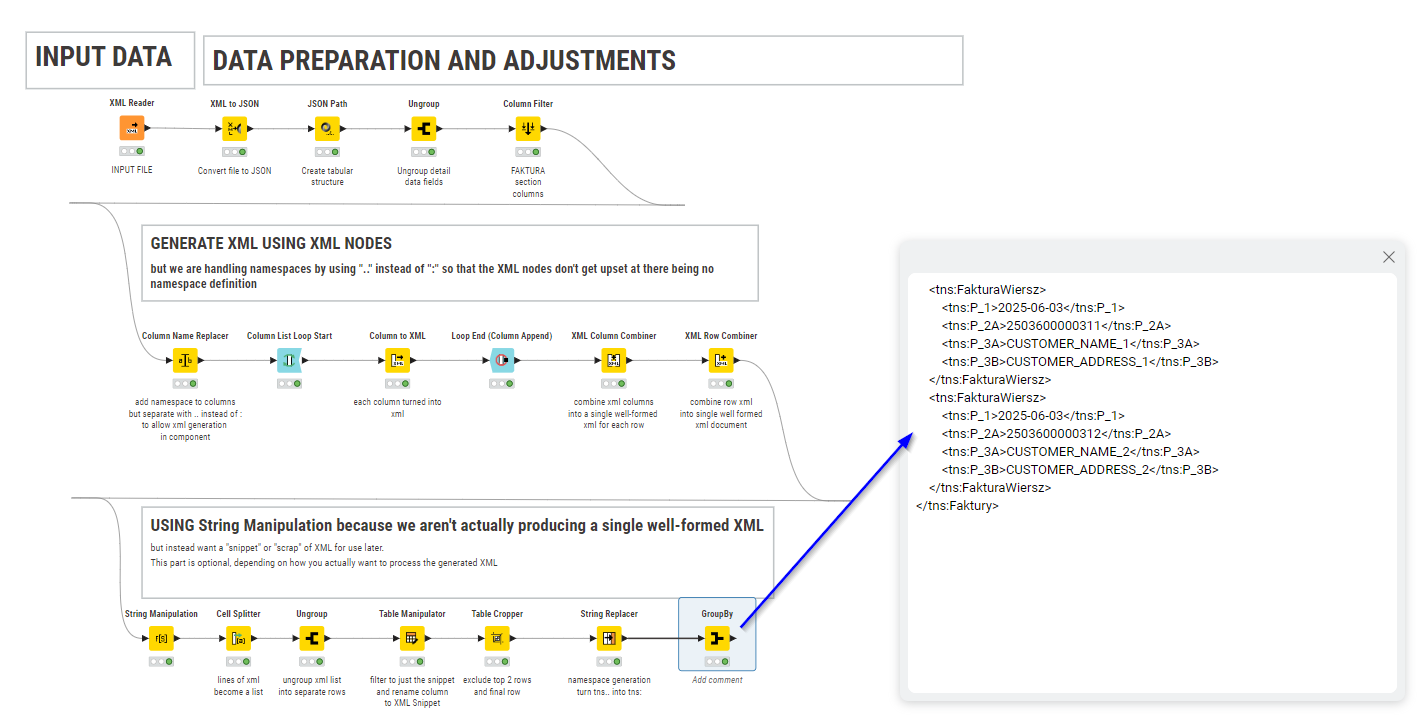
Anyway… to achieve your requested aim, the only way I could think of doing this was to get a little creative, and make use of both XML nodes (and tricking them into ignoring namespaces) and then including some string manipulations/transformations.

To trick it to ignore the namespaces, I opted to prefix the columns “tns..” instead of “tns:” during XML creation (with the XML nodes) so the column name is treated as just an element name with no namespace. After generating the xml I then used String Replacer to replace occurrences of “tns..” with “tns:” during the “string transformation” phase.

This is the result:

XML to JSON to XML JPK FA SIMPLIFIED-TAKBB.knwf (173.4 KB)

I would imagine that at some point you then need to fit this xml back into your main body, but without knowing exactly what you have it’s difficult to offer more advice on that part. See if the above gets you further on, and we can go from there if you need more help.

3 Likes

Thanks!!

XML’s are a pain to work with and it’s probably best to have the full picture. Perhaps it’s summarized easiest this way: I want the current input XML to be converted to a table structure and back into an XML. The tags, the structure, namespaces etc should all be similar. I can take care of the data alterations myself, as that’s not complicated. To simply said: XML –> knime table –> XML.

So in the end the final XML should look as follows (as the input XML).

<?xml version="1.0" encoding="UTF-8"?>
<tns:JPK xmlns:etd="http://crd.gov.pl/xml/schematy/dziedzinowe/mf/2018/08/24/eD/DefinicjeTypy/" xmlns:xsi="http://www.w3.org/2001/XMLSchema-instance" xmlns:tns="http://jpk.mf.gov.pl/wzor/2022/02/17/02171/" xmlns:kck="http://crd.gov.pl/xml/schematy/dziedzinowe/mf/2013/05/23/eD/KodyCECHKRAJOW/" xsi:schemaLocation="http://crd.gov.pl/xml/schematy/dziedzinowe/mf/2018/08/24/eD/DefinicjeTypy/StrukturyDanych_v5-0E.xsd">
  <tns:Naglowek>
    <tns:KodFormularza kodSystemowy="JPK_FA (4)" wersjaSchemy="1-0">JPK_FA</tns:KodFormularza>
    <tns:WariantFormularza>4</tns:WariantFormularza>
    <tns:CelZlozenia>1</tns:CelZlozenia>
    <tns:DataWytworzeniaJPK>2025-06-23T12:18:08Z</tns:DataWytworzeniaJPK>
    <tns:DataOd>2025-06-01</tns:DataOd>
    <tns:DataDo>2025-06-30</tns:DataDo>
    <tns:KodUrzedu>1234</tns:KodUrzedu>
  </tns:Naglowek>
  <tns:Podmiot1>
    <tns:IdentyfikatorPodmiotu>
      <tns:NIP>123456789</tns:NIP>
      <tns:PelnaNazwa>COMPANY_NAME</tns:PelnaNazwa>
    </tns:IdentyfikatorPodmiotu>
    <tns:AdresPodmiotu>
      <etd:KodKraju>PL</etd:KodKraju>
      <etd:Wojewodztwo>QWERTY</etd:Wojewodztwo>
      <etd:Powiat>Z</etd:Powiat>
      <etd:Gmina>WARSZAWA-WLOCHY</etd:Gmina>
      <etd:Ulica>STREETNAME</etd:Ulica>
      <etd:NrDomu>1</etd:NrDomu>
      <etd:Miejscowosc>Warszawa</etd:Miejscowosc>
      <etd:KodPocztowy>01-001</etd:KodPocztowy>
    </tns:AdresPodmiotu>
  </tns:Podmiot1>
  <tns:Faktura>
    <tns:KodWaluty>PLN</tns:KodWaluty>
    <tns:P_1>2025-06-03</tns:P_1>
    <tns:P_2A>2503600000311</tns:P_2A>
    <tns:P_3A>CUSTOMER_NAME_1</tns:P_3A>
    <tns:P_3B>CUSTOMER_ADDRESS_1</tns:P_3B>
    <tns:P_3C>SUPPLIER_NAME</tns:P_3C>
    <tns:P_3D>SUPPLIER_ADDRESS</tns:P_3D>
    <tns:P_4B>123456789</tns:P_4B>
    <tns:P_5A>PL</tns:P_5A>
    <tns:P_5B>987654321</tns:P_5B>
    <tns:P_6>2025-06-30</tns:P_6>
    <tns:P_13_1>699.43</tns:P_13_1>
    <tns:P_14_1>160.87</tns:P_14_1>
    <tns:P_15>860.3</tns:P_15>
    <tns:P_16>false</tns:P_16>
    <tns:P_17>false</tns:P_17>
    <tns:P_18>false</tns:P_18>
    <tns:P_18A>true</tns:P_18A>
    <tns:P_19>false</tns:P_19>
    <tns:P_20>false</tns:P_20>
    <tns:P_21>false</tns:P_21>
    <tns:P_22>false</tns:P_22>
    <tns:P_23>false</tns:P_23>
    <tns:P_106E_2>false</tns:P_106E_2>
    <tns:P_106E_3>false</tns:P_106E_3>
    <tns:RodzajFaktury>VAT</tns:RodzajFaktury>
  </tns:Faktura>
  <tns:Faktura>
    <tns:KodWaluty>PLN</tns:KodWaluty>
    <tns:P_1>2025-06-03</tns:P_1>
    <tns:P_2A>2503600000312</tns:P_2A>
    <tns:P_3A>CUSTOMER_NAME_2</tns:P_3A>
    <tns:P_3B>CUSTOMER_ADDRESS_2</tns:P_3B>
    <tns:P_3C>SUPPLIER_NAME</tns:P_3C>
    <tns:P_3D>SUPPLIER_ADDRESS</tns:P_3D>
    <tns:P_4B>123456789</tns:P_4B>
    <tns:P_5A>PL</tns:P_5A>
    <tns:P_5B>134679852</tns:P_5B>
    <tns:P_6>2025-08-31</tns:P_6>
    <tns:P_13_1>846.62</tns:P_13_1>
    <tns:P_14_1>194.72</tns:P_14_1>
    <tns:P_15>1041.34</tns:P_15>
    <tns:P_16>false</tns:P_16>
    <tns:P_17>false</tns:P_17>
    <tns:P_18>false</tns:P_18>
    <tns:P_18A>true</tns:P_18A>
    <tns:P_19>false</tns:P_19>
    <tns:P_20>false</tns:P_20>
    <tns:P_21>false</tns:P_21>
    <tns:P_22>false</tns:P_22>
    <tns:P_23>false</tns:P_23>
    <tns:P_106E_2>false</tns:P_106E_2>
    <tns:P_106E_3>false</tns:P_106E_3>
    <tns:RodzajFaktury>VAT</tns:RodzajFaktury>
  </tns:Faktura> 
  <tns:FakturaCtrl>
    <tns:LiczbaFaktur>2</tns:LiczbaFaktur>
    <tns:WartoscFaktur>1633976.24</tns:WartoscFaktur>
  </tns:FakturaCtrl>
  <tns:FakturaWiersz>
    <tns:P_2B>2503600000311</tns:P_2B>
    <tns:P_7>RENT</tns:P_7>
    <tns:P_8A>EA</tns:P_8A>
    <tns:P_8B>1</tns:P_8B>
    <tns:P_9A>699.43</tns:P_9A>
    <tns:P_11>699.43</tns:P_11>
    <tns:P_12>23</tns:P_12>
  </tns:FakturaWiersz>
  <tns:FakturaWiersz>
    <tns:P_2B>2503600000312</tns:P_2B>
    <tns:P_7>VARIABLE SERVICE CHARGES</tns:P_7>
    <tns:P_8A>CLI</tns:P_8A>
    <tns:P_8B>424</tns:P_8B>
    <tns:P_9A>.15</tns:P_9A>
    <tns:P_11>62.75</tns:P_11>
    <tns:P_12>23</tns:P_12>
  </tns:FakturaWiersz>  
  <tns:FakturaWierszCtrl>
    <tns:LiczbaWierszyFaktur>2</tns:LiczbaWierszyFaktur>
    <tns:WartoscWierszyFaktur>1328435.97</tns:WartoscWierszyFaktur>
  </tns:FakturaWierszCtrl>
</tns:JPK>

One of the data manipulations I have to do is change the content of data tag P_7, if certain conditions are met, based on data on other files (it’s more complex of course, otherwise I could just find and replace using Notepad). But the structure remains exactly the same as above.

Hi @robvp, yes you are right that dealing with XML is a pain!

As you mentioned before, one method for dealing with this is using the JSON nodes and then converting back to XML at the end. But even that is not straightforward and there are plenty of things to trip you up. Finally xml namespaces! Yes these are a pain too, and attempting to handle these can cause the namespace prefixes to get corrupted between JSON and XML, which is also an annoyance that I have not been able to find a way to prevent, so have needed a workaround.

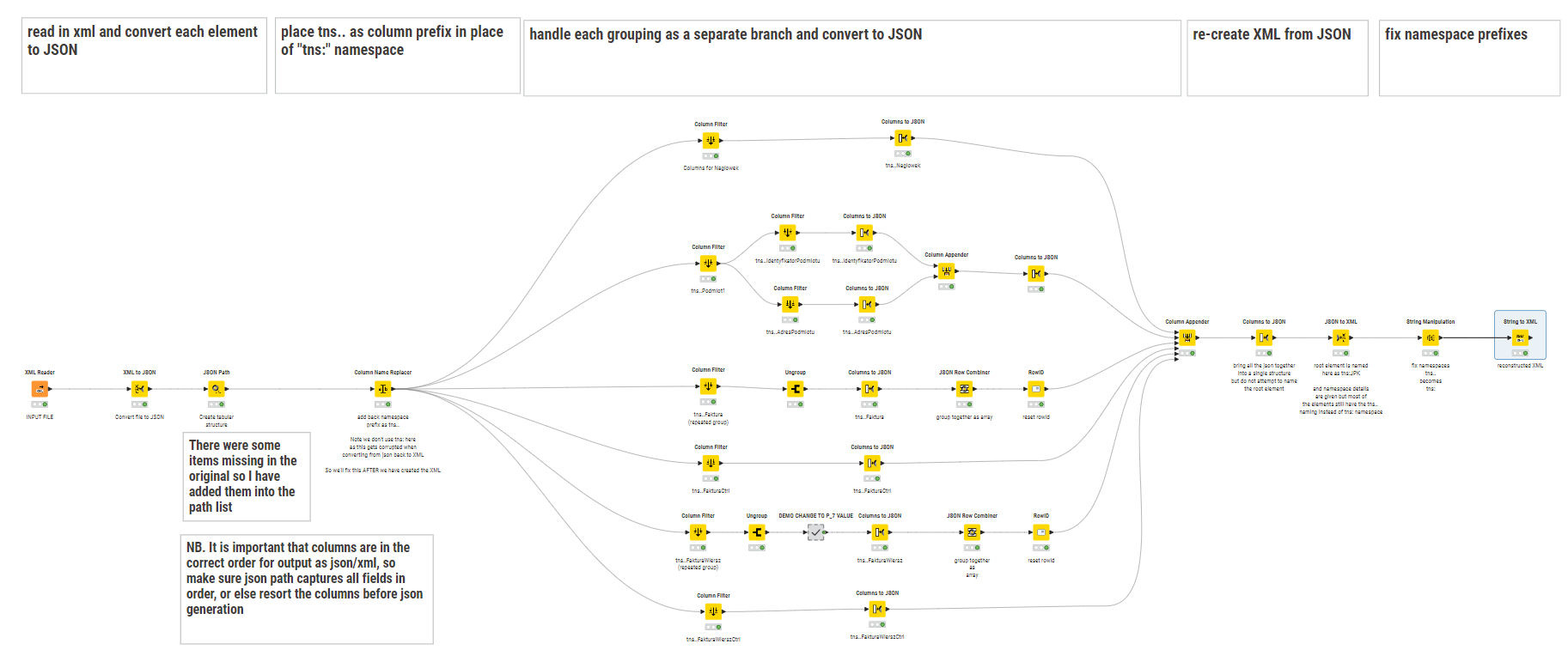
Attached is a workflow that uses the data in your original, and converts to JSON. I modified your original json path because there were a couple of columns skipped, so I added these back.

It groups up the different fields that are to be output in each group, and combines them into their respective groupings (in json), then re-combines them and finally converts back to XML


You will see in the second branch from bottom that it includes a demo metanode that simulates a change to one of the P_7 values. “RENT” becomes “RENTAL INCOME”.

Rather than me try to explain everything here, perhaps study what I’ve done. It was quite convoluted, and took a bit of time to work it through, but hopefully if you look at how the column filters split each field grouping out, and then regroup them it will be fairly self-explanatory. Any questions, please let me know.

You will see that where Faktura and FakturaWiersz are “repeated groups” these get handled slightly differently, with each being ungrouped in isolation and then recombined.

Also Podmiot1 has two sub-groupings so again these get treated differently with each sub-group then being split out before being re-combined.

I’m hoping that the take-away from this is that patterns will emerge on how this works, and perhaps some more generic/general components can be written to simplify this workflow. I may investigate that challenge further!

XML to JSON to XML JPK FA SIMPLIFIED-2-takbb.knwf (288.3 KB)

Hope it helps.

3 Likes

Wow, this is helping a lot!! I’ll save this workflow for any new XML alterations required!

I only have one issue left which I’m not able to tackle…the name spaces…

In your workflow it results in the following name space line:

<tns:JPK xmlns="xmlns:etd=http://crd.gov.pl/xml/schematy/dziedzinowe/mf/2018/08/24/eD/DefinicjeTypy/ xmlns:xsi=http://www.w3.org/2001/XMLSchema-instance xmlns:tns=http://jpk.mf.gov.pl/wzor/2022/02/17/02171/ xmlns:kck=http://crd.gov.pl/xml/schematy/dziedzinowe/mf/2013/05/23/eD/KodyCECHKRAJOW/ xsi:schemaLocation=http://crd.gov.pl/xml/schematy/dziedzinowe/mf/2018/08/24/eD/DefinicjeTypy/StrukturyDanych_v5-0E.xsd" xmlns:ns="http://www.knime.org/json2xml/originalKey/" xmlns:tns="xmlns:etd=http://crd.gov.pl/xml/schematy/dziedzinowe/mf/2018/08/24/eD/DefinicjeTypy/ xmlns:xsi=http://www.w3.org/2001/XMLSchema-instance xmlns:tns=http://jpk.mf.gov.pl/wzor/2022/02/17/02171/ xmlns:kck=http://crd.gov.pl/xml/schematy/dziedzinowe/mf/2013/05/23/eD/KodyCECHKRAJOW/ xsi:schemaLocation=http://crd.gov.pl/xml/schematy/dziedzinowe/mf/2018/08/24/eD/DefinicjeTypy/StrukturyDanych_v5-0E.xsd">

There’s two problems:

  1. The start
    <tns:JPK xmlns="xmlns:etd=
    This should be
    <tns:JPK xmlns:etd=
    So without the xmlns=
  2. The URL’s should be between double quotation marks (““).
  3. Further down the “etd” name spaces didn’t work, for only a few tags.

In the end the name space should look as follows:

<tns:JPK xmlns="xmlns:etd=http://crd.gov.pl/xml/schematy/dziedzinowe/mf/2018/08/24/eD/DefinicjeTypy/ xmlns:xsi=http://www.w3.org/2001/XMLSchema-instance xmlns:tns=http://jpk.mf.gov.pl/wzor/2022/02/17/02171/ xmlns:kck=http://crd.gov.pl/xml/schematy/dziedzinowe/mf/2013/05/23/eD/KodyCECHKRAJOW/ xsi:schemaLocation=http://crd.gov.pl/xml/schematy/dziedzinowe/mf/2018/08/24/eD/DefinicjeTypy/StrukturyDanych_v5-0E.xsd" xmlns:ns="http://www.knime.org/json2xml/originalKey/" xmlns:tns="xmlns:etd=http://crd.gov.pl/xml/schematy/dziedzinowe/mf/2018/08/24/eD/DefinicjeTypy/ xmlns:xsi=http://www.w3.org/2001/XMLSchema-instance xmlns:tns=http://jpk.mf.gov.pl/wzor/2022/02/17/02171/ xmlns:kck=http://crd.gov.pl/xml/schematy/dziedzinowe/mf/2013/05/23/eD/KodyCECHKRAJOW/ xsi:schemaLocation=http://crd.gov.pl/xml/schematy/dziedzinowe/mf/2018/08/24/eD/DefinicjeTypy/StrukturyDanych_v5-0E.xsd">

I was able to change this using string replacer. However, I can’t convert the adjusted string into an XML. It gives an error.

I’ve tried working on it, see attached.

XML to JSON to XML JPK FA SIMPLIFIED-namespaceissue.knwf (336.9 KB)

Hi @robvp ah yes, I see I made a small error in the namespace declaration, but also hadn’t allowed for additional namespaces, so I’ve looked at what you were doing and I can see what you were aiming at, but I’ve gone back and adjusted the workflow so that the “etd” namespace columns get identified up-front. This would be better for future proofing if there ended up being multiple columns with the same name but different namespaces (which of course is the primary reason for namespaces in the first place :wink: )

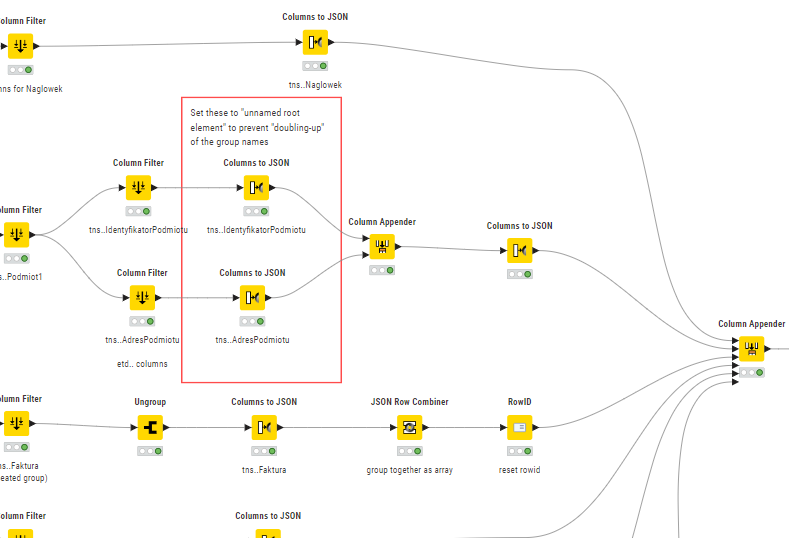
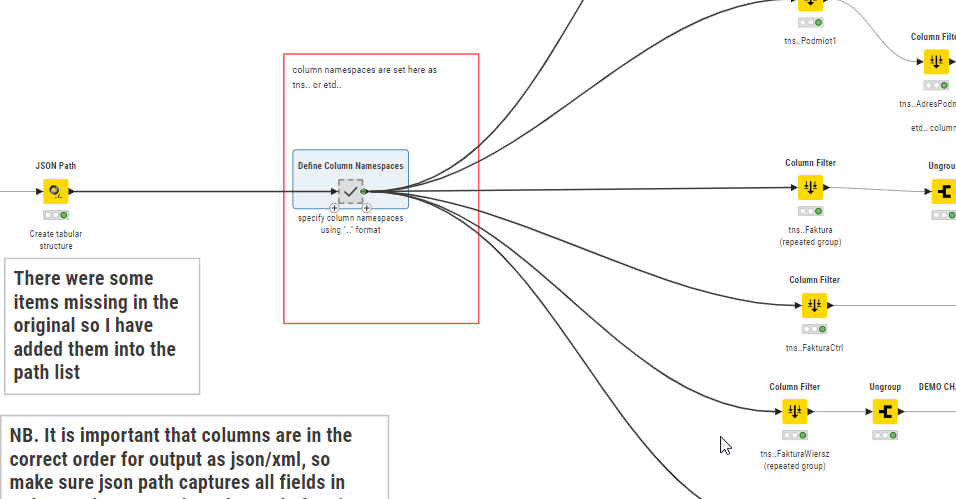
So a metanode at the beginning splits the columns and sets some to “tns..” and others to “etd..”

This could be adjusted further as necessary if there are other namespaces.
I then updated downstream nodes that were affected by these column name changes.

I also noticed my error in the nodes highlighted here. These have to be set to “unnamed root element” since otherwise the grouping element name gets nested inside itself!

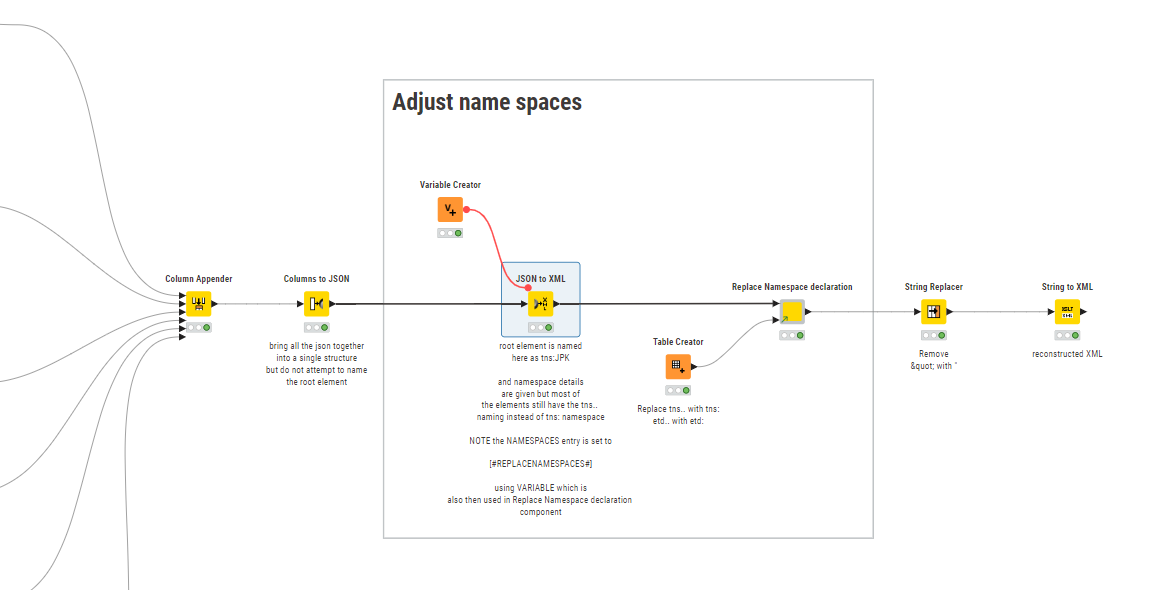
And finally, the part that was causing trouble with namespaces. I thought about how to simplify this process and make it flexible for future use and created a component to handle the namespace “corrections”

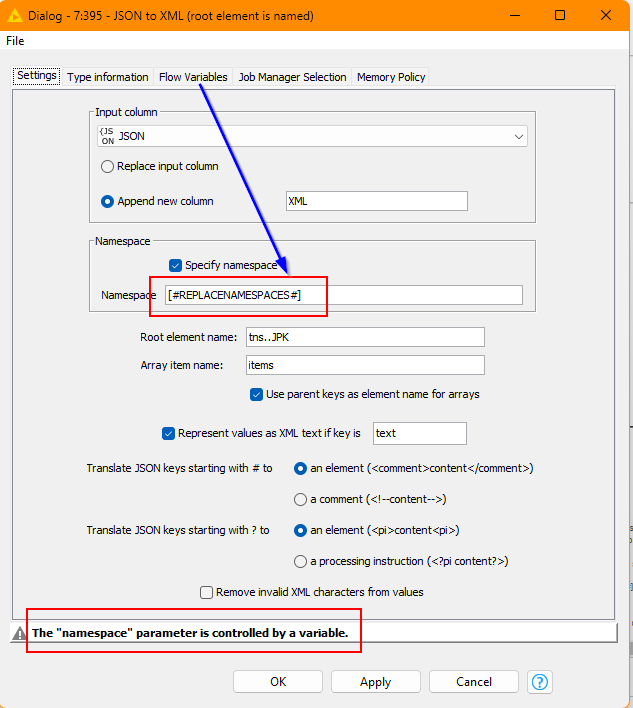
The Variable Creator contains a var called “NAMESPACES-REPLACEMENT” and is set to an arbitrary value that you won’t find elsewhere in your XML, e.g “[#REPLACENAMESPACES#]”

This is then used to populate the Namespace entry in the JSON to XML node

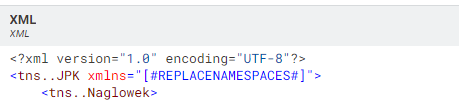
and this causes the declaration line to be generated as this:

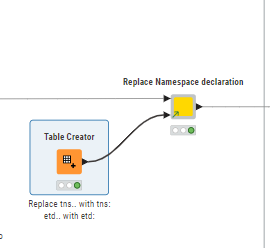
There is then a component that I created to keep things clean “Replace Namespace declaration”.

This component performs two jobs. Firstly it handles the replacement of “tns..” with “tns:” and “etd..” with “etd:” (using a Table Creator to supply the internal String Replacer (Dictionary)

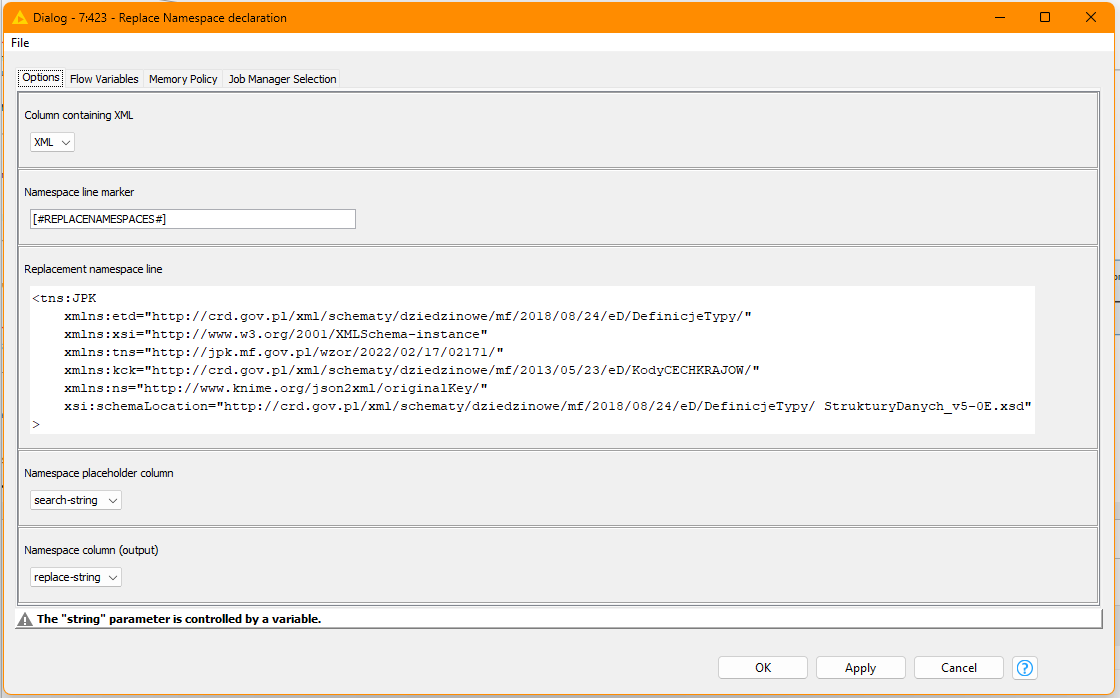
and secondly it replaces the entire line containing the above “[#REPLACENAMESPACES#]” marker/ It is configurable so if I have the namespace line declaration wrong, you can change it:

I don’t know if you still need the String Replace to replace &quot; with , I assume you do so I’ve left it in anyway. This now generates well-formed XML again.

The included component is shared in my “experimental” space on the hub.

Feel free to pull it down, disconnect, modify/adapt and share on your own hub space as you see fit.

Here is the updated workflow

XML to JSON to XML JPK FA SIMPLIFIED-3-takbb.knwf (436.2 KB)

edit: btw in the namespace info you gave in your last post, the namespaces seemed to be doubled-up.
I removed the duplication but just realised on re-reading what I pasted above that a ref to KNIME.ORG was also in there. I imagine that shouldn’t really be there, but that can be manually adjusted now in the above component as needed.

3 Likes

Wow, I don’t know what to say! This looks perfect!!! I really am amazed! Thank you very much!

2 Likes

You’re welcome @robvp, and thanks for indicating the solution. :+1:

This topic was automatically closed 7 days after the last reply. New replies are no longer allowed.