From your lips to God’s ears. This is ridiculous that a year later nobody is working on this. It can be done without a ton of effort with specific API calls, so not sure why it can’t be backed into this node or a different node.
How can we add a +1 to vote for this? I’d like to do that.
its not related to the commercial HUB offering, or to AI.
hence, its low prio for them.
If you scroll all the way up to the first post, in the top left corner there should be a “Vote” Button => Click it 

1 Like
Oh goodness, I’m so blind. Thank you!
The current SharePoint Online List Writer node in KNIME lacks support for updating specific records by ID, which forces users to overwrite entire lists even when only a few rows need to be changed. This creates unnecessary risk, breaks column formatting (especially for fields like hyperlinks), and adds manual cleanup steps to otherwise automated workflows.
The absence of row-level update functionality is a major gap compared to other platforms like Alteryx, which allow targeted updates using native connectors. Without this, KNIME users are left with complex Graph API workarounds that require advanced setup and authentication.
Adding support for updates via ID, along with optional upsert behavior, would significantly improve KNIME’s usability in enterprise environments and reduce the overhead for SharePoint-based workflows.
Please consider prioritizing this enhancement — it’s a foundational capability that would benefit a wide range of use cases.
1 Like
If I had not voted before, I’d vote again. This surely must be one of the features with the most up-votes - I can just second what you said @aehrenworth …
Maybe we can get an update on this one @ScottF ?
Hi all -
I can tell you that we have an update planned for this in the December release. There is still internal discussion about the details of implementation, so I will leave it to @tobias.koetter to comment further when the time is right.
Thanks everyone for your patience!
1 Like
Hello everyone,
as Scott mentioned we are planning to add this long and heavy requested feature with the December release. The start of development is planned for next week. If everything works out you will be able to test the new feature in the nightly build Mid of November  . I will keep you posted here.
For the feature we decided on the following solutions for the known challenges:
-
If the SharePoint List has duplicate column names
- The node will lookup all matching columns, sort them by id, and take the first none read-only matching column
-
If the SharePoint List has a different column counts
- If the SharePoint list has more columns than KNIME table the node will only insert values into the columns from the KNIME table and leave the other columns empty (or with their default values).
- If the KNIME table contains more columns (that are not present in SharePoint) the node will fail a proper error message
-
Type mapping
- The node will not perform any type checking since it is very hard to do. We will add a short section to the append option that warns about this in the node description
The main goal for this feature is that if you run a KNIME workflow twice the first run will create the list and the second run will append the new rows to the existing list without any problems.
Regarding the updating of existing records, this will not be supported by this new feature. The reason is that updating will require additional settings such as lookup logic (by id or “business key”), etc. which would be better handled by a dedicated SharePoint List Updater node (internal ticket AP-25230). We did some initial investigation and will followup on this here most likely with some questions 
Bye
Tobias
2 Likes
Hello again,
some update on the progress of the “Append” option which is making good progress. I hope that it will be in the nightly build by the end of next week for testing.
We also did further investigate the “Update” option suggested by @aehrenworth (Thanks). We might be able to add this as additional option of the SharePoint List Writer node as well. However this option will not come with any lockup logic as described before. Instead you need to select one KNIME column from the input table that contains the SharePoint list item id. This should be straight forward since the table returned by the SharePoint List Reader node contains the ID column. So I guess a typical workflow that updates all existing items in SharePoint will look like this:
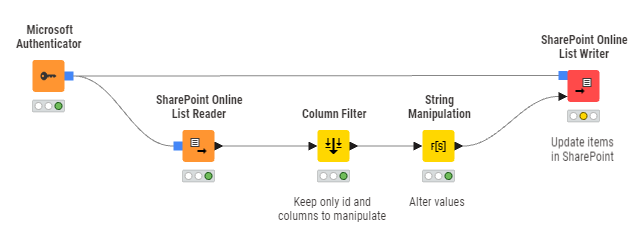
The lookup of items by column values as described before could be implemented by retrieving all list items into KNIME. Once they are in KNIME you can filter and updating them. So a typical workflow would look like this:
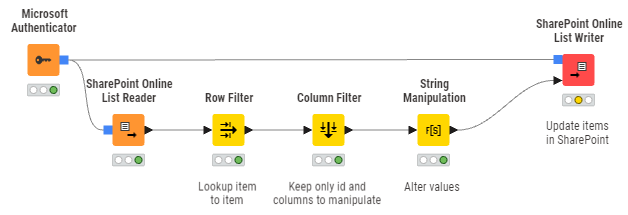
This is not the most performant way but we hope still a big improvement
What do you guys think?
Bye
Tobias
2 Likes
Internal ticket ID: AP-25301
Summary: SharePoint Online List Updater
Fix version(s): 5.8.1
Other related open ticket(s):
AP-25324: Rename Delete SharePoint Online List node to SharePoint Online List/Item Deleter and support individual item deletion
AP-25302: Add “Fail on error” advanced settings option to the SharePoint Online List Writer
1 Like
Internal ticket ID: AP-21548
Summary: Add “Append” option to the SharePoint Online List Writer
Fix version(s): 5.8.1
Other related open ticket(s):
AP-25324: Rename Delete SharePoint Online List node to SharePoint Online List/Item Deleter and support individual item deletion
AP-25302: Add “Fail on error” advanced settings option to the SharePoint Online List Writer
1 Like
This sounds promising!
Hello everyone,
it is done
We just released version 5.8.1 of the KNIME Analytics Platform. This version includes the new “Append” option in the SharePoint Online List Writer node. In addition we also added a new SharePoint Online List Updater node that allows you to update individual items of an existing list based on their ID. Thanks for the idea @aehrenworth .
Thanks for your patience.
Bye
Tobias
5 Likes
Cannot see append option or install the sharepoint update list node. Current version 5.9.0
I checked and there are two nodes on the hub:
==> Update items in a list based on their ID
And
Now has option to append to existing list.
1 Like
Hi @Sunraj ,
the new option is available in KNIME 5.8.1 (already released) and 5.10.0 (will be released soon). I know this is a bit confusing but the deadline for the 5.9.0 release was earlier than the 5.8.1 release and we wanted to have it in the long term support version.
Bye
Tobias
1 Like