i want to make a simple Data App demo with a scatter plot that can be adjusted by user input. I uploaded the workflow, made a version and started the Data App instance. Unfortunately, the browser page which should display the App only shows “Finished successfully”.
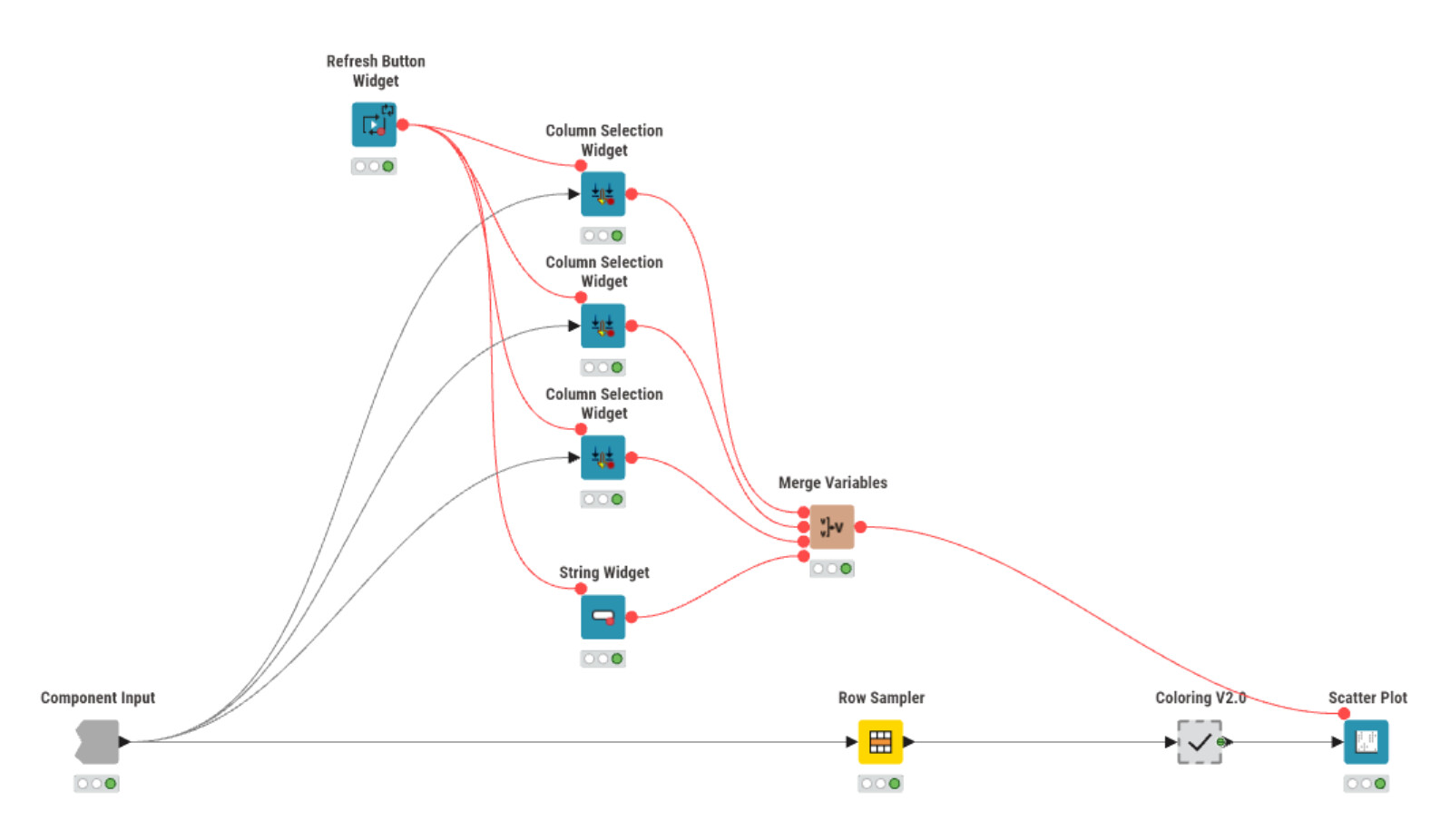
The workflow consists of a CSV-Reader, a Column Filter and a component. You ca see the component in the image below. Its a very minimal example with a scatter plot that receives input from user widgets inside the component.
I was thinking that the coloring component inside the component could be the culprit but there is no view node inside.
Any help or hints are welcome, thank you very much in advance.
By default KNIME saves workflows in the state they currently are. This can be useful if you train a long running model and don’t want to wait again tomorrow when you continue building your workflow.
For deployments that means that only those nodes are executed which have not yet been saved in an executed state. If a workflow is saved with all nodes executed, nothing is left to be done. That’s why you see the Finished successfully immediately.
I’m also learning and have had this same issue. It’s because you have all nodes executed in your workflow (i.e. they’re all green). To fix you basically need to reset at least one node and create a new version based on this so your component is in the “ready to execute” (yellow) stage. Then it should work as expected.