Best Practice for bundling data files with component templates?

Hi KNIME Community,

I’m working on creating a reusable component that needs to read from a file (could be CSV, model file, etc.). My goal is to package this component as a template that can be shared with others, including the file itself.

The Challenge: I want the file to “travel” with the component template so that when someone imports and uses my component, they don’t need to provide their own copy of the required file.

What I’ve Tried:

  • Using knime://knime.workflow/data paths, but these reference the parent workflow’s data directory, not the component itself

  • The component template exports successfully, but when used in a different workflow, it can’t find the bundled file

Current Workarounds:

  • Embed data directly: Recreate small datasets using Table Creator (I guess it works for small data only)

  • External file dependency: Require users to provide their own file copy (not ideal for reusability)

Questions:

  1. Is there a way to truly bundle files within a component template?

  2. What’s the recommended approach for components that need reference files?

  3. Are there any undocumented features or creative solutions you’ve used?

This seems like a common use case - creating self-contained, reusable components with their own reference data or configuration files. Any insights or suggestions would be greatly appreciated!

Thanks in advance!
Gio
@gcincilla I once created this approach where a code file is being created from inside a node and then be stored in a sub-path. Not very elegant but it does work.

Hi,
what is the purpose of shipping some data with it? For testing or displaying the functionality?

You can create data using scripting nodes like “python” or “R” if this is sufficient. Otherwise you can use the workflow invocation techniques to create, save and share workflows. As you already found out: its easy to store data in the data area of a workflow.

@gcincilla there also is this node that can provide sample data sets and can just live inside a component.

1 Like

Hi @gcincilla ,

As you have found, you cannot physically include a data file with a component although as mentioned by others in this thread you could have the component write data out to a file, but an alternative approach is to make your data file available on a public web server or cloud service, which the component can then retrieve on first invocation within a workflow.

One option is to use the Transfer Files node within your component to download the file to the workflow’s data folder.

Alternatively, I have a component available on the community hub called “Download JAR file”. Although, as its name suggests it was written to enable the inclusion of Java Archive (JAR) files, it can actually be used for any file. It makes it very simple to place any file into the workflow’s data folder, and it is also written so that it first checks for the presence of the file name, so that it doesn’t waste resources/time downloading the file again if its already present.

For example, suppose I wanted to include a csv file. Here, for demonstration I’ll use a publicly available CSV file from datablist.com

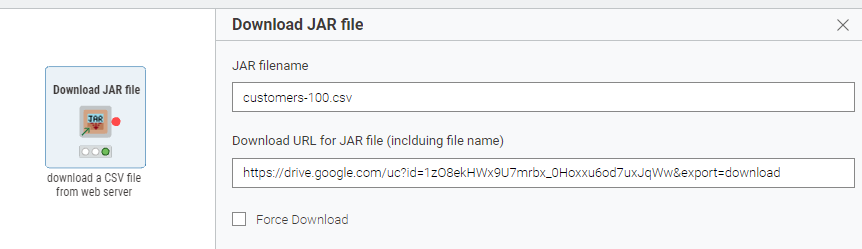
Include my Download JAR file component in a workflow, and configure it like this to download a CSV file:

If you want to try it yourself. the demo file is customers-100.csv and the URL is

https://drive.google.com/uc?id=1zO8ekHWx9U7mrbx_0Hoxxu6od7uxJqWw&export=download

If you leave “Force Download” unchecked, it will only download the file if it doesn’t already exist in the data folder of the current workflow, so effectively it downloads the file on first invocation but after that it remains available.

The Transfer Files node could also be configured to download the above file, but I didn’t find a way of controlling the resultant filename, so if as in this case the file’s name isn’t defined on the URL, it could be a problem. In that respect, the Download JAR files component is more straightforward.

Maybe I should consider renaming the component as simply “Download file” :wink: but for now, here it is:

2 Likes

Thank you all for your help and suggestions! I think that if the file is a small tabular text file, I will keep using the workaround of setting the data in a Table Creator node inside the component template. Otherwise, I believe @takbb ’s suggestion is the most versatile.

Cheers,

Gio

This topic was automatically closed 7 days after the last reply. New replies are no longer allowed.