Dear KNIME Community,
I’m developing a data app on KNIME Hub that needs to retrieve a Google Sheet file, and I’m looking for the most user-friendly and secure authentication method.
Specifically, I want to guide a KNIME Hub user (i.e. consumer) through:
- Authenticating their Google account
- Granting necessary permissions to access their Google Sheets
- Retrieving a specific spreadsheet
What would you recommend as the most straightforward approach? I’m considering options like:
- Google Authenticator node
- OAuth 2.0 flow
- Credential management within the app
- Any other methods you’ve successfully used
Any insights, workflow examples, or best practices would be greatly appreciated.
Thank you,
Gio
Hi @gcincilla,
when using the Hub it is of utmost importance to use the Secrets Manager:
Create an API key via Google Developer Console for propper access management. Save the key in the Secrets Manager, access the it in the corresponding node. Hope that helps.
Best, Mike
CTO @ DataNautics GmbH - Your KNIME-Experts
Contact: info@datanautics.gmbh // datanautics.gmbh // +49(0)170-325 713 9 // Linkedin
Daten Automatisierung für Finanz-, Produktion-, IT- und Marketing-Prozesse mit KNIME
1 Like
Hi @mwiegand,
Thanks for your reply. Yes, I’m aware of the KNIME Secrets access protocol, but in this case, I don’t need to access a secret that is available on the KNIME Hub for all users.
What I would like to understand is how a KNIME Hub user can (if possible):
- Authenticate their Google account
- Grant the necessary permissions to access their Google Sheets
- Retrieve a specific spreadsheet (of theirs)
This means their credentials cannot be stored as a KNIME Hub Secret.
I hope this clarifies my question. Do you have any suggestions?
Hi @gcincilla,
you’ve basically got two options:
- Save the credentials in the workflow (very bad)
- Use the Hub Secrets Manager to safely store and access credentials
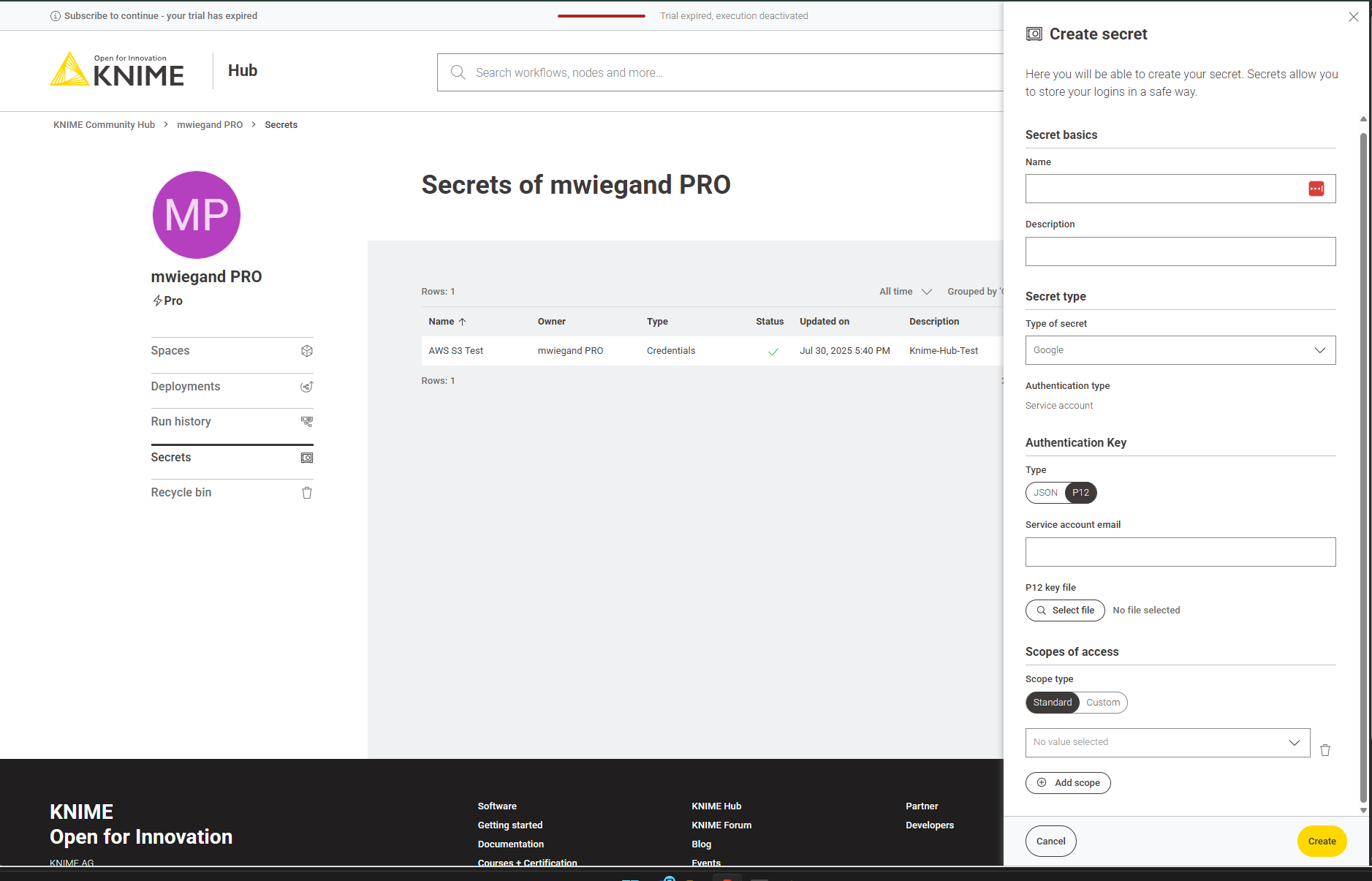
The setup of creating Google Credentials looks like so:
This article, in case you need a how to, describes hwo to create a p12 file using the Google Developer Console quite well:
If you require any assistance, let me know.
Best, Mike
CTO @ DataNautics GmbH - Your KNIME-Experts
Contact: info@datanautics.net // datanautics.net // +49(0)170-325 713 9 // Linkedin
Daten Automatisierung für Finanz-, Produktion-, IT- und Marketing-Prozesse mit KNIME
3 Likes
Hello @gcincilla ,
please see the best practices section of the KNIME Secrets User Guide. Ideally the users have their own account in KNIME Hub where they can safely manage their own Google login. The Data App would than use the KNIME Hub Secret Selector component to allow the user to select this secret during execution.
Bye
Tobias
3 Likes
Thank you for your help Tobias!
So, if I understand correctly, this means that all Data App consumers must also be users of the KNIME Business Hub instance, right?
I was wondering if it’s possible for a simple Data App consumer to use, for example, a personal Google Sheet within the Data App without being a KNIME Business Hub user, but I imagine this is not a very common use case.
Bye,
Gio
Hi @gcincilla,
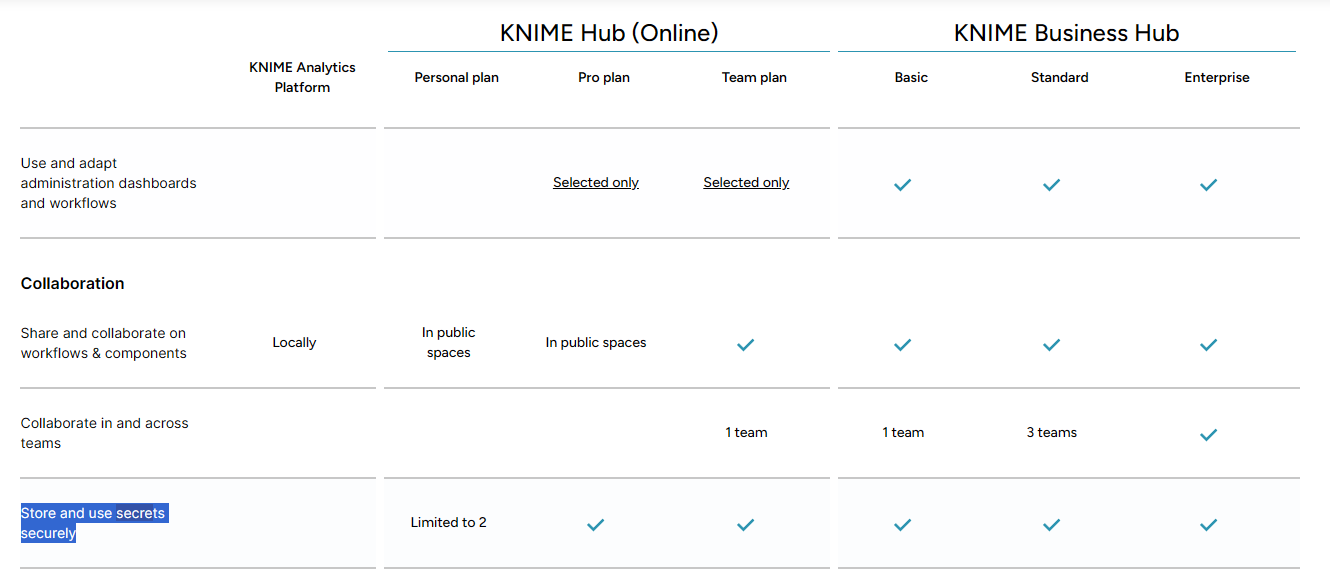
no. If you check the table which compares features of each Hub type:
The sophistacted secret manager and sharing capabilities start with the recently launched Pro Plan for 19 € / Month.
Best
Mike