I already asked the admin of the KNIME server to install the fonts I need, but this did not solve the issue. Any idea of what could be the source of the issue?
I am adding the workflow I used to create these snapshots. PPT_Report.knwf (12.9 KB)
The issue is present in both PPT and PDF formats.
I have just tried to export it as an HTML and a Word file. In those formats, fonts are correctly configured.
Apologies for the delay in this, but there is a workaround. If you attempt this, please be cautious because these are not typically expected to be user-facing changes. If you need assistance implementing this and your company has a paid license, please open a ticket with the Support team (Customer Portal)
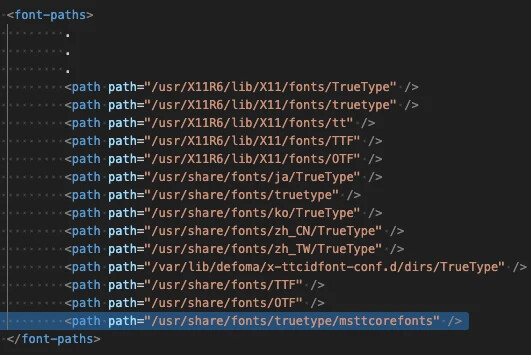
1- Install the fonts with the commands below. Fonts are copied under /usr/share/fonts/truetype/msttcorefonts folder.
4- Then in the docker file (via the app, or manually) we can remove the original fontsConfig.xml and copy the new one (same original file with 1 extra line)
RUN rm /home/knime/knime/plugins/org.eclipse.birt.report.engine.fonts_4.15.0.v202403260939/fontsConfig.xml COPY fontsConfig.xml /home/knime/knime/plugins/org.eclipse.birt.report.engine.fonts_4.15.0.v202403260939/
5- Create the new docker image and verify that fonts work as expected.