Bug: K-AI not available for Expression Row Filter

Description:
When sending a prompt to K-AI in Expression Node Filter, the following error is displayed:

Could not connect to AI service, received response: (422) {"detail":[{"type":"enum","loc":["path","language"],"msg":"Input should be 'python', 'echarts' or 'knime_expression'","input":"knime_expression_filter","ctx":{"expected":"'python', 'echarts' or 'knime_expression'"}}]}

Steps to reproduce:
1.
2.
3.
4.
5.

Actual results:

Expected results:

Attachments:

OS: WIN 11

1 Like

Hello @MartinDDDD,
thank you for reporting the issue.
The reason for it is that the Community Hub K-AI does not have support for the Expression Row Filter but the error is not very helpful, so we’ll fix that.

Best regards,
Adrian

2 Likes

Dear @MartinDDDD,

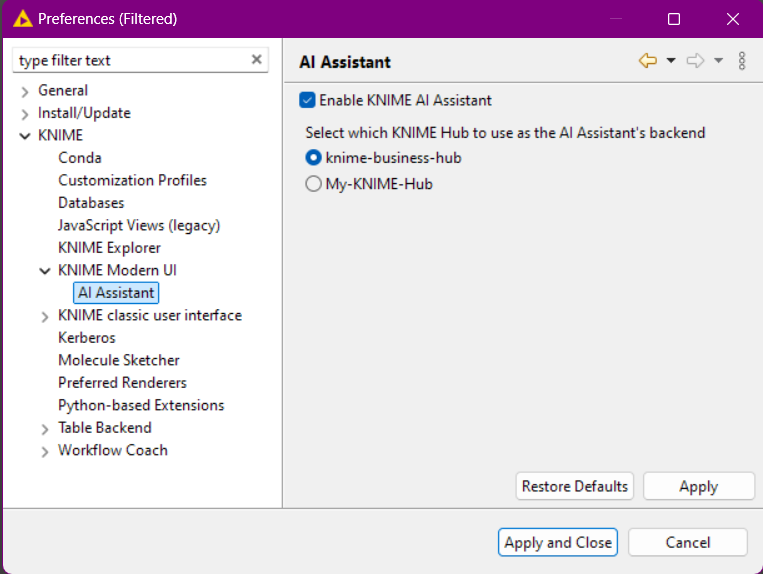
You can also switch to the K-AI from the Hacking Days Business Hub:

  1. Make sure you have added the Business Hub to your AP (as explained in the instructions post)
  2. Go to Preferences > KNIME > KNIME Modern UI > AI Assistant and select the Business Hub mountID (default is: knime-business-hub)

4 Likes

Thanks makes a lot of sense - didn’t think that far :). Will try again tomorrow with the business hub!

1 Like

Just to close the loop on this:
After connecting to business hub as per instructions K-AI worked for this node!

1 Like

Dear @MartinDDDD,

The error message is now improved with this ticket: AP-23582

1 Like

Internal ticket ID: AP-23582
Summary: Confusing K-AI error in Expression Row Filter if hub is outdated
Fix version(s): 5.4.0