It seems that the Table View (JavaScript) and Tile View (JavaScript) nodes, both currently in legacy state, have stopped behaving as expected with regard to number formatting.
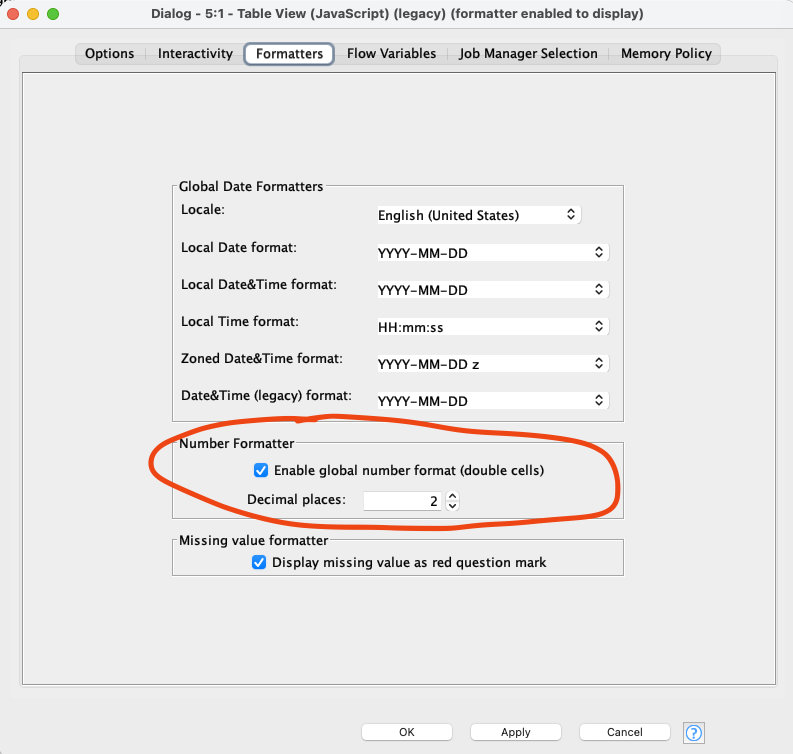
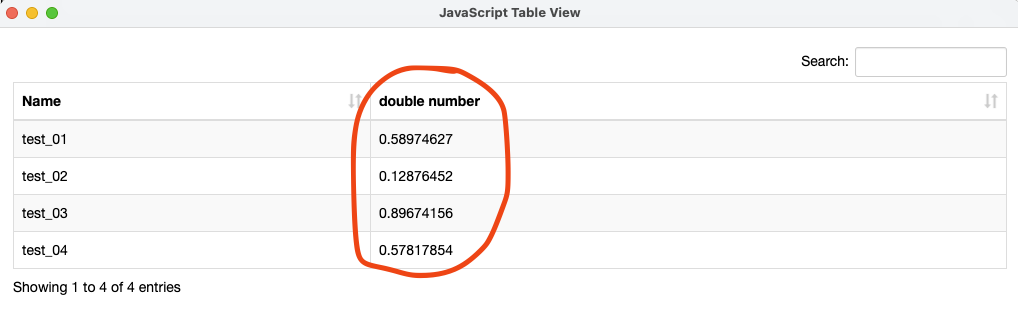
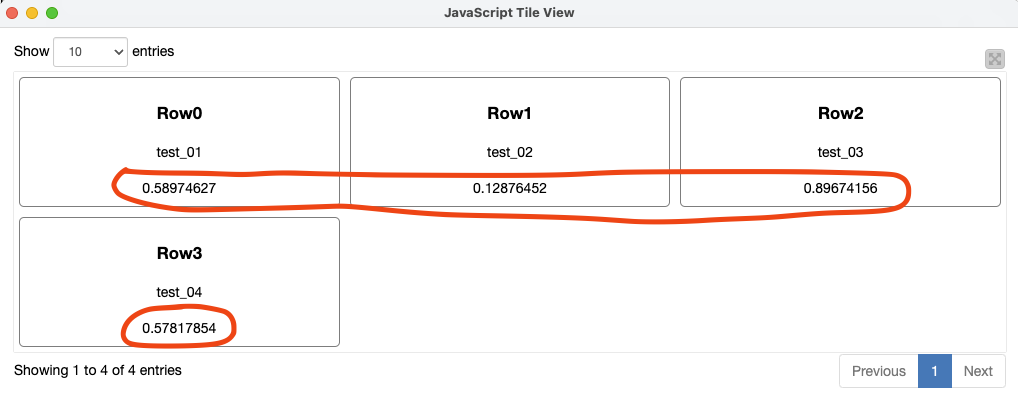
Specifically, when I enable the Global Number Formatter in the Formatters tab of either node and set it to display only 2 decimal places, the setting appears to be ignored: all decimal places are still displayed in the JavaScript view of both nodes.
I have attached some screenshots to illustrate the issue:
The formatter configuration
The actual output in the 2 JavaScript views (showing all decimal places still being displayed)
thanks for reporting. I just tested it and can reproduce it. Seems like this is not working since version 5.5. Any reason you can’t switch to the modern table?
The new (modern) Table View is indeed sleek and comes with some nice new features, such as:
Better control over column width, row height, and row padding;
The ability to copy cell content, which is a basic but very handy feature for day-to-day use that was surprisingly missing in the old Table View (JavaScript).
These are all very welcome additions. However, I feel it still lacks some important functionalities that the old Table View (JavaScript) node offered. The most notable example is:
Number and date/time formatting control: the ability to define decimal places and date/time formats directly within the view, without having to change the format of the underlying columns.
This kind of formatting control can be crucial. In that sense, the new Table View is clearly a step in the right direction, and I appreciate the effort that has gone into it. I am confident that, as it continues to mature, these missing features will be added, making it a complete and well-rounded replacement for its legacy counterpart.
On a related note, could anyone tell me which new (modern) node is intended to replace the old Tile View (JavaScript)? Is there already a modern equivalent available, or is it still on the roadmap? A tile-based view is really essential for users like me who use KNIME in a cheminformatics context, where molecular structures are typically visualized as tiles.
thanks for the response. Is the formatting something you configure different for each node?
Usually what I tend to do is either defining a formatter with the number/string format manager nodes or define a default renderer in the KNIME preferences.
As for the Tile View node, this is currently already being worked on
Thank you for your hints @DanielBog !
I was not aware of the Number Format Manager node. Is it (relatively) new? I didn’t pay attention when it was introduced. I’ll give it a try.
Regarding the Tile View node, it’s great that you are already working on it! Do you already know when it will be released?
I was experimenting with the Number Format Manager node, but unfortunately it seems it works only with the new Table View node and not with the Table View JavaScript one. Is that by design or is it a bug?
Moreover, I had a closer look at the new Table View node, and it has another limitation compared to the good old Table View JavaScript table: it does not seem possible to set it up to enable single-row selection, which is an essential feature in many of our workflows. According to this thread, this is a missing feature (UIEXT-1762). This means that there is currently no option in KNIME to view a table with single-row selection while also having control over the column format! I hope this can be fixed soon.
Can you please tell me if this is correct or if I’m missing something?
Internal ticket ID: UIEXT-3458 Summary: Global number formatter in table view (JavaScript) don’t have an effect anymore Fix version(s): 5.5.4, 5.8.4, 5.12.0