Call Workflow Service fails in batch: "Cannot determine ID of local mountpoint" (KNIME 5.9)

Title:
Call Workflow Service fails in batch: “Cannot determine ID of local mountpoint” (KNIME 5.9)

Body:

Hi,

I need help fixing a persistent issue with Call Workflow Service when running my workflow in batch mode on KNIME Analytics Platform 5.9 (Windows 11).

:check_mark: My setup

  • KNIME 5.9 on Windows 11

  • 1 Master Workflow

  • 1 Child Workflow (Table Creator → Excel Writer)

  • The Master workflow uses Call Workflow Service

  • In KNIME UI both workflows run without any error

  • In batch mode, the Call Workflow Service always fails

:check_mark: The exact batch error:

Execute failed: Cannot determine ID of local mountpoint
Caused by: java.lang.IllegalStateException
LocalRelativeToMountpointFSConnection...

:check_mark: What I already tried (based on forum suggestions)

  • Removed all Mountpoint Connectors

  • Set Excel Writer in child to “Local File System”

  • Used a String Configuration node with variable CALLEE_PATH

  • In Call Workflow Service → Flow Variables → set calleeWorkflow/path = CALLEE_PATH

  • Passed the same variable in batch using:

    -workflow.variable=CALLEE_PATH,"C:/Users/.../ChildWorkflow",String
    
    
  • Ensured workflows are closed before batch

  • Added CEF skip flag to avoid chromium crash

  • Verified batch syntax with carets (^)

  • Verified no knime://LOCAL URIs exist

  • Tried absolute paths only

  • Tried with and without Mountpoint Connector

  • Tried both “Local File System” and “Mountpoint” file systems

:check_mark: Batch command

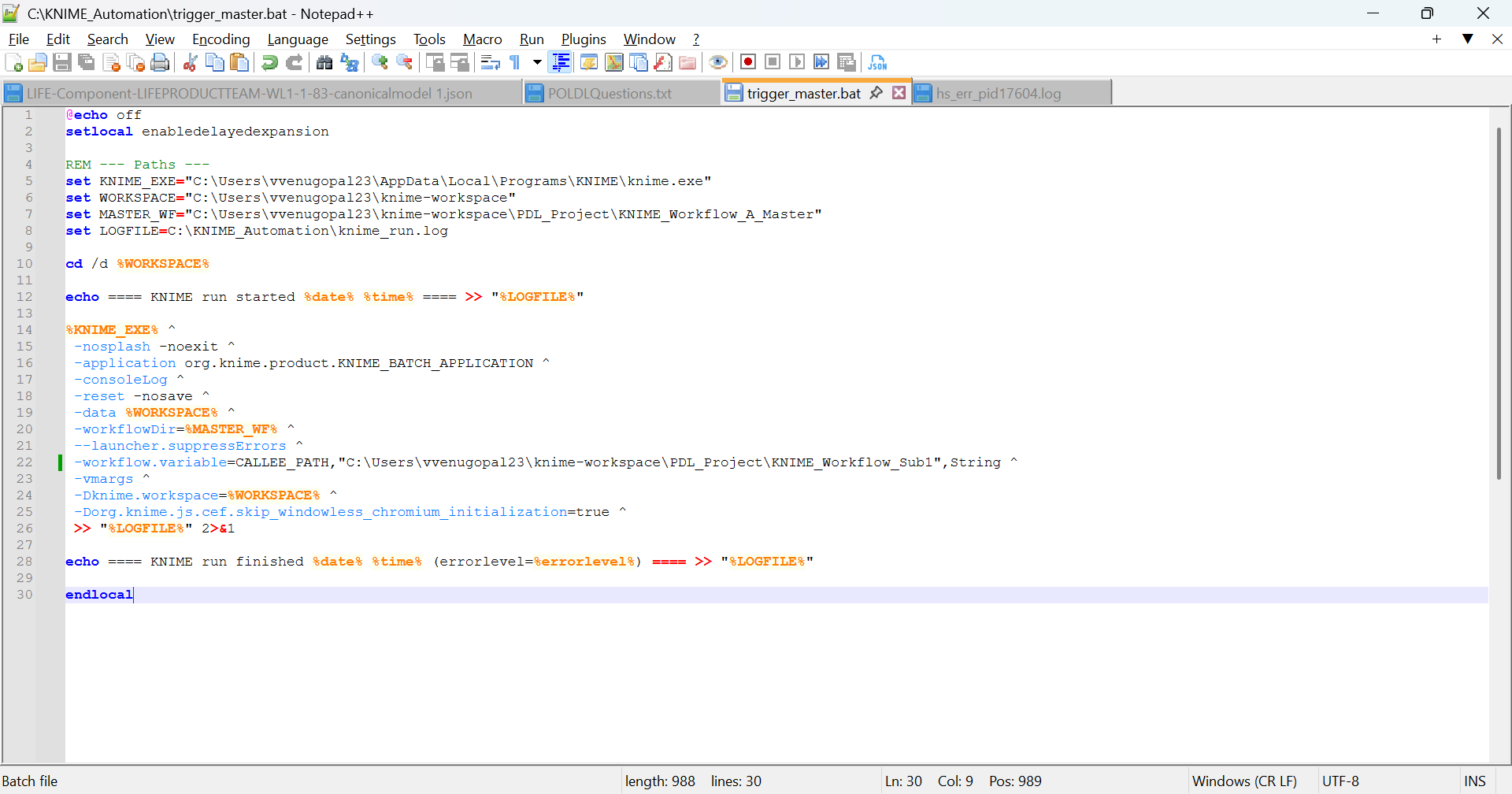
%KNIME_EXE% ^
 -nosplash -noexit ^
 -application org.knime.product.KNIME_BATCH_APPLICATION ^
 -consoleLog ^
 -reset -nosave ^
 -data C:\Users\...\knime-workspace ^
 -workflowDir=C:\Users\...\KNIME_Workflow_A_Master ^
 --launcher.suppressErrors ^
 -workflow.variable=CALLEE_PATH,"C:/Users/.../KNIME_Workflow_Sub1",String ^
 -vmargs ^
 -Dknime.workspace=C:\Users\...\knime-workspace ^
 -Dorg.knime.js.cef.skip_windowless_chromium_initialization=true

:check_mark: Problem

Even though the Call Workflow Service works in KNIME UI, in batch mode it still tries to resolve a “RelativeToMountpoint” path internally and fails with:

Cannot determine ID of local mountpoint

:check_mark: What I need help with

  • How to correctly configure Call Workflow Service in KNIME 5.9 for batch

  • Whether Call Workflow Service still expects a File System Connection in headless mode

  • Whether absolute Windows paths via flow variables are supported

  • The correct approach to avoid mountpoint resolution entirely in batch

Thanks in advance — any precise steps or examples would be appreciated!

@vidha_80 you might want to check the absolute paths as workflow variables. Batch mode does not like relative paths and no paths being determined within the workflow.

You can set these variables in the batch file.

Medium: “KNIME Batch Processing on Windows and MacOS

1 Like

Subject:
Batch execution: variable unused + Call Workflow Service forces knime:// path + “Cannot determine ID of local mountpoint” (KNIME 5.9)

Hi team,

Thanks for the earlier suggestions. I have collected the screenshots and logs, Before the attachments, I want to highlight a key behavioral detail:

KEY ISSUE OBSERVED

When I type any plain relative path in the Call Workflow Service dialog, for example:

../KNIME_Workflow_Sub1

and click Apply, KNIME automatically rewrites it to:

knime://knime.space/../KNIME_Workflow_Sub1

This means:

  • KNIME forces a knime:// mountpoint-based URI

  • even though I am not using mountpoints

  • and even though I intend to override the UI path using a workflow variable

Because the URI is forced into knime://knime.space/..., batch mode cannot resolve the LOCAL mountpoint ID, and therefore I always receive:

Execute failed: Cannot determine ID of local mountpoint

This happens even with absolute OS paths passed correctly via batch variables.


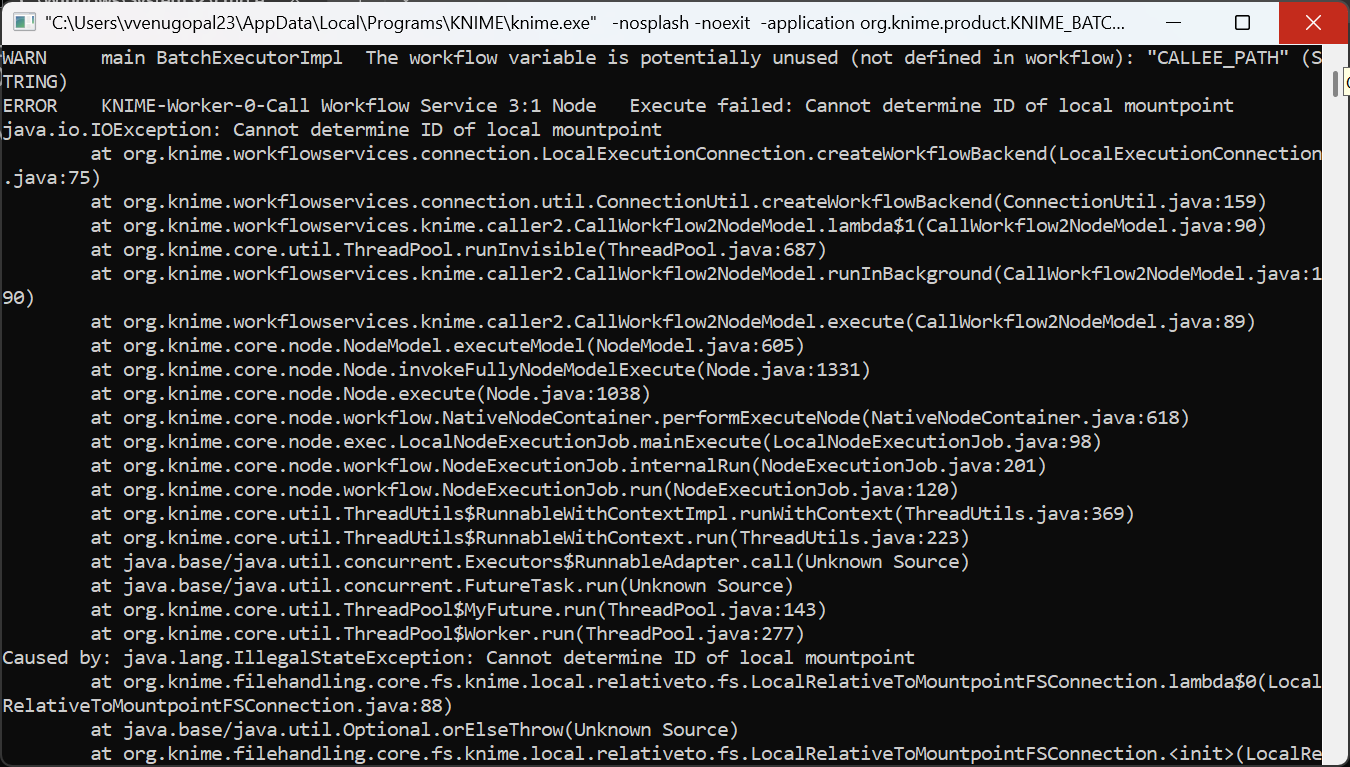
CURRENT ERRORS

WARN  BatchExecutorImpl  The workflow variable is potentially unused (not defined in workflow): "CALLEE_PATH"
ERROR Call Workflow Service ... Execute failed: Cannot determine ID of local mountpoint
Caused by: java.lang.IllegalStateException: Cannot determine ID of local mountpoint
   at ... LocalRelativeToMountpointFSConnection ...
   at ... SettingsModelWorkflowChooser.getCalleeKnimeUri ...

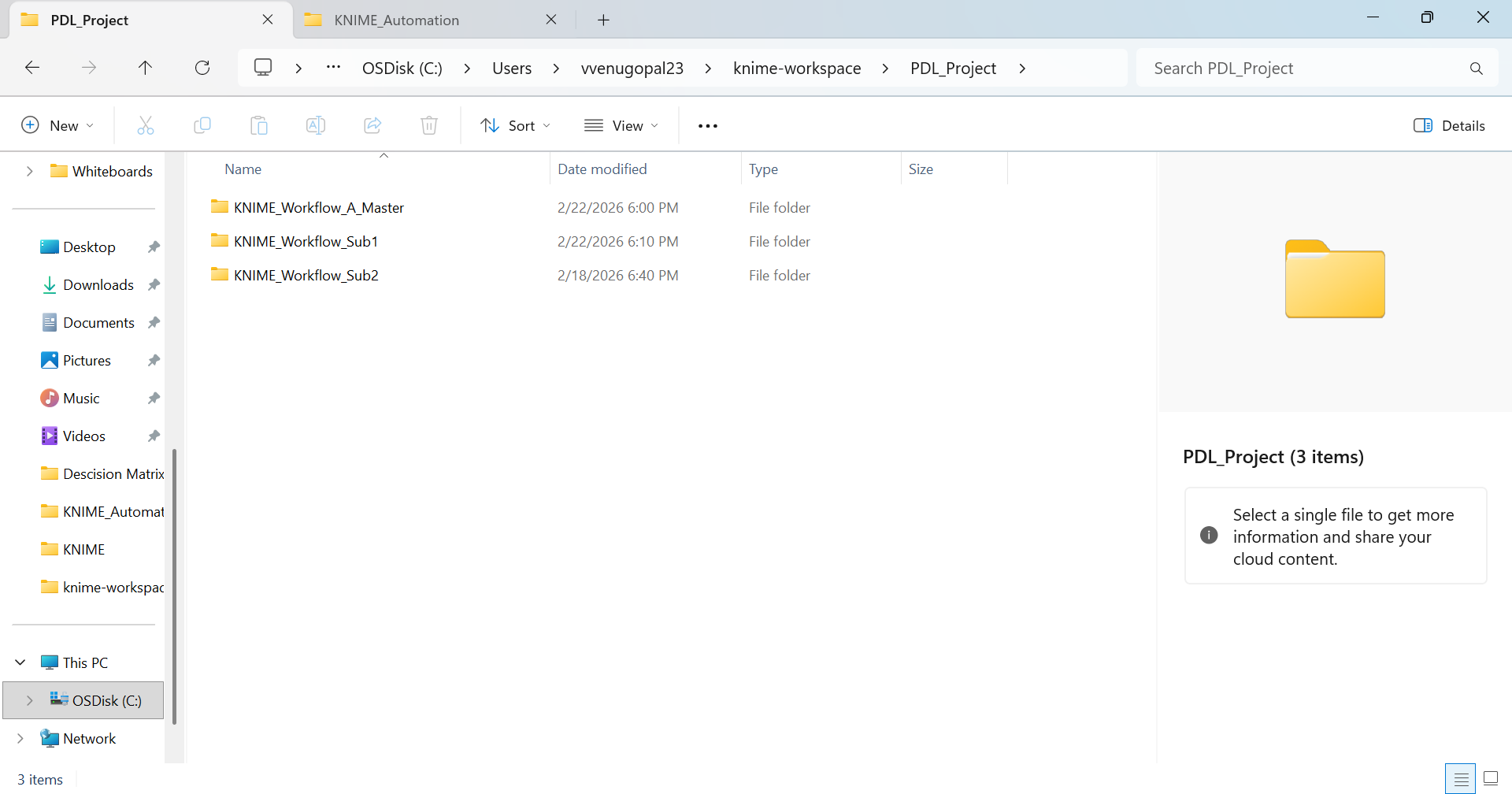
MY FOLDER STRUCTURE (correct):

PDL_Project
 ├── KNIME_Workflow_A_Master
 └── KNIME_Workflow_Sub1

MASTER WORKFLOW SETUP

  • Removed all Mountpoint Connectors

  • Removed String Configuration

  • Call Workflow Service:

    • Workflow Path: KNIME rewrites anything into knime://knime.space/...

    • Flow Variables:

      calleeWorkflow → path = CALLEE_PATH


BATCH FILE (variable passed correctly)

-workflow.variable=CALLEE_PATH,"C:/Users/.../PDL_Project/KNIME_Workflow_Sub1",String ^

CALLEE_PATH should override the UI path in batch mode.

WHAT I NEED CLARIFICATION ON

1. Why does KNIME force convert my workflow path into a knime://knime.space/... URI?

Even when I want to use absolute OS paths and no mountpoints?

2. Is the correct flow-variable key still calleeWorkflow → path?

Batch keeps reporting that the variable is unused.

3. Is there a known change in Call Workflow Service where batch requires a File System port?

4. Is there a way to prevent KNIME from rewriting paths into knime:// URIs?

Because that rewrite is exactly what triggers the mountpoint resolver in headless mode.

ATTACHED (screenshots + logs):

:one: Call Workflow Service → Workflow Path tab
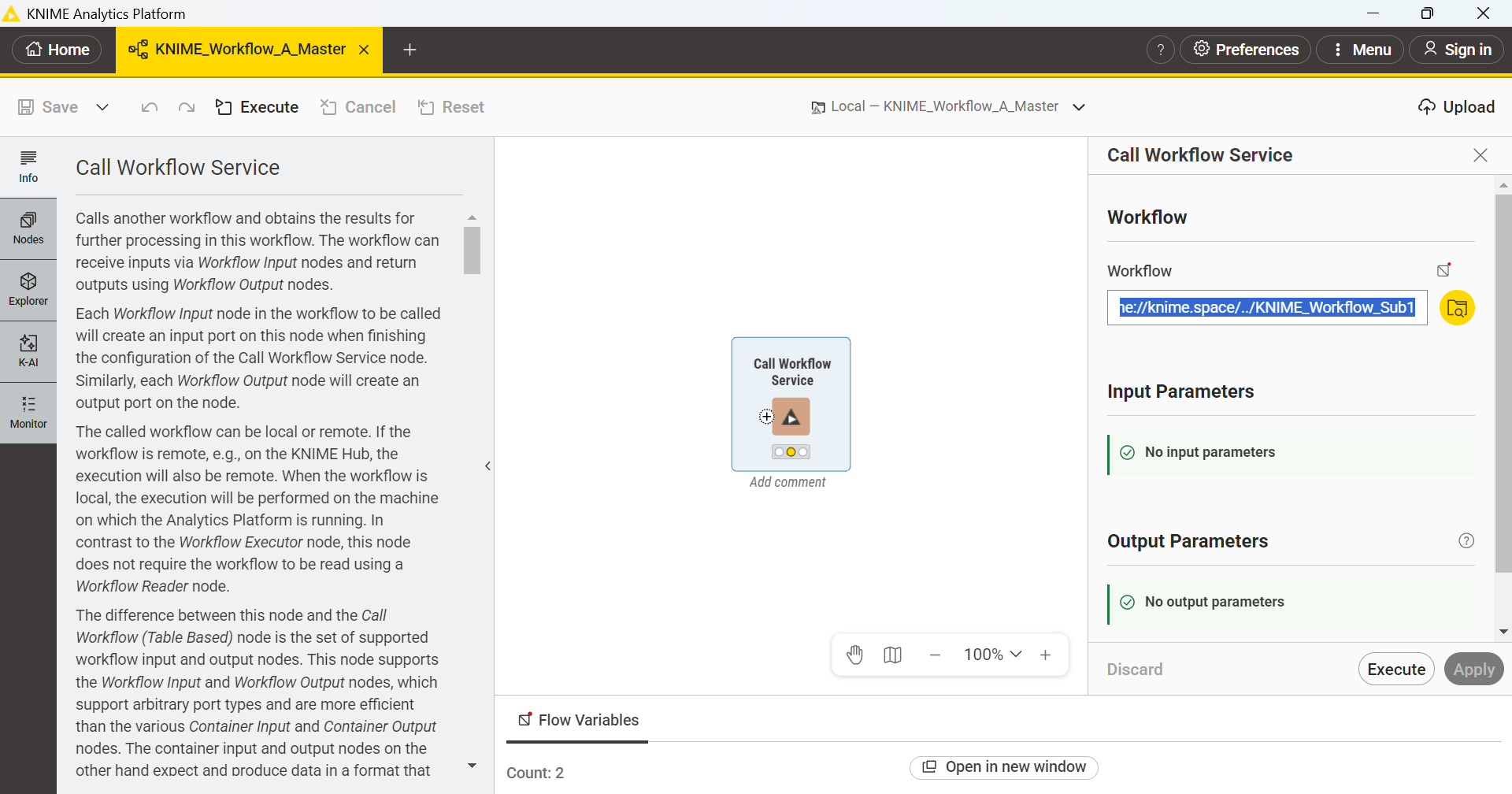
:two: Call Workflow Service → Flow Variables tab
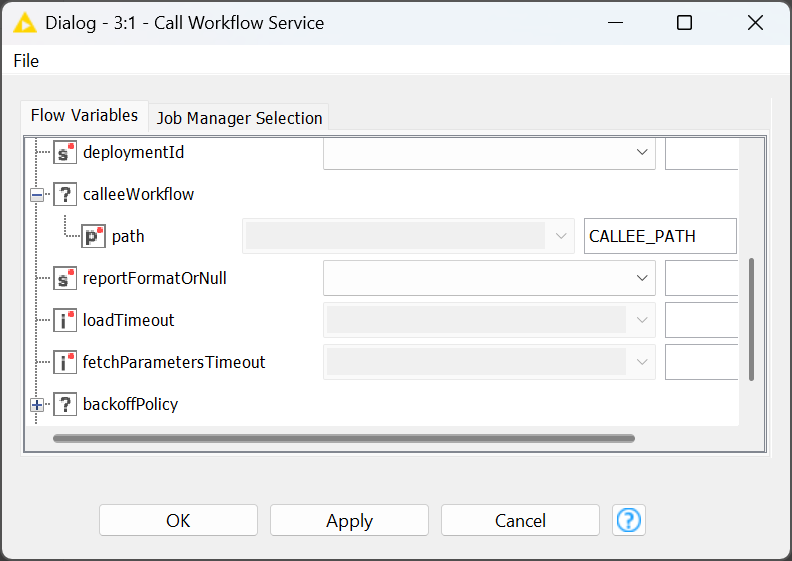
  • shows binding: calleeWorkflow/path = CALLEE_PATH

  • A screenshot of the Flow Variables tab

:three: Folder structure screenshot

:four: Log section with full stack trace

Important context

We are planning to use KNIME in our project, and this workflow‑invocation behavior is critical for us to move forward with adoption. Any guidance on the correct, stable setup for batch workflow calling would be hugely appreciated.

Please let me know if you need additional information.
Thank you for your help — looking forward to understanding the correct approach for path handling in batch mode.

Hi @mlauber71,

Just following up to check if there are any updates or additional guidance you can share on this issue.

I have attached all screenshots, logs, and node XML as requested.
Since we are planning to use KNIME in our project, resolving this “mountpoint ID / workflow path rewrite” behavior is important for us to move forward.

Whenever you get a moment, any direction or next steps would be greatly appreciated.
Thanks again for your time and support!

@vidha_80 I have tried to use the workflow variables and force fixed paths to be used when calling sub workflows, but nothing has worked so far unfortunately.

maybe just some things to add for batch mode (not using the call nodes):

  • you can call a parent workflow via batch and have it call child workflows via batch again
  • Knime in batch mode defaults to a “standard” workspace in C:\Users{username}\knime-workspace (or similar). if you usually work e.g. with a workspace in D:, then this will be a different workspace in use
  • better double escape \ in variables (strings/paths) and consider adding the machine name aka \\\\hostname\\D\\...
  • i had better luck running batch mode on .knwf files instead of running it on the unzipped folders you have in a workspace
1 Like

@fe145f9fb2a1f6b @vidha_80 one idea could be not to use the Call Workflow node but to call a batch file that might then start a different KNIME instance. Not very elegant. Maybe think about investing in some KNIME specific automation.

i mean, you can just call subprocesses directly in Java (using e.g. the Java Edit node) or Python.
I made a similar thread recently KAP Execution use case best practice without response from the developers yet. maybe soon.

Thanks a lot @fe145f9fb2a1f6b and @mlauber71 for the pointers.

We did explore the batch‑chain route (parent workflow calling child workflows via batch), and while it does run, our business constraints don’t allow us to rely on batch orchestration for this use case. We also accounted for batch‑mode nuances—like KNIME defaulting to a different “standard” workspace unless -data is provided—and tested both -workflowDir/-workflowFile and -workflow.variable paths/flags. Still no luck for our scenario.

On the “call‑workflow” path, we tried:

  • Passing the workflow path as a flow variable and binding it in Call Workflow (Services)

  • Table Creator → Call Workflow (Table Based)

  • Mountpoint Connector

  • Table to Variable → Variable Expressions → Variable to Path

  • Various combinations of the above

The blocker we keep hitting is that at runtime the path we pass gets converted to an FSLocationVariableType and rewritten to a relative path (e.g., knime://knime.workflow/...). That relative path becomes unresolved when launched via batch, and the call fails. We are looking for a way to prevent this auto‑conversion or to force absolute resolution in the callee. [knime.github.io], [forum.knime.com]

If you (or anyone) knows how to (a) stop the FSLocation auto‑conversion, (b) force absolute paths end‑to‑end in Call Workflow nodes, or (c) ensure the same file‑system context is transferred to the callee so the FSLocation resolves correctly, we would really appreciate the specifics. For reference, we have noted that Call Workflow (Table Based) often converts incoming path/URI variables to strings, and that it can accept a File System Connection port—so any “known good” settings there would also help. [hub.knime.com]

using the Column Expression, Variable Expression (both legacy), you might be able to force or convert the Path. (I suspect that you will need to re-generate or overwrite this variable within the workflow at least once.

these legacy nodes allow setting the type of path (url, local, etc)

@fe145f9fb2a1f6b Thank you!

It would be really helpful. If you could refer any example workflow to FSLocationVariableType? because I observed during runtime it uses only this path which is the Workflow path of Call Workflow Service. This uses the relative path Knime://knime-workspace, this is not recognized when triggering from Workflow and always throws the following error

ERROR KNIME-Worker-1-Call Workflow (Table Based) 3:5 Node Execute failed: Cannot determine ID of local mountpoint
java.io.IOException: Cannot determine ID of local mountpoint
at org.knime.workflowservices.connection.LocalExecutionConnection.createWorkflowBackend(LocalExecutionConnection.java:75)
at org.knime.workflowservices.connection.util.ConnectionUtil.createWorkflowBackend(ConnectionUtil.java:159)
at org.knime.workflowservices.json.table.caller.AbstractCallWorkflowTableNodeModel.createWorkflowBackend(AbstractCallWorkflowTableNodeModel.java:147)
at org.knime.workflowservices.json.table.caller.AbstractCallWorkflowTableNodeModel.executeInternal(AbstractCallWorkflowTableNodeModel.java:124)
at org.knime.workflowservices.json.table.caller.AbstractCallWorkflowTableNodeModel$1.call(AbstractCallWorkflowTableNodeModel.java:109)
at org.knime.workflowservices.json.table.caller.AbstractCallWorkflowTableNodeModel$1.call(AbstractCallWorkflowTableNodeModel.java:1)
at org.knime.core.util.ThreadPool.runInvisible(ThreadPool.java:687)
at org.knime.workflowservices.json.table.caller.AbstractCallWorkflowTableNodeModel.execute(AbstractCallWorkflowTableNodeModel.java:106)
at org.knime.core.node.NodeModel.executeModel(NodeModel.java:605)
at org.knime.core.node.Node.invokeFullyNodeModelExecute(Node.java:1331)
at org.knime.core.node.Node.execute(Node.java:1038)
at org.knime.core.node.workflow.NativeNodeContainer.performExecuteNode(NativeNodeContainer.java:618)
at org.knime.core.node.exec.LocalNodeExecutionJob.mainExecute(LocalNodeExecutionJob.java:98)
at org.knime.core.node.workflow.NodeExecutionJob.internalRun(NodeExecutionJob.java:201)
at org.knime.core.node.workflow.NodeExecutionJob.run(NodeExecutionJob.java:120)
at org.knime.core.util.ThreadUtils$RunnableWithContextImpl.runWithContext(ThreadUtils.java:369)
at org.knime.core.util.ThreadUtils$RunnableWithContext.run(ThreadUtils.java:223)
at java.base/java.util.concurrent.Executors$RunnableAdapter.call(Unknown Source)
at java.base/java.util.concurrent.FutureTask.run(Unknown Source)
at org.knime.core.util.ThreadPool$MyFuture.run(ThreadPool.java:143)
at org.knime.core.util.ThreadPool$Worker.run(ThreadPool.java:277)
Caused by: java.lang.IllegalStateException: Cannot determine ID of local mountpoint
at org.knime.filehandling.core.fs.knime.local.relativeto.fs.LocalRelativeToMountpointFSConnection.lambda$0(LocalRelativeToMountpointFSConnection.java:88)
at java.base/java.util.Optional.orElseThrow(Unknown Source)
at org.knime.filehandling.core.fs.knime.local.relativeto.fs.LocalRelativeToMountpointFSConnection.(LocalRelativeToMountpointFSConnection.java:88)
at org.knime.filehandling.core.fs.knime.relativeto.RelativeToMountpointFSDescriptorProvider.getActualFSConnection(RelativeToMountpointFSDescriptorProvider.java:107)
at com.knime.enterprise.client.filehandling.hub.space.RelativeToHubSpaceFSDescriptorProvider.createFallbackMountpointRelativeFSConnection(RelativeToHubSpaceFSDescriptorProvider.java:116)
at com.knime.enterprise.client.filehandling.hub.space.RelativeToHubSpaceFSDescriptorProvider.createConnection(RelativeToHubSpaceFSDescriptorProvider.java:91)
at org.knime.filehandling.core.connections.DefaultFSConnectionFactory.createRelativeToConnection(DefaultFSConnectionFactory.java:156)
at org.knime.filehandling.core.connections.DefaultFSConnectionFactory.createRelativeToConnection(DefaultFSConnectionFactory.java:142)
at org.knime.filehandling.core.defaultnodesettings.FileSystemHelper.retrieveFSConnection(FileSystemHelper.java:123)
at org.knime.filehandling.core.defaultnodesettings.filechooser.AbstractFileChooserPathAccessor.getConnection(AbstractFileChooserPathAccessor.java:159)
at org.knime.filehandling.core.defaultnodesettings.filechooser.AbstractFileChooserPathAccessor.initializeFileSystem(AbstractFileChooserPathAccessor.java:166)
at org.knime.filehandling.core.defaultnodesettings.filechooser.AbstractFileChooserPathAccessor.getOutputPath(AbstractFileChooserPathAccessor.java:183)
at org.knime.filehandling.core.defaultnodesettings.filechooser.AbstractFileChooserPathAccessor.getRootPath(AbstractFileChooserPathAccessor.java:316)
at org.knime.filehandling.core.defaultnodesettings.filechooser.workflow.SettingsModelWorkflowChooser.getCalleeKnimeUri(SettingsModelWorkflowChooser.java:219)
at org.knime.workflowservices.connection.CallWorkflowConnectionConfiguration.getWorkflowPath(CallWorkflowConnectionConfiguration.java:321)
at org.knime.workflowservices.connection.LocalExecutionConnection.createWorkflowBackend(LocalExecutionConnection.java:73)
… 20 more