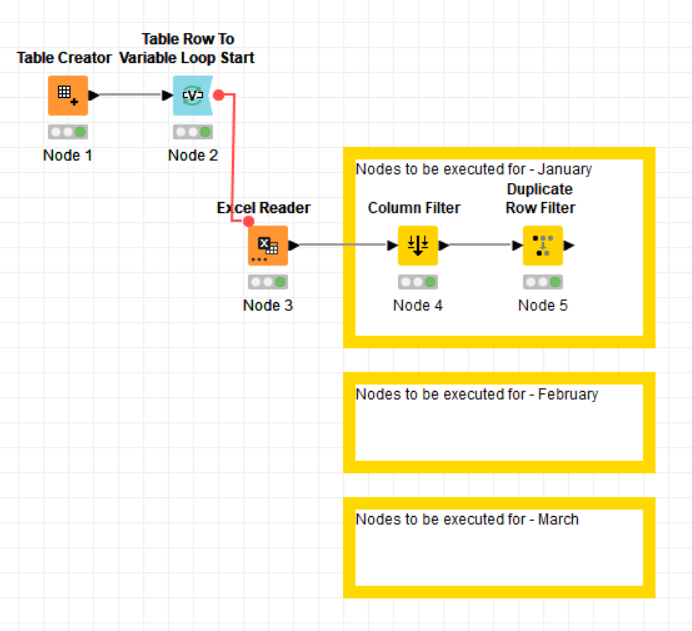
I have a XLSX file with data segregated for each month i.e., January, February and March. I need to run different set of nodes for each month’s data.
Since the month name is given in the sheet name, I’m using ‘Table Row to Variable Loop Start’ to select the data of each month by adding the month variable to sheet_name. However, I’m quite confused on how to use the IF Switch/ CASE Switch to execute those different set of nodes.
Should I use ‘Variable Expressions’ too?
Hi,
Please have a look at the attached example workflow. I use the Read Excel Sheet Names node together with the Table Row to Variable Loop Start. That way there is no need to hard-code the sheet names in the Table Creator.
Inside the loop, I take the sheet name and use workflow services to dynamically call another workflow that sits in a separate folder next to the main workflow.
Kind regards,
Alexander
Thank you for the quick response @AlexanderFillbrunn .
I think the workflow you have shared can be used for a different use case, where I’d created lot of metanodes. This will surely help me organize that workflow, however I believe this will not work for the one I’m working on.
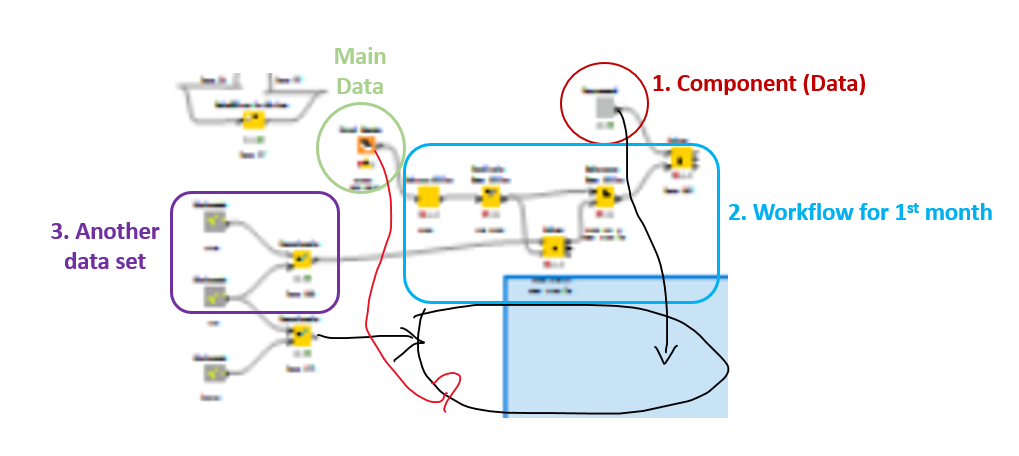
Here, as seen in this glimpse of my workflow’s outline, I was planning to join different data sets along with the loop, i.e., from 1. Component and 3. Concatenated data set into 2. .
The bunch of nodes I wanted to execute for each month comes under 2
“However, I’m quite confused on how to use the IF Switch/ CASE Switch to execute those different set of nodes.”
for scenarios with multiple or numerous conditions, the switch-case statement generally offers better efficiency/readable. here’s my simple example of a case-switch implementation based on your sample data. note: this example serves just a demonstration of case-switch node utilization rather than a solution to your current problem KNIME_case-MM.knwf (128.6 KB)
Hi,
We have a guide for workflow services. I hope this helps! There you also see an example for a workflow service with multiple inputs. Essentially, you only add multiple Workflow Service Input nodes.
Kind regards,
Alexander
the response given by @marzukim really helped me in understanding the Case Switch nodes and answered to my requirement. Hence, marking it as a solution.
However, the solution given by @AlexanderFillbrunn on using workflow service is very much helpful when dealing with more than 3 conditions in my requirement. It organizes the workflow and I believe it can be considered as a best practice.