Connect to Visual FoxPro data for read / write

Hi,

I am using latest 30 day trial of Analytics Platform desktop to connect to Visual FoxPro DBC or its DBF’s.

I made it as far as this posted did, and need the same guidance that I assume he received:

Help to connect a database to Knime - KNIME Analytics Platform - KNIME Community Forum

As far as I can find, FoxPro is not a Can bus Database.

Thank you!

Bob

Hi,

welcome to the KNIME Forum.

As far as I know is there not a dedicated Node for this database type (tbh I never heared about it before).
But if you just want to load the data and work with it, you can use a Python Script node with one of these tools
dbfread · PyPI or simpledbf · PyPI

import knime.scripting.io as knio

from simpledbf import Dbf5

Path = r"C:\temp\customer.dbf"

dbf = Dbf5(Path, codec='latin-1')

df = dbf.to_dataframe()

knio.output_tables[0] = knio.Table.from_pandas(df)

Or if you have already installed the ODBC connector in the Windows Settings you can use the ODBC-connector.

1 Like

@bbrink I was able to access FoxPro (dbf) databases thru some drivers in KNIME. First you register a custom database in the KNIME preferences like this. Yes, with all three drivers (com.wisecoders:dbf-jdbc-drive, com.h2database:h2, com.github.albfernandez:javadbf):

The URL Template is this:

jdbc:dbschema:dbf:/<database>

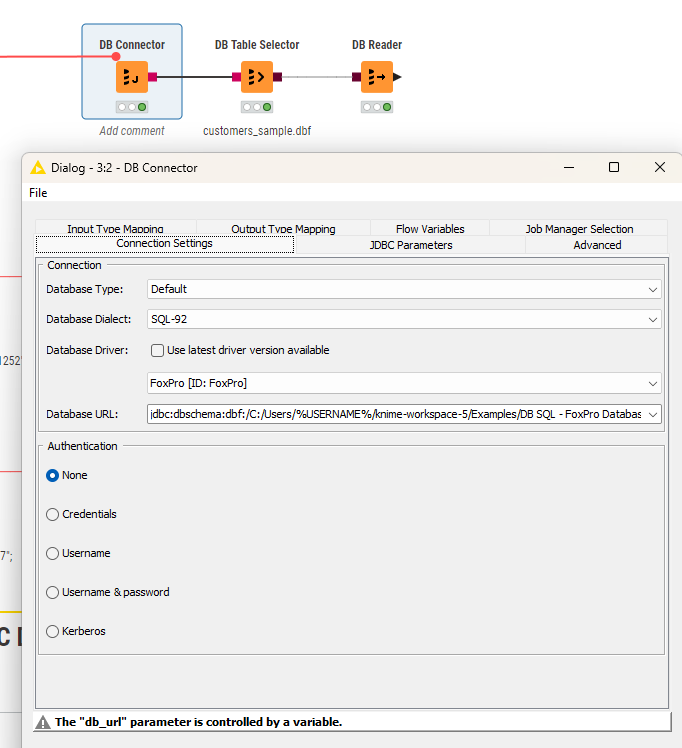
Then you configure the DB Connector node with a custom string pointing to the location of your DBF files (the folder not the individual file although that might also work):

jdbc:dbschema:dbf:/<PATH>?charset=windows-1252

You can let a Java Snippet create the path dynamically on your system.

Now you should be able to select the database you want. Remember: you might have to tweak the charset settings.

You can check this workflow using sample DBFs with more detailed instructions how to install the drivers:

Another option could indeed be to use a Python or R library as @ActionAndi has suggested if the DBF files would allow that.

1 Like

Awesome! I was able to get the ODBC / JDBC drivers installed and connected. Your extensive example was just what I needed. I had tried the Python route but found it more confusing, given my limited Python experience. Thank you for your help.

3 Likes