Please see attached Excel file (which I got off my workflow).
Col F (called ppp) is what I am trying to reproduce in KNIME.
Data is grouped by Age LBD (col A). For each Age LBD, there is a Age_LBD_Proj (col D) which is a person aging by 1 more year for which I need to calculate their ppp current = cumulative ppp (cell above) x (1 - q of current row).
At the end of a specific Age LBD, I need to repeat the above process for the next Age LBD.
The final output will need to be pivoted by Age LBD and 50 columns with ppp for each Age LBD for that projection year (1 to 50).
Where there is no data for a particular projection year then that ppp becomes missing value.
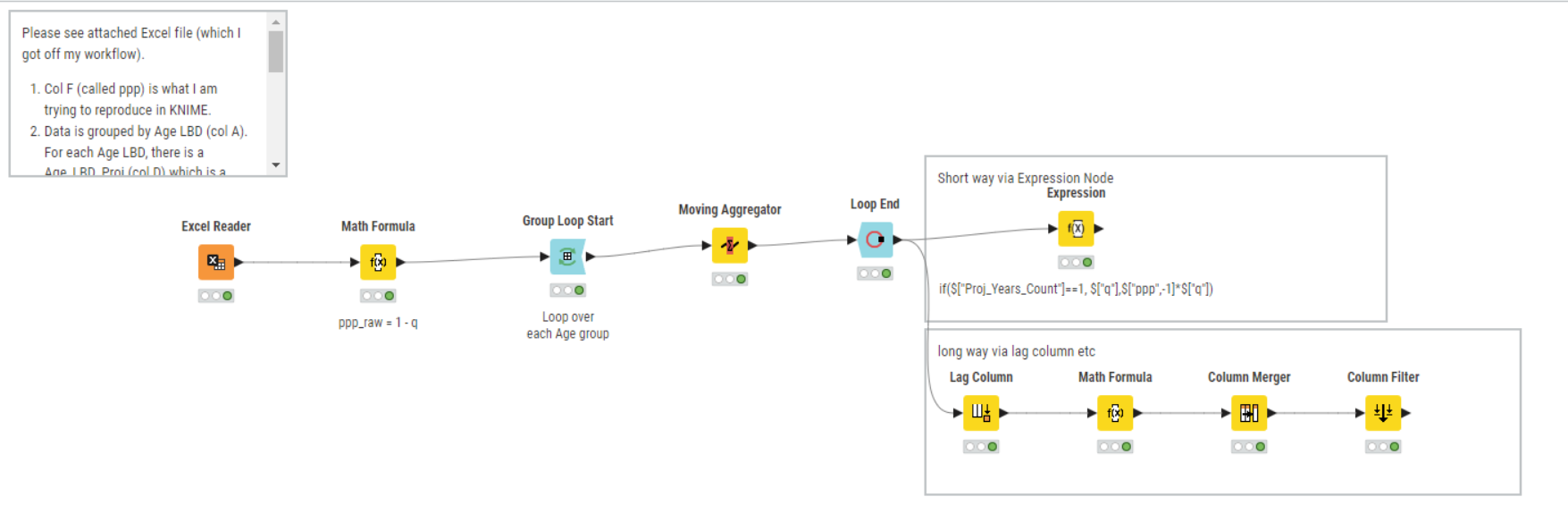
To solve this task you can use the “moving aggregator” node with the “Group Loop” nodes.
Group loop iterates through every group in the “Age” column (e.g. just the rows of 18 in the first iteration, then 19 in the second and so on). With the “moving aggregator” node you can do the math of the cumulative multiplication.
Hi @ActionAndi, Wow! This is fantastic. Your workflow was simple and and worked like a charm (I was figuring out a Java snippet path to help me but no need)! I was able to match KNIME output with what Excel produced. Thanks so much.
To add another level of complexity, how would I tweak the workflow to now calculate ppq ie for each projected Age LBD, product of all the previous p’s and current q.
First Proj_Year = q
Second Proj_Year = p (of previous year) x q
nth Proj_Year = pppp (product of previous n-1 p’s) x q
Hi Andreas, no problem. Attached is the output file from KNIME based on the previous workflow you helped with to get product of all the previous and current p’s for each Age_LBD. These are columns A to G.
In column I (called ppq and highlighted yellow), I have inserted Excel formula to reflect what I am trying to achieve in KNIME ie for each projected Age_LBD, get product of previous p’s and multiply with current q.
Just some background - this is to do with probability of survival (p) and death (q). ppq means survive all the way and then die at current age while ppp means survive up to and incl. current age.
Hi Andreas, thanks a tone! The Expression node solution was neat and worked perfectly.
The Lag Column didn’t work quite well as it lagged values for all Ages LBD (it needs to stop for each Age, before restarting again). However, on inserting the Lag Column & Math Formula nodes within the Loop, it worked and I was able to match the results to Expression node method and Excel formulas.
Great to learn about the Expression node and that we can reference previous and next rows in it. This is very handy for us in actuarial pensions/life work as we are always needing to reference back to previous rows to build future projections.
Thanks again for making my transition from Excel to KNIME so smooth!