Hi @wethernt , you probably need to have a mapper/dictionary for this kind of matching, in addition to removing punctuation and standardizing case (upper/lower case).
Looking at your sample list coming from the POS, I think a mapping for the following should be enough:
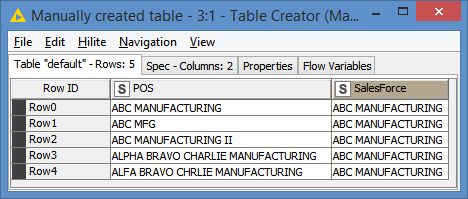
I used the same sample input data as you have:
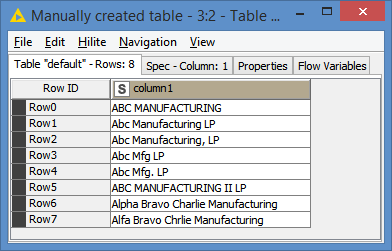
I prepare the data with some string manipulation before doing the mapping:
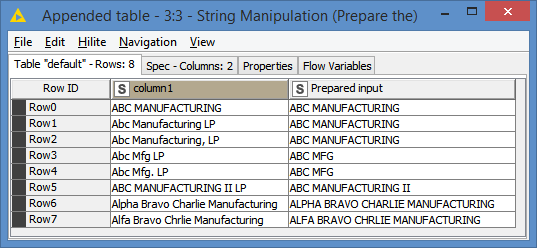
replaceChars(regexReplace(upperCase($column1$), " LP$", ""), ".,", "")
This is basically removing any " LP" at the end, and also removing punctuations such as dots (.) and commas(,), and changing everything to uppercase to match the case of the mapper.
After the manipulation, the prepared data looks like this:
And after mapping:
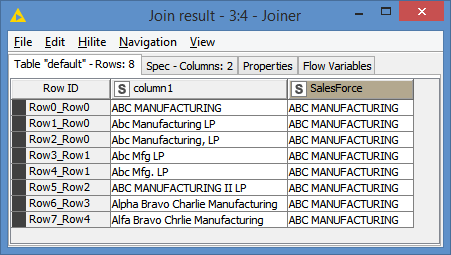
Alternatively, even the Mfg ones could be removed from the mapper, and convert the MFG to MANUFACTURING during the data preparation process before being mapped. But without seeing the rest of the data, I can’t tell if all Mfg of the should be converted or not.
And that is applicable for any of the real data that you have. That is, you will have to build the mapper according to the data that you have and also according to how much or what you want to manipulate before mapping.
The workflow looks like this:
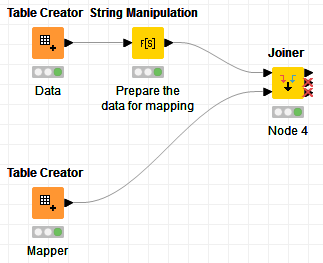
Here’s the workflow: Customer Name Matching internal to external name.knwf (11.6 KB)