I’ve run into a strange little issue and I’d really appreciate some help. I tried searching the forum to see if a similar question was already posted, but I couldn’t find anything relevant.
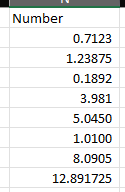
I have an Excel file that contains a column with numbers that have decimal places. These numbers can have any number of decimals, it’s not consistent. They are stored in Excel using a custom format, so on the screen they appear like this:
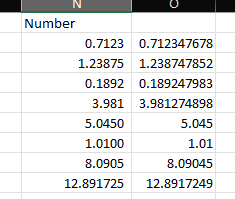
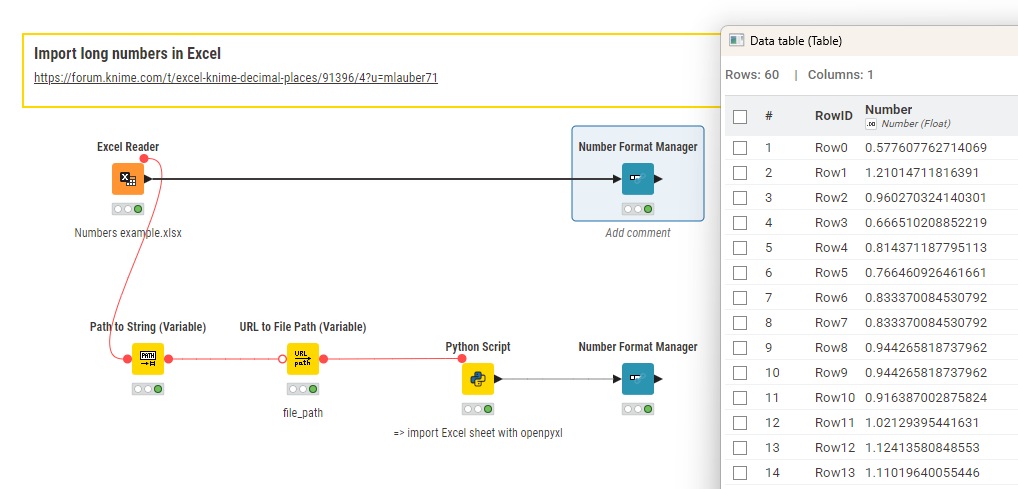
The problem is that when I load these values into KNIME using the Excel Reader, KNIME reads the full underlying numeric values, meaning all decimal places that Excel actually stores.
What I need instead is to load the numbers exactly as they appear in Excel, according to their custom number format.
So, for example:
if the custom format in Excel displays 3 decimal places, I need KNIME to read exactly 3,
if it displays 5 decimal places, I need KNIME to read 5,
and so on.
If I import them with all of their original decimal places, I have no way of knowing how many decimals each value should be rounded to, since Excel formatting is not preserved by the Excel Reader. This is very important for me because I need to perform further transformations and calculations on these numbers later in the workflow.
I’m aware that Excel has the “Set precision as displayed” option, but I’m trying to avoid modifying the source file manually, ideally, I’m looking for a solution that’s fully automated within KNIME.
Does anyone know if there’s a way to:
retrieve the formatted (displayed) value instead of the raw numeric value,
or extract the number of decimals based on Excel formatting,
or any workaround that achieves the same effect?
Any advice, hints, or creative solutions would be greatly appreciated.
Thanks in advance!
as you already figured, Excel actually stores more digits than its displaying.
if your displaying is not consistent and known ahead, your only option I am aware of, which wont require additional tools, would be converting the file into a zip, decompress and look for the formatting of EACH INDIVIDUAL cell to then loop through your data and correct this in a similar manner.
alternatively, ask the person responsible for the file to
not use the displaying option and instead put the figures in as expected or use scientific notation
provide a mapping of the precision
potentially, ask them to provide also a csv export (that should be possible for pure excel tables by non-technical people) [but you may have to test upfront, if the data in there is limited to the precision displayed or full]
Thanks a lot for taking the time to look into my issue.
Unfortunately, that’s not what I needed. Let me try to keep it short: if a number in Excel is shown with n decimal places, I want to import it into KNIME with exactly the same number of decimals, not in full long format. If the value in Excel is displayed as 0.1234 → KNIME should read it as 0.1234, not 0.123456789. Basically, I want to round numbers to the exact number of decimals they are displayed with in Excel.
KNIME, as you mentioned, reads the full underlying numeric value with all decimals, which means I have no way of knowing inside the workflow how many decimals I should round each number to.