I’m trying to do a check (and output an error column) if my value exists in a list of valid values as part of an Expression Node:
if(
$[“ColumnValues”] = MISSING
OR
$[“ColumnValues”] IN (“YES”, “NO”, “TRUE”, “FALSE”, “X”, “0”, “1”),
MISSING,
$[“Field Name”] + " is not valid.")
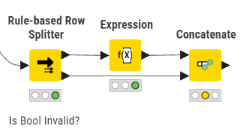
I think I could use a rule based row splitter, then write my error message on the TRUE path before concatenating again, but that seems like an odd choice:
tldr: Nope the Expression node does not support IN and it has no sensible way achieving your goal without cumbersome nesting or unnecessary long statements.
Alternatively, use the Rule Engine (supports IN), a Reference Row Filter/Splitter if your comparison is limited to 1 column or the old Column Expression Node
Ok thanks. I’ve looked at the Rule Engine. But it also doesn’t seem to support combining strings, so I can’t achieve my desired output of:
$[“Field Name”] + " is not valid."
I’ll have to stick with my rule based row splitter into Expression, which is a little bit annoying, but does work.