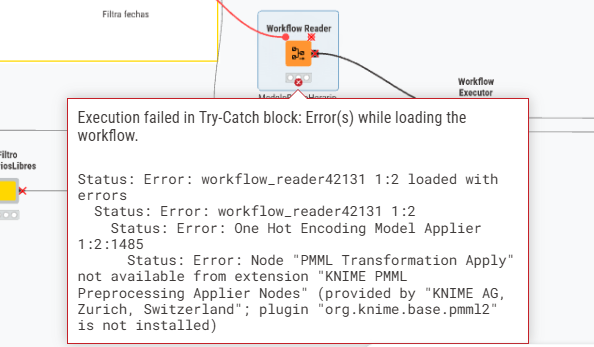
I am facing an issue when executing a workflow on KNIME Business Hub. The workflow runs perfectly on my local Analytics Platform, but fails on the Hub with the following error:
Error message: Execution failed in Try-Catch block: Error(s) while loading the workflow.
Status: Error: workflow_reader92048 1:1 loaded with errors
Status: Error: workflow_reader92048 1:1
Status: Error: One Hot Encoding Model Applier 1:1:1485
Status: Error: Node “PMML Transformation Apply” not available from extension “KNIME PMML Preprocessing Applier Nodes” (provided by “KNIME AG, Zurich, Switzerland”; plugin “org.knime.base.pmml2” is not installed)
Context:
The error occurs inside a Workflow Reader
The specific node causing the issue is the One Hot Encoding Model Applier.
I have verified that the extension is installed in my local environment (version 5.6.0), but it seems to be missing in the Hub’s Executor.
Question: What is the best way to ensure this extension is available in the Business Hub Executor? Do I need to manually update the Executor’s Docker image, or is there a way to force the Hub to download missing extensions during runtime?
@DanielaMaestre As you indicated this error indicates that your executor doesn’t have the KNIME PMML Preprocessing Applier extension installed. The most likely cause for this is that your execution context is configured with an image that doesn’t include this extension.
To ensure this extension is available in your executor please ensure you are using a ‘knime-full’ image that is the same or a newer version as the version of AP you are using. The ‘knime-full’ images include all extensions created and supported by KNIME and base Python environment. The basic ‘knime’ images only include the minimum extensions and plugins required for the executor to operate.
Alternatively, you can use the Executor Image Manager data app we provide to create a custom executor image that includes the specific extensions you need. For details on managing executor images and execution contexts please see KNIME Business Hub Admin Guide. Specifically, the section on Docker executor images
@DanielaMaestre Pro and Team accounts utilize the executors available through hub.knime.com. These executors cannot be customized using the Executor Image Manager. However, they should have most commonly used extensions available as per the list available in the following documentation: