Hi @ArjenEX , the Column to XML is basically taking the whole content as data, and it thinks that the “<” and “>” are part of the data, and therefore “escapes” them by basically converting them to html code.
I do not have any sample html similar to your structure (note: it is always the best idea to give us sample data, and in case of sensitive data, you can “sanitize” them by replacing them by fake data), so I basically use the html code of THIS page itself.
With the HTML Parser, it basically takes the html string and convert it to HTML objects, which you can then access via XPath.
Here’s what my workflow looks like:
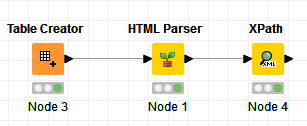
I extracted the title tag and the 2nd meta tag, and I extracted them as both XML format and string/value format for this example via XPath:




For the data from the meta tag, the meta tag does not enclose any data, but rather its “content” attribute is what has data, and you can see how I extracted that.
You can play around with the XPath with your HTML content to extract tbody and values within the tr and td
Here’s the workflow: html to table.knwf (34.0 KB)