Hi KNIME Team,
I would like to request an update to the SQLite Connector node to support remote file systems (specifically KNIME Hub Spaces) directly, similar to how modern file reader nodes work.
The Current Problem: Currently, the SQLite Connector primarily relies on local file paths. While this works fine for local development, it becomes a significant bottleneck when deploying workflows to KNIME Business Hub.
To connect to a .sqlite database stored in a Hub Space, I cannot simply point the node to the file. Instead, I have to build a complex “staging” workflow to:
-
Authenticate with the Hub.
-
Create a temporary local folder.
-
Use Transfer Files to copy the database from the Hub to the temp folder.
-
Extract the local path string.
-
Finally pass that string to the SQLite Connector.
As shown in the attached screenshot, what should be a single node operation turns into a 7-node workaround chain just to establish a connection:
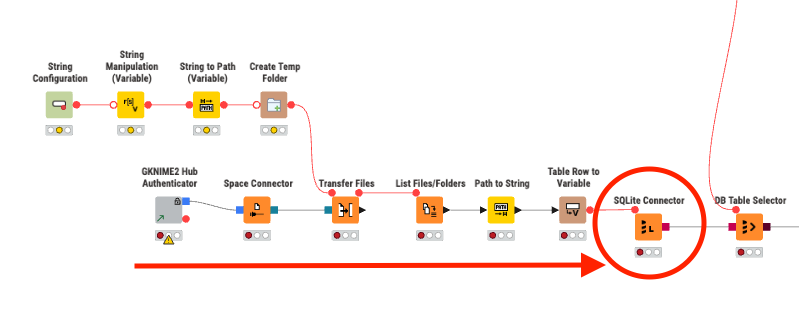
Could you add an optional File System Connection input port (blue square port) to the SQLite Connector node?
This would allow us to connect a KNIME Hub Connector directly to the node and select the database file via the remote path, eliminating the need for temporary file transfers and complex path manipulation.
This would bring the SQLite Connector in line with other modern nodes like Excel Reader or CSV Reader that seamlessly handle remote file systems.
Thanks!