I am setting up an Agent. In one of its tools, I would like to transfer files from a Sharepoint into the data folder of the tool worklow data folder. The tool workflow transfers the files successfully when executed manually. However, when executed under the control of the Agent Prompter node, the File Transfer node generates the error message in the KAP console:
”ERROR Transfer Files 4:13740:12381 Execute failed: Node is not allowed to access workflow data area because it’s executed within in a restricted (virtual) scope.”
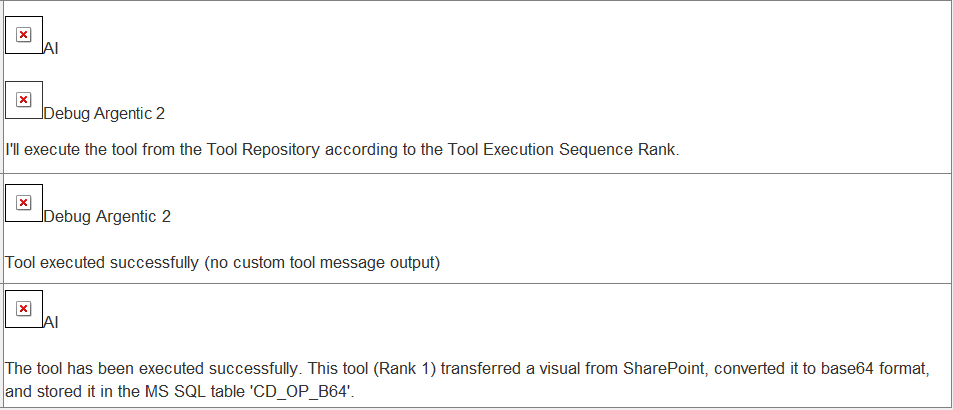
Nevertheless, the Agent Prompter node output reports a successfull execution of the tool:
And inside the File Transfer node, are you using a workflow-relative,mountpoint-relative, or absolute path to the tool’s data folder?
If you’re using a workflow-relative path, that’s the root cause. Tools executed inside an Agent run in a restricted context, and workflow-relative paths are resolved relative to the Agent workflow, not the tool workflow. As a result, access to the tool’s workflow data area is blocked, triggering the “restricted (virtual) scope” error.
Alternatives:
Use a mountpoint-relative path if the Agent workflow and the tool workflow live under the same folder structure
Or use an absolute path, which is always allowed (though not portable)
Thank you very much! Of course, you are right. This is only logic. I used the relative-to-workflow-data-area in the Transfer Files node. I will try the alternatives you mentioned.
I tried sofar to run the Agent locally and on the Hub. The aim is that the Agent runs as a Knime Data App. In view of this, what alternative option would you recommend (be more robust/reliable/feasible/easy to set up): mointpoint-relative or absolute path?
If you want to run the Agent as a Data App on the Hub, I recommend using a mountpoint-relative path. It’s portable, works both locally and on the Hub. Just make sure the agentic workflow and the tool workflow are in the same folder level so the relative paths resolve correctly.
When I use the ‘mountpoint-relative’, the Agent runs in KAP successfully.
Also on the Hub, I am able to write with ‘mountpoint-relative’ (using additional the Knime Authenticator & Site connector nodes). However, I am facing here a new obstacle with the ‘mountpoint relative’:
Downstream of the Transfer Files node, I am using Python Script nodes. The python scripts reading and writing to the folder of the transfered files. When I use the mountpoint-relative settings on the Hub, my mountpoint relative stored files cannot be found anymore by the scripts (using Extract Context Property node: e.g. Context.Workflow.Hub.Space.Path Variable). Do you think this is at all possible?
Or can I read/write from Python Script nodes only inside the data folder of the workflow on the Hub & face again the initial problem (agent virtual generated folder not part of the tool workflow)?
I’m not completely sure what’s triggering the error in your setup. If you can share a minimal example (agentic workflow + tool workflows), I can try to reproduce it on my side and see what’s going wrong.
thank you for your reply. I think I found a solution for this by defining a ‘finish’ of the tool workflow.
As the error occurs only on the Hub and not local, I assumed that running it as Job on the Executor caused the error message. Jobs seem to have a strict lifecycle: submitted → running → finished. I assumed that the error indicates that all nodes were executed successfully and then the workflow stops, without reaching an explicit ‘finish’.
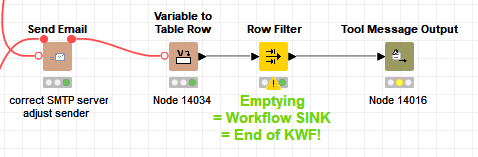
The Tool Message Output node as last node seems not to provide such a finish. Creating a ‘data sink’ (e.g. emptying row filter) before the Tool Message Output averts in two of the Tool workflows the error message when runned on the Hub.
I am guessing a sink is only a ‘unintended’ workaround. I am not sure if this works for every workflow (I have to implement the empyting row filter now in the remaining 12 Tool workflows and run the entire Agent again to see if this really works). I was looking for a node defining a Job ‘Finish’ and did not see one. I tried without success the Capture Workflow Start/End nodes and Workflow Ouput nodes before the Tool Message Output node.
Do you know by chance a suitable Job ‘Finish’ node?
I was able to reproduce the issue on my side. It appears that if any tool call fails earlier in the flow, all subsequent tool calls are marked as failed, even though they succeed. Interestingly, in my case, the email is still sent successfully, despite the job ending with the message: “0 nodes with execution failure.”
When there are no prior failures, everything, including the email sending, runs completely fine with no errors.
Is this the behavior you’re seeing as well? Could you confirm whether you also have a failing tool call earlier in your flow?
We have an internal ticket to track this behaviour: AP-25344.
yes, this is the behaviour I saw. With the generation of a data sink, the ‘0 nodes with execution failure’ error message is not raised. I tested it now within all my 14 Tool workflows.
Do you know if there are other ways/nodes to clearly define a workflow end of Tool workflows running inside AI Agent as Job executed by the Knime Business Hub Executor?
I am not sure if not sending anything is resolving the issue. As mentioned in the node description
If the Tool workflow does not specify an output message, a placeholder message notifying the agent about successful Tool execution will be used instead.
Something like ‘Tool executed successfully (empty custom tool message)’ will be sent back. Maybe use a static message communicating a successful run, as in this tool workflow.