Hardware Experiences for KNIME AP via Remote

Hello fellow KNIMErs

I’m looking for experiences and best practices from people using KNIME AP via remote.

We’re running 5.2.5 on a virtualized EPYC 7543 32C server with 256GB RAM allocated, using it via rdweb, unfortunately I can’t get the exact configuration as I’m just an end user.

Using AP is really sluggish, latency by pinging the server is around 7-10ms so I wouldn’t blame it on that.

I’m not sure if it’s an inherent issue with rdweb or if running it on server hardware is the culprit.

Running 5.8 locally on my office laptop works a lot better but I can’t use it that way as our IT doesn’t allow direct DB access.

My idea would be trying to get a workstation (ThinkStation P8 or similar) for each location that we can share via remote, not sure if that helps or if it’s more tied to the fact that we have to use it remotely via web interface in the first place.

I’d be happy for some insights.

Note: We have around 150 people globally using KNIME AP so getting a workstation for each is probably not realistic.

1 Like

@rkehrli these thoughts:

  • you obviously have checked that you have a good amount of RAM allocated to KNIME thru the knime.ini
  • From my experience in a corporate environment if KNIME is slow on a server often an aggressive virus scanner is to blame. KNIME consists of hundreds if not thousands of small files and if they get scanned all the time it slows the system down
  • changing the behaviour of the scanner might mean to dive deep into the documentation of the provider and also ‘negotiate’ with IT and security to maybe reduce the scans to once every few hours or so
  • The you might wat to check the performance of the disk. That sometimes is an issue if you have virtual environments since faster SSDs would cost more money and sometimes cheaper options are initially chosen. But KNIME has a lot of small files that need to be accessed

https://medium.com/low-code-for-advanced-data-science/mastering-knime-unlocking-peak-performance-with-expert-tips-and-smart-settings-49e2c0dab9cc#fff0

2 Likes

@mlauber71

Thanks for the insights, we certainly have some way to go with our larger workflows but our key user here is currently just copy & pasting the reports from Hyperion as that gets turned off at the end of the year, we had around 300 reports to migrate in a 2 year timeframe.

Doesn’t help that using AP feels like having a 200ms ping on a remote session.

Our IT also had a meeting with KNIME regarding the performance of our scheduled workflows and the takeaway was that they can’t help us because our configuration is unusable.

It doesn’t help that the project lead’s knowledge of KNIME is based on using it for his doctorate in meteorology, we have pretty much zero knowledge when it comes to setting up the backend for AP and Business Hub, he’s still adamant that there is no way to force-run a workflow on the scheduler…

I’m not sure how VMWare or rdweb handles resources as my IT career ended 20 years ago but my gut tells me that the performance issues on the remote AP are the server lacking any graphics acceleration and it’s running a software emulated “GPU”.

I wouldn’t be surprised if we had issues running a new KNIME version with the new renderer.

As for hard discs I can only see the generic VMWare SCSI drive but not the underlying hardware, given that it’s server hardware it’s probably a virtual drive on a HDD raid.

Hi,

Do you want to use the remote server to run automated/scheduled workflows or to develop workflows and run them manually?

Some years ago I shared with three to four co-worker a workstation to run workflows with a higher demand on RAM and compute power. At that time we also ran workflows in batch mode with scheduling. This manually maintained scheduling was a bit of a hussle therefore we were happy to switch to KNIME server or later to the KNIME Hub.

Hi @ActionAndi

We’re using the server to run KNIME AP to develop our workflows and run/schedule them on a separate on-prem Business Hub

The reasons why we’re using remote are:

  • IT wants to centralise as much as possible so were sharing the hardware with colleagues in India, China, the USA etc.
  • Lowest common denominator is also a thing, we have around 300 reports that run regularly, while a lot of other locations have 0.
    We’re trying to offload the critical reports to run directly in our ERP but in-house knowledge to do that is non-existant and outsourcing requires a bulletproof business case
  • IT does not want to allow data transfers from our E1 database via KNIME to the local clients, basically the data needs to stay in the same datacenter (not going to tell them that by using the ERP data is already transferred over the internet…)

My “compromise” would be having a dedicated workstation per location/country as we’re also running into the issue of some people “blocking” KNIME by using up all the RAM and us being unable to reach them due to different time zones.

IT/Management isn’t too keen on spending much money as KNIME was being sold as a “free” alternative to Hyperion, Hyperion is also going EOL so we needed a new solution anyways.

Hyperion was very efficient as it ran on the database but you basically needed a Master in SQL to create the reports while KNIME is much easier to create sophisticated datasets for those that don’t speak SQL fluently.

Ah okay now I understand.
I suggest to have a well equipped Workstation with 128 GB RAM and if you are free to choose Linux as operating system I would do that. With that multiple users can work simultaneously with KNIME. As KNIME is installed locally these installations cannot interfere. I would check the KNIME.ini files for proper RAM settings.

1 Like

Hello @ActionAndi @mlauber71

Thanks for your help and experiences, I’ll forward that to management and see what I can do.

Having tried 5.8 locally I suspect performance on both the AP and Business Hub would improve by updating, KNIME 5.2.5 seems really hesitant when it comes to releasing memory and we can’t run GC node on the scheduler according to our IT.
5.8 is a lot more aggressive when it comes to clearing memory after large Expression and Joiner nodes.

I’ll also try to fish for new workstations and maybe get them to allow us to work on the database locally, according to our local key user we got “banned” from accessing the database due to network bandwidth concerns.

1 Like

I did some testing in our environment to try to show the end customers to send their SQL up to the database using something like the DB Query Reader rather than bringing all the data to the AP to do Joins, FIltering, etc. You eliminate the network overhead and storage usage on the AP and just get the data back that you need. That may be part of your issues. My tests selected a particular value that returned about 3000 records from a 1.2 million row test database. Sending the SQL up is a sub-second response. Bringing the rows down and filtering was 10s of seconds up to a minute depending on how you are connected to the network.

You should be able to save those queries from Hyperion and put them in KNIME if that helps in the short term.

I do have KNIME installed on a VM, just single user, and use the windows remote desktop to access it. I do not see significant performance issues manipulating the remote KNIME AP from my laptop. Again, this may depend on network between the laptop and the VM but in my case, it is not an issue.

2 Likes

My current setup at my corporate is the following:
Lenovo Thinkpad 14”, 16 GB RAM, WIN11 for office stuff
HP DESKTOP PC as remote PC with 64 GB RAM and Intel i7 CPU (idk what kind)

The Desktop PC stands somewhere in the office under a desk and is wired with fast LAN network. Our Laptops are connected with WLAN.
When I want to work with larger datasets or (more importent) with many different data sources distributed in the intranet I connect remotly with the DESKTOP. This works like a charm!

Downloading large amounts of data from a database is always an issue. In my experience many data science starters think that a database is just another data storage and do not know the capabilities to actually do the most calculations on it. So they download all the data to their laptops and do filtering, joining and groupby calculations there. So one of my tasks as a trainer is to show them the brilliant DB related nodes in KNIME :smiley:

Cheers

Andreas

3 Likes

Hi

@ActionAndi

I think the culprit is the VM running on the server and rdweb (as I understand a web application for remote desktop), directly connecting to a workstation would probably solve a lot of what feels like latency issues.

As for SQL, my colleague chopped of some SQL off our largest report and moved the manipulation to KNIME because he could barely understand it, even though he has written it himself.

I’ve also ran a test on our worst workflow and I’ve already shaved off 2 minutes of run time by combining 6 Column Expressions into 1 Expression node and switching to the Columnar Backend, so I’ll try to push our IT to update to 5.8 as much as possible.

1 Like

Hi @rkehrli! This might be one of my favorite threads here for an optimization nerd like myself! I have a few observations after reading the thread:

I can see a few issues with the setup. Throwing more hardware at the problem is definitely not ideal and will only get you so far. I see a few architectural flaws that can be addressed with nearly zero cost (provided you have some flexibility over that in your org).

1/ CPU desktop rendering : you correctly noted the server you’re using does not have an IGPU & CPU is used for desktop rendering. The performance will be disastrous ESPECIALLY on Windows ( which i’m guessing you’re running on guest vms since rdweb is used). I previously successfully used a remote headless vm on linux via xrdp. If it is possible at all to change the OS on the remote server’s guest vms, i’d opt for linux with a lightweight desktop environment like xfce & lower resolutions (e.g. 720P) – knime ap worked like a charm for me that way.

2/ Scheduled workflows & resource optimization : sounds like you need an orchestrator that will manage the concurrency & dependancy of your scheduled workflows. You need to be able to prevent resource over-allocation across tasks & have much better observability of your server’s resources, task failures etc. I’d highly recommend running AP workflows via NodePit Batch https://nodepit.com/product/batch & orchestrating them via Cronicle : https://cronicle.net/. This setup is free, & incredibly easy to work out for less technical users (as opposed to having something more elaborate like apache airflow). Cronicle can even scale to multiple machines so getting a 2nd ,3rd , 4th server & orchestrating all tasks across these servers would not be a problem (you can even specify to figure out the most optimal path across servers & orchestrate scripts to minimize ram usage/ maximize parallelism & speed etc).

3/ resource optimization at workflow design level : a few users in the thread pointed out that doing most of the transformations within the DB is the way to go. I understand your users are not SQL pros, but how comfortable are they using the DB nodes? How much of your workflow logic can be pushed to a DB vs knime native nodes? I would really recommend using state of the art olap engines like duckdb which very nicely integrates with knime via jdbc driver. Duckdb can also directly read from mysql/postgresql/sqlite.

Using knime-native nodes although super useful for rapid development/experimentation, have some serious drawbacks when running in production (no parallelism + eager execution aka materializing every transformation step).

Buying 2x powerful hardware will cost you a ton & you’ll only get 2x performance boost (at the very most & resource scaling often doesn’t happen linearly so gains would probably be sth like 1.5x). By using duckdb you can achieve 50x speedups for free with much lower resource usage & much better memory management (aka no crashes). I’d really recommend this approach for anything “greenfield”. if you can additionally afford some time to refactor a few resource-intensive knime-node workflows, this will give you an additional boost.

If you already have a lot of workflows built entirely with knime nodes, you can achieve some serious performance improvements by moving to spark with spark workflow executor with minimal workflow changes. This will give you both parallelism as well as lazy evaluation, although still likely 5-10x slower vs duckdb.

https://hub.knime.com/knime/extensions/com.knime.features.bigdata.knosp/latest

https://www.youtube.com/watch?v=LTEMNEluHAo in this video made by KNIME you can see how to set it up around 1:11:35 mark. This can be used with local big data environment but the version of AP would need to be kept below 5.3 (as per my post here : https://forum.knime.com/t/local-big-data-environment-workflow-executor-not-compatible-after-ap-version-5-3/89972/5)

hope this helps and let me know what you think about the above!

3 Likes

Hi @Add94

Thanks for your insights. As for influence to get such changes done, I probably won’t get far, I would probably have more success getting IT to buy a workstation for ever KNIME user.

1/ Our issues with AP are mostly sluggishness and RAM usage. My path forward will be:

  • Update to a newer version to cut down on RAM usage, 5.8. is able to run the mentioned “monster” workflow from below on my 8GB setup pretty well
  • Getting a workstation (something like a Lenovo P8) per country/location, probably my easiest way as according to IT “there is no issue”

Linux is probably not an option due to lack of knowledge in our IT.

2/ I’ll look into Batch and Cronicle, I feel it’s out of our ITs league though.

I feel we’ll have to work on our basic setup of Business Hub and the underlying hardware though, our IT got told from a consultant(?) “we can’t help you, your setup is crap”.

Unfortunately IT isn’t giving us access to the Business Hub so I can’t really tell what’s going on, all of our requests, data apps etc. have to go via IT.

3/ Most of our workflows are fine, one is a monster though (that should be integrated into the ERP anyway, but here we are).

What it does is basically take all our items, work orders and demands and calculate/filter if an item is running late or is missing from other orders. Getting the correct filtering is crucial and takes a lot of Column Expressions, Lag Columns and Joins. Copying the SQL from Hyperion didn’t work and running it mostly on SQL is a maintenance nightmare.

One issue with the workflow is that we need multiple Column Expressions on tables 800k rows by 320 columns because if you do multiple expressions in one node it doesn’t take previous outputs into account.

I’ve done a quick test on 5.8 on my Laptop using the new Expression node and I was able to cut the runtime of a “package” of 6 CE nodes down from 2:20mins down to around 20s by using the columnar backend.

We or rather our KNIME/ERP "wizard” is running out of time to transfer the reports off of Hyperion so he focuses mostly on having a working report and less on optimization.

IT will shut off the Hyperion server by 31.12.2025, we won’t even be able to look at the reports anymore (currently running in read-only mode).

1 Like

No worries! and I understand that getting all that buy-in to implement the changes is rather difficult.

Lack of Linux know-how is a shame & is very limiting in this aspect, but we all work under certain constraints so that’s understandable….

If it’s one monster workflow causing most of the performance issues , then I’d definitely look mostly into software-side optimizations (workflow design, considering spark/duckdb etc). SQL monoliths may be difficult to manage but if you break it down into small blocks and construct queries incrementally in knime - this should be absolutely fine. I don’t know Hyperion but i’m guessing it follows Oracle’s syntax? copy pasting SQL into a different RDBMS in knime likely won’t work due to syntax differences. There is an amazing python tool which can translate across sql syntaxes very easily (& with no LLMs :slight_smile: ) sqlglot API documentation

if you wrap some of the resource intensive steps (e.g. a sequence of multiple col expressions) within spark executor in knime, you’d not need to make any changes but you’ll get lazy evaluation + all cores working together.

To put it in perspective, you’re mentioning c.800K rows & 320 col tables with multiple transformation steps happening sequentially. This is not a lot of data. This is tiny data in my view. with DuckDB (which you can use with KNIME) , you can process TBs of data (billions of rows) on a single laptop seamlessly Big Data on the Move: DuckDB on the Framework Laptop 13 – DuckDB . You can also do so in a severely ram-constraint environment.

re cronicle - your team can even start using a simple windows task scheduler + nodepit batch. it’s really only a few clicks to set it up so should be relatively easy for your IT to handle :slight_smile:

Buying so much hardware for a simple use case sounds like an overkill to me, but if this is a viable option for you and your team then who am I to advise against it!

you can also consider using cloud-based resources and only using what you need ? If this absolutely needs to be a windows machine, there are multiple cloud services offering windows vms.

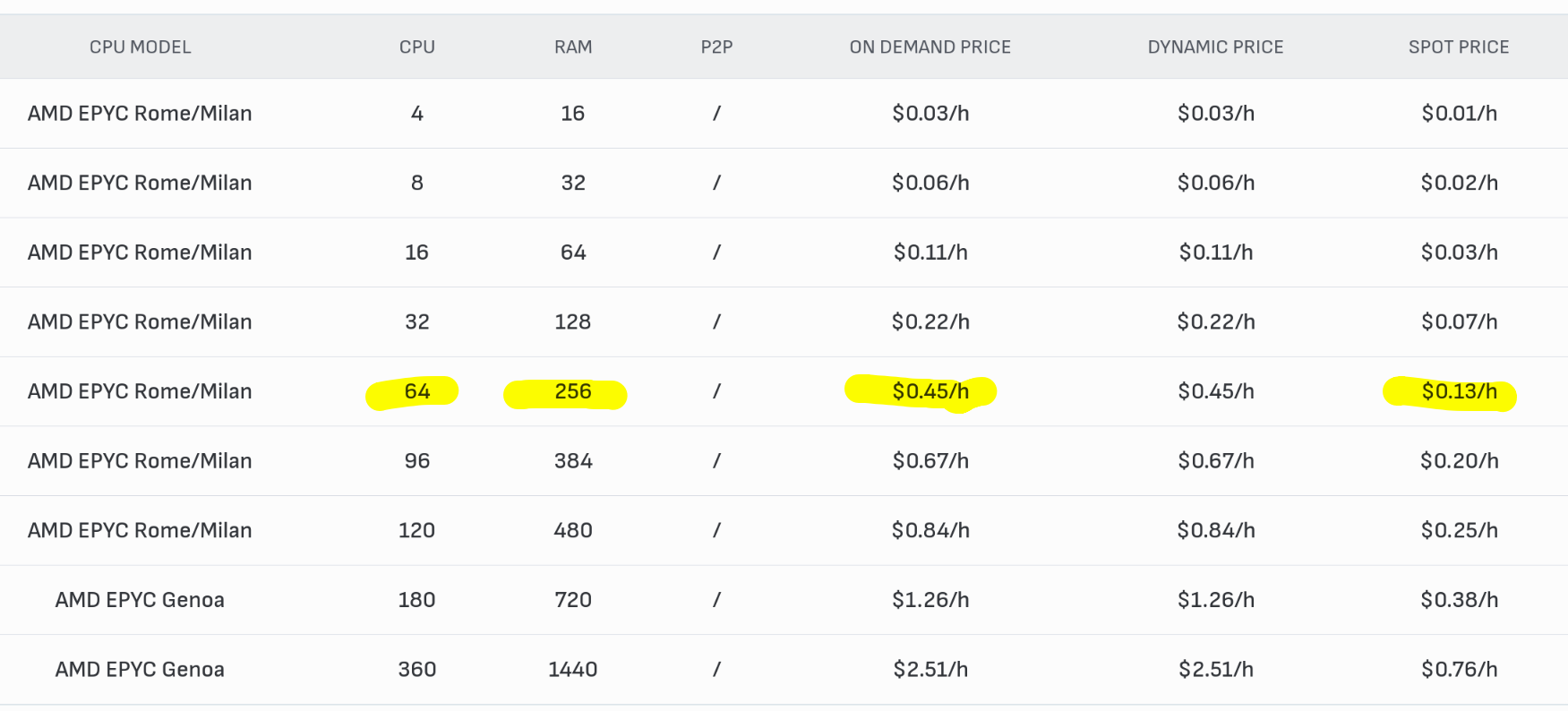
In an ideal scenario you would orchestrate your workflows (which are optimized with duckdb/spark) and pay for the compute you’re using. E.g the provider linked below (although offering only linux nodes), also has an API for resource provisioning. So you can literally tell your orchestrator to spin up a machine 5-10 minutes before the task is supposed to run, run it & turn it off. this brings costs down significantly (you’ll still need to pay for long term storage of course). CPU pricing is dirt cheap especially for spot workloads. e.g the equivalent of your epyc server with 256gb ram & 64 cores costs 0.13USD/hr in spot pricing & 0.45 USD/hr in an on-demand pricing. GPU Instances — Verda (formerly DataCrunch)

1 Like

Hi @Add94

Well to be fair that “monster” was the first productive workflow my colleague made, the whole thing takes about ~45 minutes to run on the Business Hub, compared to around 20 in AP, which is also a reason why I’m pushing to “throw more hardware at the problem”, our Hub server has even less resources than our AP.

Refactoring the workflow is on the to-do list but I can’t really help as I can barely understand what’s exactly going on.

I’ll also look into Spark, thanks for the tip.

We also tried outsourcing it to someone with more KNIME expertise but the company wasn’t able to produce a 1:1 copy of the Hyperion exports.

As for IT, risking some wrath of the DevOps gods and HR, is really lacking any competence for things beyond first level support.

So I’m trying to make a “business case” as easy as possible, “buy this and update to this and things will run fine”.

My first step before buying new hardware is refactor the part of the workflow I can do myself and “force” IT to update to 5.8 as I’m expecting quite a bit of performance gains by combining the dozens of single Column Expressions into a couple of Expression nodes and replacing Joiners with Value Lookups where applicable.

We’re doing things with KNIME that should actually be done in the ERP unfortunately but we have to work with the tools we have available, any tickets related to implementing something in JDE usually get deleted.

1 Like

@rkehrli it indeed might be interesting to test DuckDB which is supposed to be quite powerful. Also it does support in-memory processing

The local SQL database H2 also does support large datasets. So you could check if moving some data preparation to a local database might speed up things.

Another thing that sometimes can help is using streaming if the use case does support it. This means a bunch of operations will get done for a chunk of the data. This can also speed up things since KNIME would not have to load the whole table into memory.

2 Likes