I’m trying to query a database table and derive a value from that table example a Name. I want the rest of the workflow to operate as usual with it’s built in loops and at the end when it’s completed it’s run, I want it to re run the db query reader node at the beginning. Picture for reference.
Summary
This text will be hidden
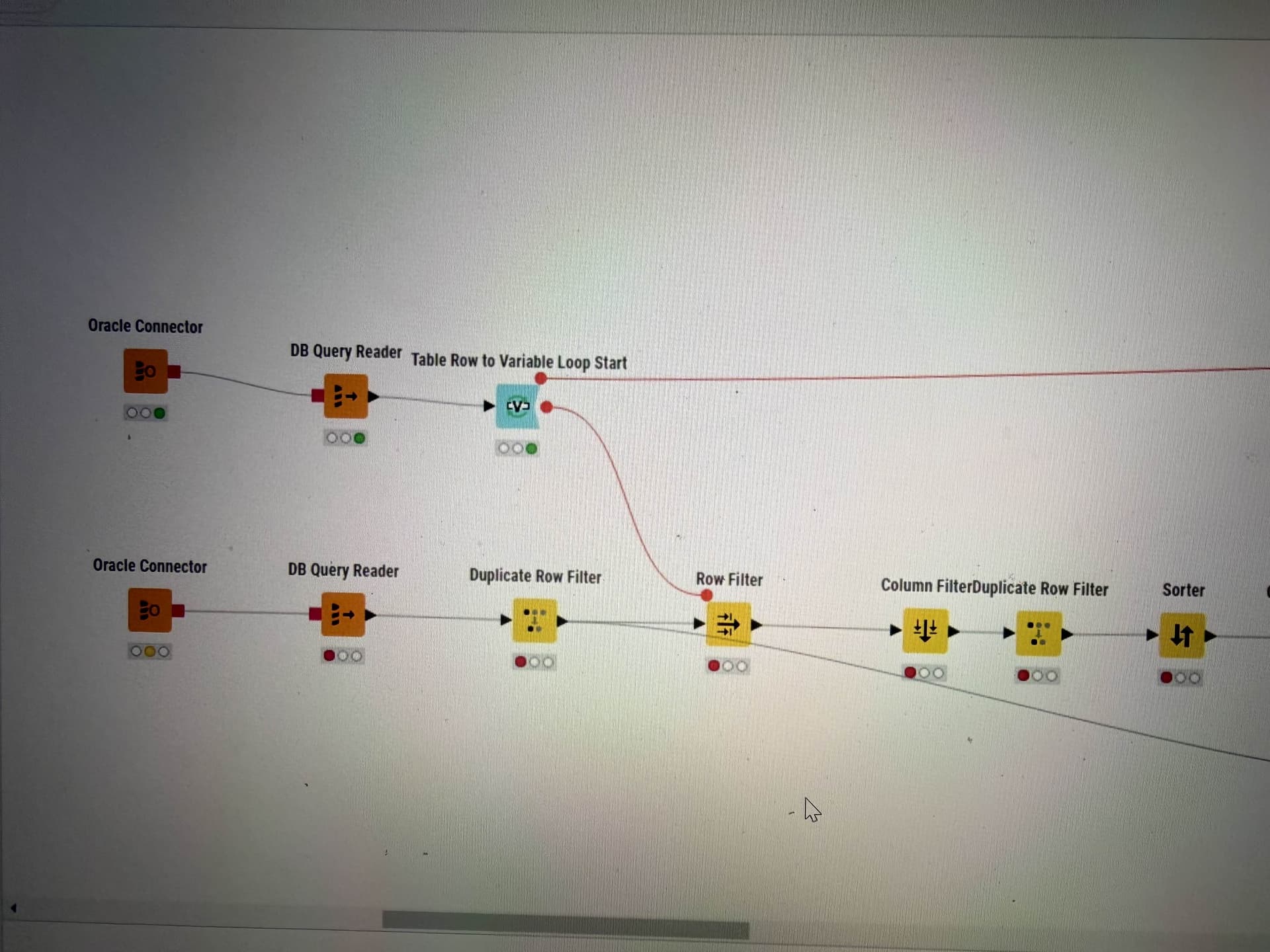
The top query gets a name to use as a variable for the row filter and the bottom part of the workflow is the actual workflow I want to run for that one name. However, when that bottom workflow finishes running completely, I want the top db query reader to get a new name to run the workflow again until there are no new names.
@zenster Maybe you can take a look at this article and the examples provided
Thank you! However, there seems to be no easy way to get the actual db query reader node to loop with any of the solutions in this article. Could be my lack of understanding but i’ve tried multiple methods to loop the db query reader to run after the main workflow runs and still no luck.
You most likely will have to think about where which operation should take place. You can extract the list of items you want to loop over from a database and then feed them one by one via Flow Variables into another DB Query node to do the jobs. You will have to make sure how to close the loop. You can either just close it with a Variable Loop end or collect information.
Yes. I’m able to get a list of the items I want to iterate over. The main struggle is that list could change after the workflow is initiated. The query checks for a specific category item being uploaded to the database. If it’s not being uploaded it will grab a random value to filter on. Then continue with the main workflow. It seems there’s no simple way to keep re-running that db query reader for an updated value.
The purpose of this is also so that multiple users running the workflow for the same database won’t overlap uploading data for the same category
Hi @zenster,
The DB Query Reader node itself cannot “loop”, but it can be placed inside a loop.
If you want the DB Query Reader to execute again, you’ll need to put that inside a loop, and currently in your screenshot it isn’t, so it will execute just the once. Are you asking how to structure it so that it is also inside a loop of its own?
When you say you’re able to get a list of the items to iterate over, but that the list could change after the workflow is initiated, what determines the change of list, and how should the workflow be handling that eventuality?
Without actually knowing what your two separate DB Query Reader nodes are actually retrieving (or the conditions) it’s difficult to second guess exactly what workflow structure you will need, other than that you are likely to need at least one additional loop outside of at least one of the DB Query Reader nodes.
As you have mentioned that the DB Query Reader should “get a new name to run the workflow again until there are no new names”, I’m thinking it could be that you want to add a recursive loop, or maybe simply a variable condition loop, either of which could end the loop when there is no more data, but it really depends on exactly how the different DB Query Reader nodes are to interact.
Can you give us more description or insight about what each DB Query Reader node does? Does the lower one, for example only run once, or should that also execute again for each execution of the upper DB Query Reader?
Yes. I can’t understand how to structure it. I would like the db query reader on the top of the screenshot to re-query after the bottom workflow is complete.
It’s not a list. The top query checks what is already being uploaded let’s say a name on a list. The way the bottom workflow works is at that row filter it will use that name because it’s not being uploaded or has been uploaded.
yes the top query is getting one name that doesn’t exist in the “upload table” and therefore we can use it for the process below. The bottom query only needs to be run once. It’s getting all the relevant data for all possible names. After it’s filtered there is already a recursive loop and a group loop. I will post the rest of the workflow if it will help.
Also thank you for you reply