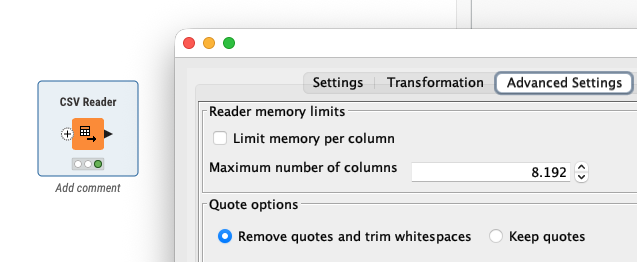
When I try to read a ~2GB CSV file directly in KNIME 5.4.4, I get the following error:
Execute failed: Memory limit per column exceeded.
Please adapt the according setting.
To work around this, I switched to the File Reader node and enabled:
Table specification → Limit data rows scanned = 10,000
While the node executes successfully, the actual output only contains 10,000 rows, so the full CSV data is not read.
If I disable the row limit, the memory error persists.
The JVM heap has been increased to -Xmx6144m, and the CSV contains multiple long String columns.
I would appreciate KNIME official support guidance on:
How to handle such a large CSV file without upgrading KNIME?
Recommended usage or configuration for File Reader / CSV Reader nodes?
Reliable methods to ensure full reading of a ~2GB CSV file?
tough to tell where the actual issue is. Increasing the ram surely is a first, good step.
does the csv reader fail when executing or when evaluating (configuring) the node?
if the ram is a limitation and configuring the node works, you could try wrapping it into a component and switching to streaming for the execution.
but, i would still think that there is a more baseline issue interfering here.
you could try - just to make sure your file isnt the issue - split the CSV into e.g. 4 parts each being about 500 mb (make sure to include the header in each file) and try loading those 4 separately once. this is not supposed to be a solution but to verify that there is no issue with the data within the csv.
thank you very much for your reply and suggestions!
I would like to provide more context and seek further guidance:
I want to use the CSV Reader node to read a ~2GB CSV file. I have already increased the JVM heap to 6GB, but reading such a large file still causes issues.
Splitting the CSV into multiple Parquet files allows reading, but the process is slow and inefficient, which is challenging for my workflow.
Regarding your suggestion to wrap the CSV Reader in a Component and enable Streaming execution, I would like guidance or examples on how to implement this effectively, so I can handle large files efficiently in KNIME.
Could you please advise whether it is feasible to read a 2GB CSV file with CSV Reader without upgrading KNIME? Also, is the Component + Streaming approach recommended?
a) if you need only selected rows and plan on filtering very early than streaming is a great way to reduce the resources needed.
b) if you need only a subset of columns, kicking those out within the reader node can help a lot too.
c) I assume that your file is available locally or do you access it via cloud/smb?
d) I know that Knime is very bad with columns containing very long strings (which you mentioned is the case for you). Knimes performance is very bad if it has to “carry through” a long text column through many nodes. It can make sense to load the CSV twice, if you do not need to work on the long string columns early on in your workflow, once excluding those columns and a second time with only those columns. you can then join them back later on.
e) changing from row-oriented to column oriented storage within Knime can also yield a good boost.
@DanielHua I am not sure if streaming is the right approach in your case although you might try. First you should check the settings of your CSV reader and see if you allow large columns. This might come down to the memory issue.
Another approach that I tries was using Python and reading the CSV file into PyArrow that then can be used by KNIME. The handling of chunk sizes seems to be a bit of a challenge. I let ChatGPT help me and this code seems to work.
import knime.scripting.io as knio
import pyarrow as pa
import pyarrow.csv as pv

csv_path = knio.flow_variables["File path"]

# Choose a fixed batch size for KNIME
TARGET = 65536  # you can raise/lower this

out = knio.BatchOutputTable.create(row_ids="generate")

buffer_tbl = None

with pv.open_csv(
    csv_path,
    read_options=pv.ReadOptions(encoding="utf-8"),  # try "windows-1252" if needed
    parse_options=pv.ParseOptions(
        delimiter="|",
        quote_char='"',
        newlines_in_values=True
    )
) as reader:

    for rb in reader:  # rb is a pyarrow.RecordBatch (size may vary)
        t = pa.Table.from_batches([rb])

        # append to buffer (keep buffer bounded by slicing later)
        if buffer_tbl is None:
            buffer_tbl = t
        else:
            buffer_tbl = pa.concat_tables([buffer_tbl, t], promote=True)

        # emit fixed-size batches
        while buffer_tbl.num_rows >= TARGET:
            chunk = buffer_tbl.slice(0, TARGET)                 # zero-copy slice
            chunk = chunk.combine_chunks()                      # safe: only TARGET rows
            out.append(chunk.to_batches(max_chunksize=TARGET)[0])
            buffer_tbl = buffer_tbl.slice(TARGET)               # keep remainder

# last (smaller) batch is allowed to differ in size
if buffer_tbl is not None and buffer_tbl.num_rows > 0:
    last = buffer_tbl.combine_chunks()
    out.append(last.to_batches(max_chunksize=last.num_rows)[0])

knio.output_tables[0] = out