@DanielHua I am not sure if streaming is the right approach in your case although you might try. First you should check the settings of your CSV reader and see if you allow large columns. This might come down to the memory issue.
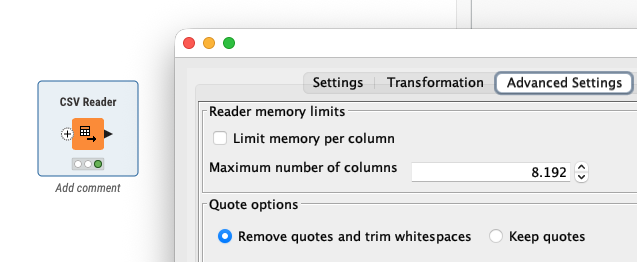
Another approach that I tries was using Python and reading the CSV file into PyArrow that then can be used by KNIME. The handling of chunk sizes seems to be a bit of a challenge. I let ChatGPT help me and this code seems to work.
import knime.scripting.io as knio
import pyarrow as pa
import pyarrow.csv as pv

csv_path = knio.flow_variables["File path"]

# Choose a fixed batch size for KNIME
TARGET = 65536  # you can raise/lower this

out = knio.BatchOutputTable.create(row_ids="generate")

buffer_tbl = None

with pv.open_csv(
    csv_path,
    read_options=pv.ReadOptions(encoding="utf-8"),  # try "windows-1252" if needed
    parse_options=pv.ParseOptions(
        delimiter="|",
        quote_char='"',
        newlines_in_values=True
    )
) as reader:

    for rb in reader:  # rb is a pyarrow.RecordBatch (size may vary)
        t = pa.Table.from_batches([rb])

        # append to buffer (keep buffer bounded by slicing later)
        if buffer_tbl is None:
            buffer_tbl = t
        else:
            buffer_tbl = pa.concat_tables([buffer_tbl, t], promote=True)

        # emit fixed-size batches
        while buffer_tbl.num_rows >= TARGET:
            chunk = buffer_tbl.slice(0, TARGET)                 # zero-copy slice
            chunk = chunk.combine_chunks()                      # safe: only TARGET rows
            out.append(chunk.to_batches(max_chunksize=TARGET)[0])
            buffer_tbl = buffer_tbl.slice(TARGET)               # keep remainder

# last (smaller) batch is allowed to differ in size
if buffer_tbl is not None and buffer_tbl.num_rows > 0:
    last = buffer_tbl.combine_chunks()
    out.append(last.to_batches(max_chunksize=last.num_rows)[0])

knio.output_tables[0] = out