I am trying to build a loop that reads in xls files, however the headings between independent workbooks may differ from time to time. How would I build it in such a way that even if the row headings in the raw xls data change from to time it will still read in the correct row for the headings for each workbook.
Hi @jta123, so you’re just looking to union based on the ordinal number of the column (position of the column) instead of name or you want to retain all column names and union the ones which match?
If option 1, I’d used the Extract Column Header node as the second output will default all your headers to Column 0, Column 1, etc. which should union based on the ordinal position.

Option 2, you can use the option in the Loop End node called Allow changing table specifications, this will marry up all matching names in the union but the other names which don’t match will be output but with NULL values where not matched in the union.

Thirdly, you can use both if your table specification gains / loses columns over the files, this is risky though.
Someone may have a better solution 
Hope that makes sense?
Thanks,
Matt
3 Likes
Thanks @Matt_D, thanks that helps alot. Would the Extract Column Header Node still work if the headings started on different rows between workbooks ?
Hi @jta123,
OK so I didn’t really process your question properly, I assumed your column headers changed but the position stayed the same, what you really need is something that picks up when your header starts at different rows in the Excel sheets?
Do you have a couple of examples of the Excel workbook you could provide? I need to know if everything above the row headers is NULL or you will have data above the required headers/data.
Thanks,
Matt
1 Like
example.xlsx (12.2 KB)
Thanks in advance @Matt_D ! So I have attached an example of what the data looks like, basically the workbooks I receive are locked and so the columns cant be edited and the row with the headings will vary between lines 7,9 and 10. I have built a loop that will read in the seperate worksheets when the data is in the form of “Workbook B”, in the attachment, However, when I receive data in the form of “Workbook A”, it will then read in the wrong row as the headers.
1 Like
Apologies, example.xlsx (14.4 KB)
Hi @jta123
No problem, i’m not sure what version you’re on as it maybe slightly different but the concept should be the same, just ensure in the Excel Reader node you ensure the following -
- The header option is unchecked (I think this maybe optional but I did it)

- The Skip Empty Rows is checked

- Do not set the range in the excel tool!

Boom, good to go, I split out the first row in the loop, unpivoted the values (columns to rows) and then used these as the header.
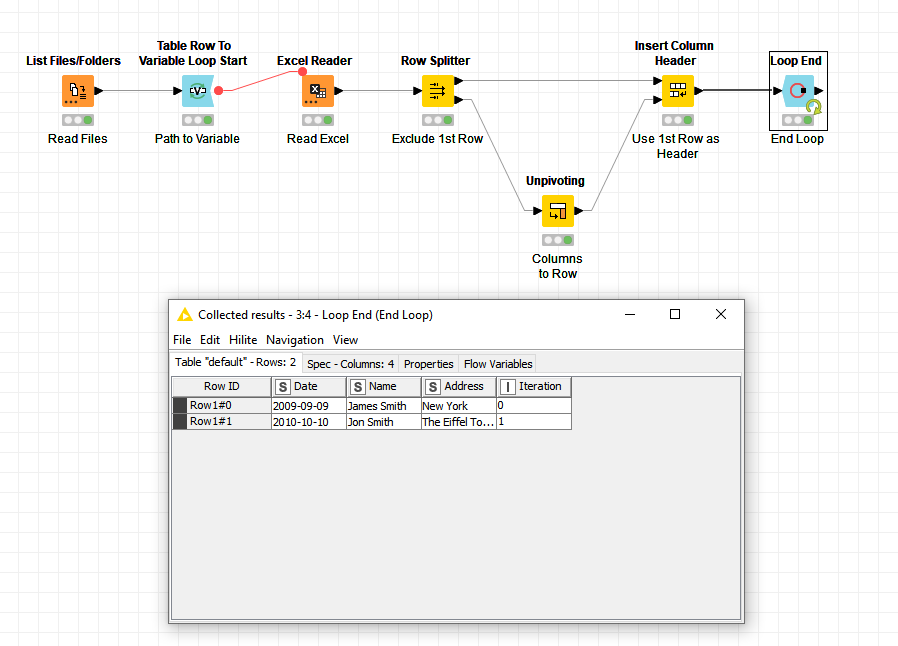
I hope this helps, any questions give me a shout.
Thanks,
Matt
9 Likes
@Matt_D Thanks this helps alot! would it be possible for me to see the workflow just so I can see your node settings for the Unpivoting node ?
@Matt_D Nevermind, I came right, thanks for the help! its working perfectly.
5 Likes

3 Likes
This topic was automatically closed 7 days after the last reply. New replies are no longer allowed.