Hi @zzkary , welcome to the KNIME community.
There’s a few things to note here. Firstly, KNIME doesn’t actually make use of bind variables within sql statements. Unfortunately this was never implemented, which is a shame because it can improve performance, makes the inclusion of queries much more standardised and portable, and they secure against sql injection attacks in rogue data. It is a feature that has been requested in the past.
Instead of bind variables, you need to include the flow variable within the actual query using a special KNIME variable placeholder format instead of the ? positional placeholder
i.e. instead of writing a query such as:
select task_id from my_database.my_table
where question_id = ?
you would write it as:
select task_id from my_database.my_table
where question_id = $${Squestion_id}$$
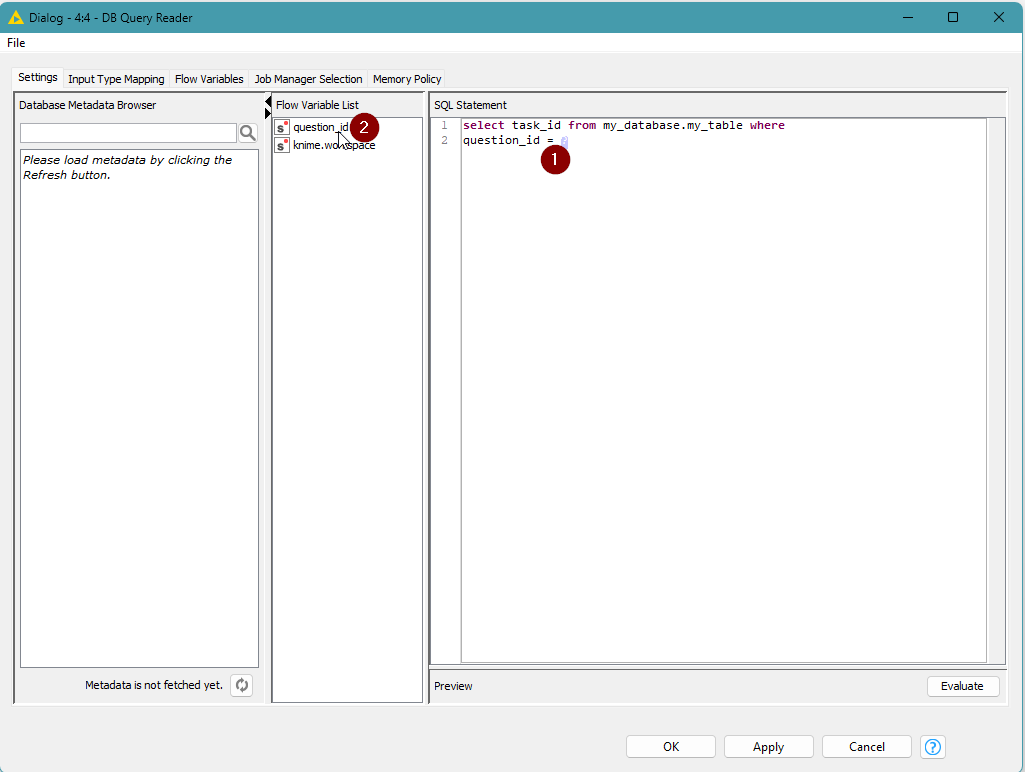
You can do this easily within the DB Query Reader node, by (1) highlighting the ? in the SQL Statement text area, and then (2) double-clicking “question_id” in the Flow Variable List in the centre panel:
so it then looks like this:
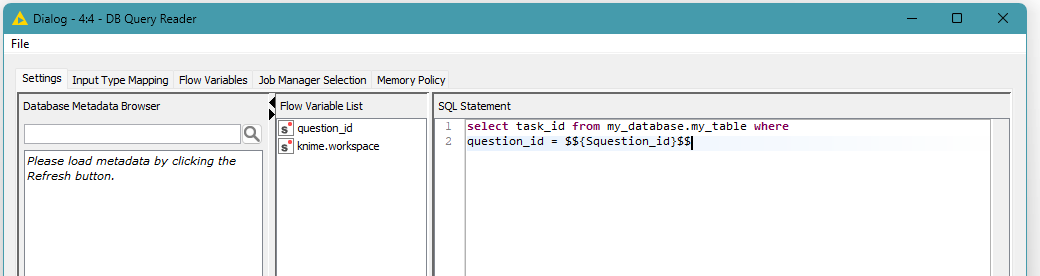
Of course you can just overtype the ? with $${question_id}$$ if you prefer.
Remove the setting of the sql_statement to your flow variable on the Flow Variables tab
Please also make sure that where you have already set “sql_statement” to “question_id” in the Flow Variables tab, that you delete this setting (revert it back so that it is set to blank)
i.e.
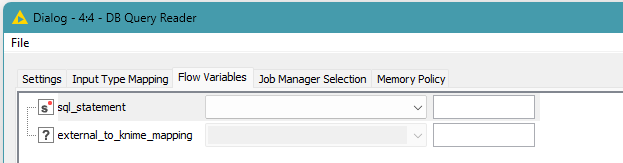
This is because if you set a value for sql_statement here it replaces the entire sql_statement with the contents of the specified variable, at execution time, so you would only ever set this to a string variable that contains the entire query.
Remove the “;”
An additional note is that in general, you should not include the “;” at the end of the sql query within the text box, as this can cause problems if it is present, especially if you attempt to use the “Evaluate” button to test the query - although I think that can depend on the database in use. For example, I tried it with postgresSQL in KNIME 5.11 and it was ok, but in the past, with Oracle I’ve seen it can cause an error.
Parameter 1 not showing?
You had a specific question about why “parameter 1” doesn’t show up in the list. In the workflow as you show it in your screenshots, I don’t see where “parameter 1” would appear from. The variable “question_id” is present, presumably because you had a column called question_id from the Excel sheet, and you have used Table Row to Variable to take the first value of the question_id column and created a question_id variable from it. So it is the question_id variable that is available to you. I hope the above description shows you how you can incorporate the question_id variable within your query, and explains why it is that the bind-variable ? format doesn’t work in KNIME.
One final thing I should add, is that with actual bind variables, you would not normally include quotes around strings, e.g. if for example you were trying to include a condition with a string column such as this:
where forum_user=?
A true bind variable would recognise that this was a placeholder for a value and would infer the type of the value being passed.
However, with KNIME, it is simply performing a string concatenation, rather than a binding, so if you were trying to pass a string value, instead of a numeric value, you would also have to include quotes around the variable.
e.g.
supposing I had a variable “forum_user” that was set to takbb,
I would have to write the condition as
where forum_user = ’$${forum_user}$$’
At execution time, KNIME would then convert this to
where forum_user = ’takbb’
If I hadn’t included the single quotes in the original query, it would convert this to
where forum_user = takbb
which would then fail because it would not understand what the symbol “takbb” refers to.
I hope that helps 
further forum references re bind variables: