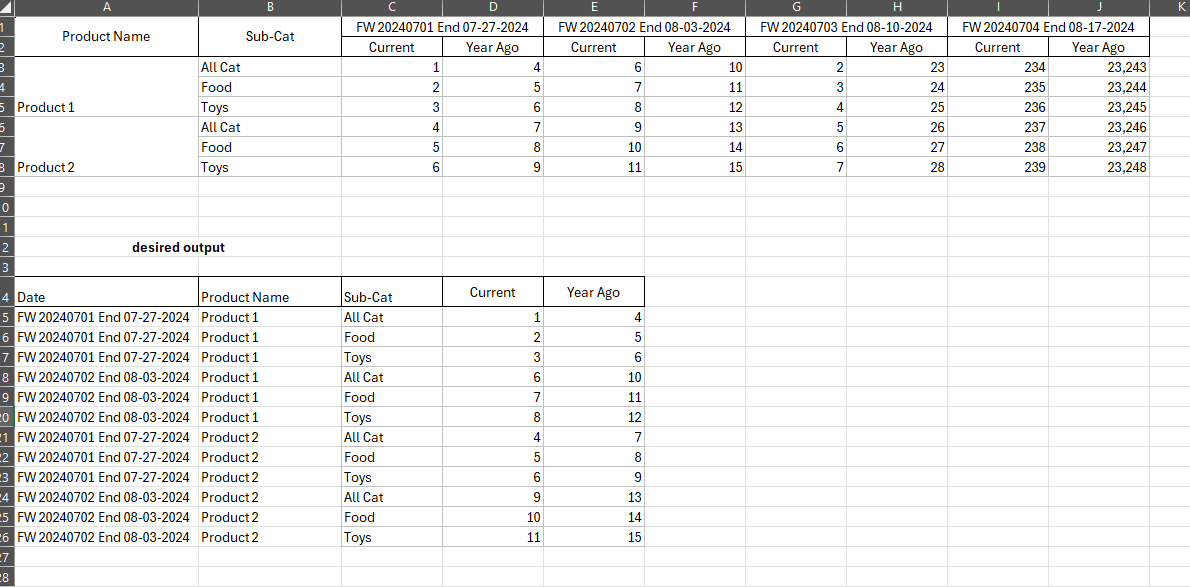
I’ve been struggling with this problem with no solution in sight. I’m trying to move the column names as rows under a new column ‘Date’ and use ‘current’ and ‘year ago’ as my new columns. I tried using both unpivot and transpose with no luck. attached is a screenshot of my current table along with the desired table.
Hi,
welcome to the KNIME Forum.
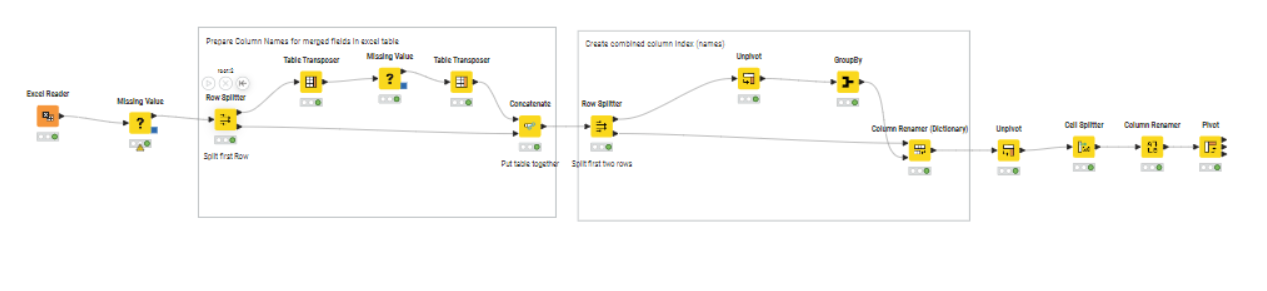
That’s a tricky one you have. But have a look, maybe this is helps
1 Like
for the row splitter, am i splitting the very first row (column names) or the first row under the column names?
Please download the Workflow from the provided link.
I changed the option in the Excel Reader so that all rows where treated as data.
The first row splitter splits the first row (the Date Information) from the rest.
1 Like
This topic was automatically closed 90 days after the last reply. New replies are no longer allowed.