How to practically use the MCP Server example workflow from KNIME Hub?

Hi everyone,

I’m trying to understand how to practically use the MCP Server workflow from KNIME Hub:
:backhand_index_pointing_right: MCP Server example on Hub

I’ve read through the flow and I think I roughly understand the logic:

The MCP Server acts as a dispatcher that handles requests like initialize, list tools, and call tools.

To make it useful, I probably need to have some tool workflows (e.g., “vehicle status” or “data quality check”) already deployed on KNIME Hub.

Then the MCP Server would call those workflows dynamically.

However, I have several questions that block me from making it run correctly:

Client input format:
When running this MCP Server workflow, it requires JSON input (the communication protocol format).
Does anyone have an example of the correct JSON-RPC input (for initialize, list tools, call tools, etc.)?

Method branching:
The workflow splits into 4 methods — initialize, initialized, list tools, and call tools — but I’m not sure how to practically test each branch.

Working example needed:
Is there any ready-to-run workflow that can work together with this MCP Server,
so that I can see a complete end-to-end demonstration (Client → MCP Server → Tool Workflow → Result)?

I’ve tried reading the Model Context Protocol documentation, but I’m still missing how to connect everything together inside KNIME.

If anyone has:

a simple MCP client JSON example, or

a workflow that successfully integrates with this MCP Server example,

please kindly share or point me to it :folded_hands:

Thank you very much!

Best regards,

1 Like

Let me ping @LukasS here since he wrote a blog post around this concept back in April (How to use KNIME Business Hub as a Model Context Protocol (MCP) Server | KNIME) and maybe be the author of that workflow himself… :thinking:

3 Likes

Hey @lca50666,

sorry for the late reply, back from holiday now: great to hear that you’re interested in the workflow! Exactly, you got the idea right, a client may call the server, and it handles the requests, branching off the different methods. If the request calls for a tool to be called, the server will do just that. With the weather forecast example, you would pass the parameters, and it would invoke the respective tool (=workflow), getting back the forecast. You’d call it with the

  • Client input format:
{
    "jsonrpc": "2.0",
    "id": 3,
    "method": "tools/call",
    "params": {
        "name": "weather_forecast",
        "arguments": {
            "longitude": -73.935242,
            "latitude": 40.73061
        }
    }
}
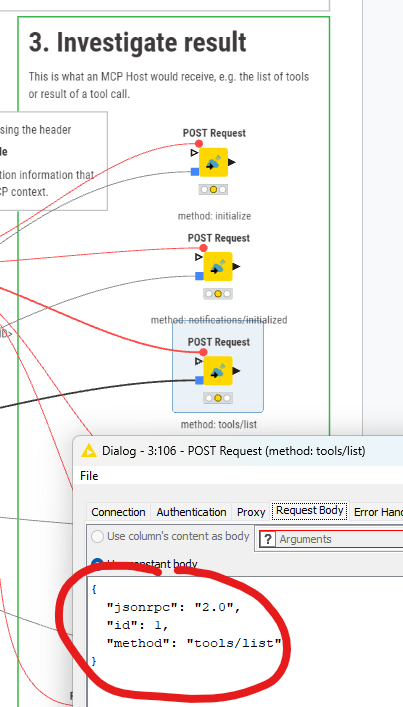
  • Working example needed: There is the Client Calls workflow that does some example calls to the MCP Server Service Deployment. You’ll find the example request bodies in the “Request Body” tab of the POST Request node.


    Back then when I created the example, it was not possible to remotely call a server from a client (as the protocol demanded communication via stdio), so there is no example (yet) on how to connect the MCP Server Service Deployment e.g. via Claude.

  • Method branching: The workflow also shows examples for the other methods, which are determined by the “method” field in the input JSON.

You probably know it already, but for the sake of completeness: these workflows are described in a blog post, on the example of a weather alert & forcast example.

Hope that helps, and please let us know how you fare!

Kind regards,
Lukas

1 Like

This topic was automatically closed 90 days after the last reply. New replies are no longer allowed.