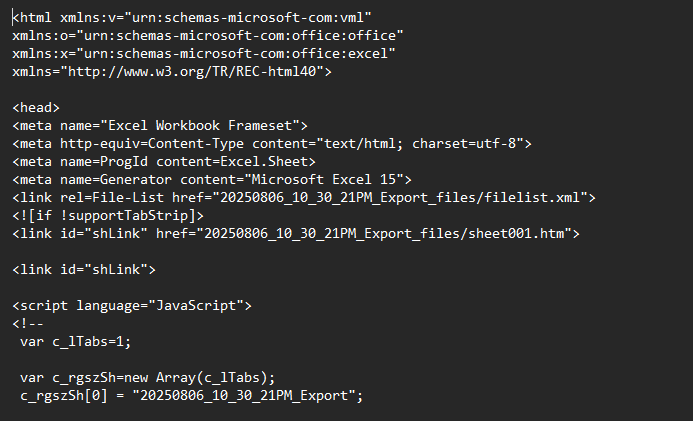
Dears
I am trying to read the attached file usking KNIME,
Can any one help in this, it is like HTML table, automatically generated like this, which nodes i should use to read it as table !
20250806_10_30_21PM_Export.xls (9.8 KB)
Dears
I am trying to read the attached file usking KNIME,
Can any one help in this, it is like HTML table, automatically generated like this, which nodes i should use to read it as table !
20250806_10_30_21PM_Export.xls (9.8 KB)
Are you sure that this files comes out as .xls by default? I got a nasty warning when trying to open it and decided to open it in a text editor and there seems to be HTML / JavaScript in it…
I briefly tried XML Reader w/o success - maybe try File Reader and then preprocess so you can convert to XML later
I asked a LLM how to import your xls file 
Martin is right (as always :-D) - it’s a html file
Here’s the answer from my best friend gem:
You’ve provided the content of what’s known as a “frameset” HTML file that Excel generates. This is a key piece of information.
This particular file does not contain the actual data from your spreadsheet. Instead, it acts as a container that defines the structure of how the spreadsheet will be displayed in a browser, using HTML frames.
If you look closely at the HTML you provided, you’ll see these important lines:
code Html
downloadcontent_copyexpand_less
<link rel=File-List href="20250806_10_30_21PM_Export_files/filelist.xml">
...
<link id="shLink" href="20250806_10_30_21PM_Export_files/sheet001.htm">
...
<x:WorksheetSource HRef="20250806_10_30_21PM_Export_files/sheet001.htm"/>
...
<frame src="20250806_10_30_21PM_Export_files/sheet001.htm" name="frSheet">
These lines all point to where the actual spreadsheet data is stored. When you save an Excel file as a “Web Page,” Excel creates a main HTML file (like the one you’ve shown) and a subdirectory. In your case, the subdirectory is named 20250806_10_30_21PM_Export_files.
Inside that subdirectory, you will find the file sheet001.htm. This is the file that contains your table data.
To import your data, you need to point pandas.read_html() to the correct file, which is sheet001.htm inside its folder.
Here is the Python code to do that. This assumes that the Python script is running in the same directory as the main HTML file and the associated folder.
code Python
downloadcontent_copyexpand_less
IGNORE_WHEN_COPYING_START
IGNORE_WHEN_COPYING_END
import pandas as pd
import os

# The main HTML file tells us where the actual data is.
# The data is in a subdirectory. Let's construct the path to the sheet.
# Based on your file, the folder is named:
folder_name = '20250806_10_30_21PM_Export_files'

# And the sheet file is:
sheet_file_name = 'sheet001.htm'

# We create the full path to the file containing the data.
data_file_path = os.path.join(folder_name, sheet_file_name)

print(f"Attempting to read data from: {data_file_path}")

try:
    # Use pandas to read the HTML table from the correct file.
    # read_html returns a list of all tables found in the file.
    list_of_dataframes = pd.read_html(data_file_path)

    # Check if any tables were found.
    if list_of_dataframes:
        # Usually, the first table is the one you want.
        df = list_of_dataframes[0]

        print("\nSuccessfully imported the data into a DataFrame:")
        print(df.head())
    else:
        print("No tables were found in the specified HTML file.")

except FileNotFoundError:
    print(f"\nError: The file was not found.")
    print("Please make sure the folder and file exist in the correct location.")
except Exception as e:
    print(f"An error occurred: {e}")
Identify the Frameset File: You have already done this by providing its content.
Locate the Data Subdirectory: Find the folder that was created along with the main HTML file (e.g., 20250806_10_30_21PM_Export_files).
Find the Sheet File: Inside that folder, locate the HTML file for the specific sheet (e.g., sheet001.htm).
Import with Pandas: Use pd.read_html() with the path to that sheet001.htm file to import your data.
Thanks Andi,
But there is no reader can read it in KNIME, i tried even the XML !
Can you share you r ideas !
Well I would use a python node and copy the source code above. Ask K-AI for further improvement.
As it’s written there: you have to provide the data file as well.
This topic was automatically closed 90 days after the last reply. New replies are no longer allowed.