Hi,
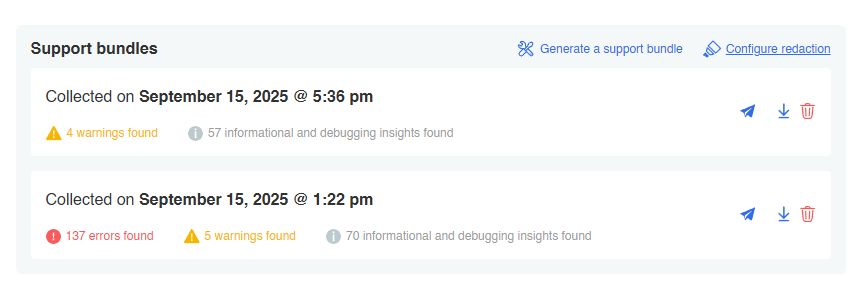
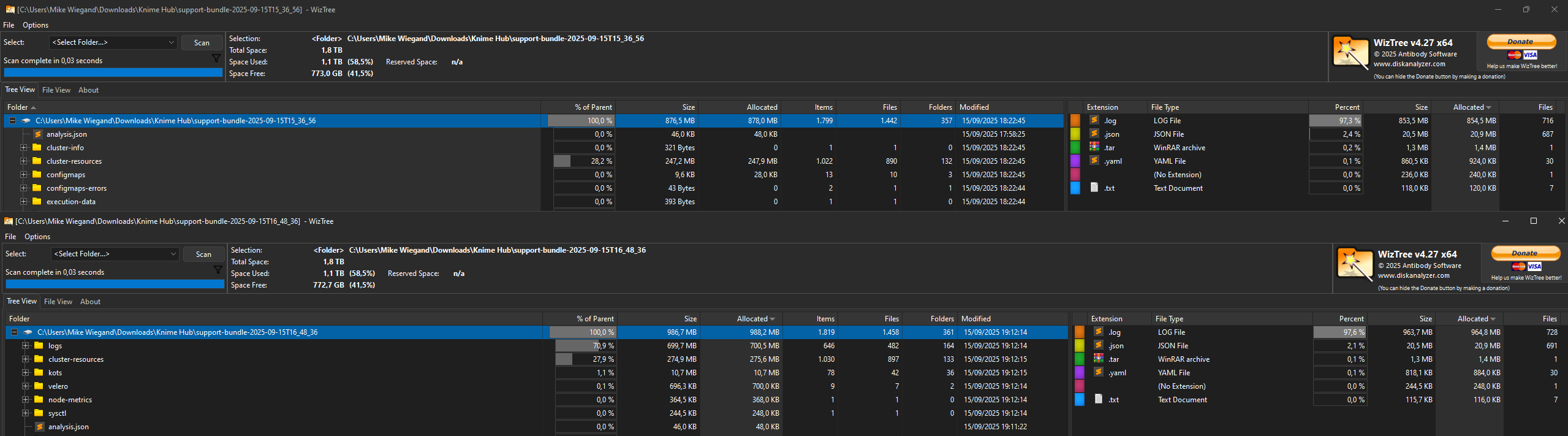
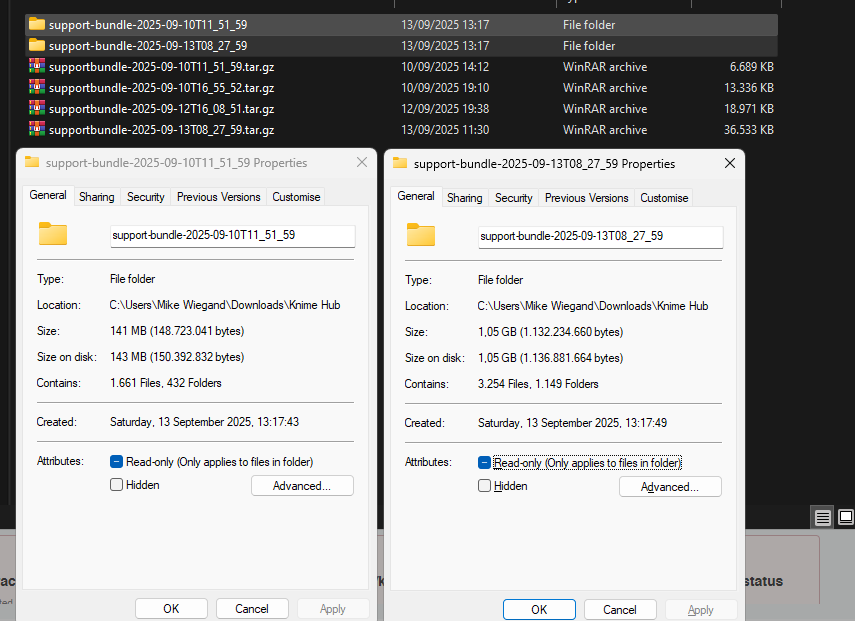
while generating the support bundles I noticed they continue to grow in size regardless of reboots and also spanning accross days.

With each support bundle the same identified errors of the past, regardless if they were fixed or not, keep popping up as well, ever increasing the amount of issues the Hub trouble shooter identifies.
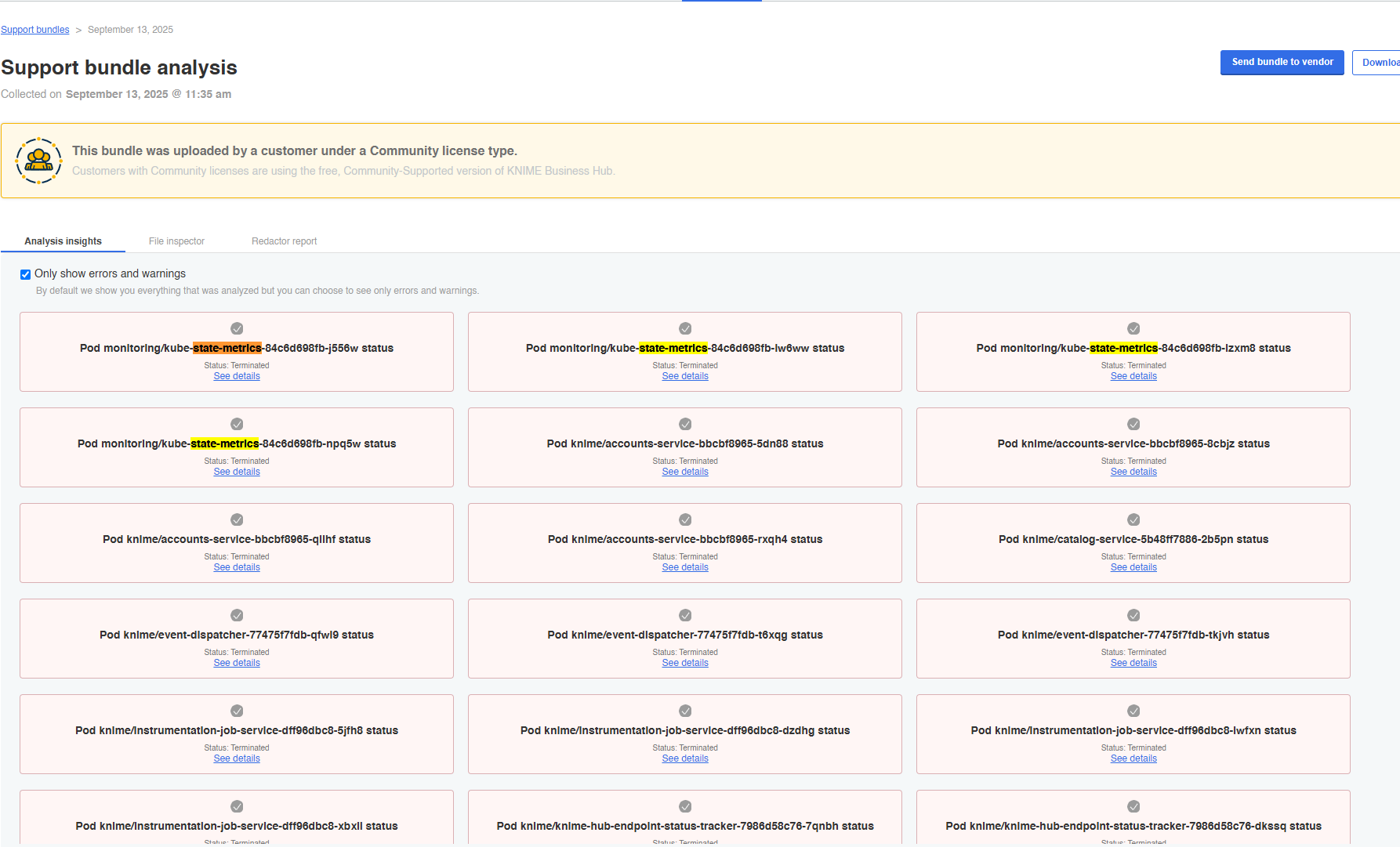
That indicates that log rotate is nto configured by default or soemthing else being buggy. I deleted the prev. three support bundles, assuming the scan is not ignoring them, but that was not true.
The Hub docs appear to not provide any insights whenever or nto log rotate was setup not can I find a setting. Hence, I’d like to propose:
- Adding a configuration in the KOTS deployment step to configure log rotate (at least something for greater visibility)
- Add an option to force rotate logs
- Fix the issue of the trouble shooter processing deprecated logs
This will also help drastically increasing the time the trouble shooter requies and saving lots of space in the long term. The current support bundle has grown 10 times in size compared to the initial one.
PPS: Kubernetes log management is done in /var/lib/kubelet/config.yaml, so it appears the troubleshooter is not ignoring rorated logs.
apiVersion: kubelet.config.k8s.io/v1beta1
authentication:
  anonymous:
    enabled: false
  webhook:
    cacheTTL: 0s
    enabled: true
  x509:
    clientCAFile: /etc/kubernetes/pki/ca.crt
authorization:
  mode: Webhook
  webhook:
    cacheAuthorizedTTL: 0s
    cacheUnauthorizedTTL: 0s
cgroupDriver: systemd
clusterDNS:
- ###.###.###.###
clusterDomain: cluster.local
containerRuntimeEndpoint: ""
cpuManagerReconcilePeriod: 0s
evictionPressureTransitionPeriod: 0s
fileCheckFrequency: 0s
healthzBindAddress: 127.0.0.1
healthzPort: 10248
httpCheckFrequency: 0s
imageMaximumGCAge: 0s
imageMinimumGCAge: 0s
kind: KubeletConfiguration
logging:
  flushFrequency: 0
  options:
    json:
      infoBufferSize: "0"
    text:
      infoBufferSize: "0"
  verbosity: 0
memorySwap: {}
nodeStatusMaxImages: -1
nodeStatusReportFrequency: 0s
nodeStatusUpdateFrequency: 0s
resolvConf: /run/systemd/resolve/resolv.conf
rotateCertificates: true
runtimeRequestTimeout: 0s
shutdownGracePeriod: 30s
shutdownGracePeriodCriticalPods: 10s
staticPodPath: /etc/kubernetes/manifests
streamingConnectionIdleTimeout: 0s
syncFrequency: 0s
tlsCipherSuites:
- TLS_ECDHE_RSA_WITH_AES_128_GCM_SHA256
- TLS_ECDHE_RSA_WITH_AES_256_GCM_SHA384
volumeStatsAggPeriod: 0s
The yaml also seem to lack a max file size (defaulting to 100M), max backup and compression declaration.
```root@ip-10-0-1-233:/etc/logrotate.d# ls -lah /var/log/apiserver/
total 1.1G
drwxr-xr-x 2 root root 4.0K Sep 13 10:29 .
drwxrwxr-x 16 root syslog 4.0K Sep 14 06:38 ..
-rw------- 1 root root 100M Sep 10 14:03 k8s-audit-2025-09-10T14-03-42.657.log
-rw------- 1 root root 100M Sep 10 16:37 k8s-audit-2025-09-10T16-37-08.073.log
-rw------- 1 root root 100M Sep 10 17:44 k8s-audit-2025-09-10T17-44-45.012.log
-rw------- 1 root root 100M Sep 12 15:43 k8s-audit-2025-09-12T15-43-45.578.log
-rw------- 1 root root 100M Sep 12 16:46 k8s-audit-2025-09-12T16-46-53.040.log
-rw------- 1 root root 100M Sep 12 18:19 k8s-audit-2025-09-12T18-19-10.912.log
-rw------- 1 root root 100M Sep 13 07:03 k8s-audit-2025-09-13T07-03-59.966.log
-rw------- 1 root root 100M Sep 13 08:29 k8s-audit-2025-09-13T08-29-15.129.log
-rw------- 1 root root 100M Sep 13 09:32 k8s-audit-2025-09-13T09-32-05.104.log
-rw------- 1 root root 100M Sep 13 10:29 k8s-audit-2025-09-13T10-29-31.933.log
-rw------- 1 root root 95M Sep 14 07:32 k8s-audit.log```
Log compression also seems missing in “/etc/kubernetes/manifests/kube-apiserver.yaml“
spec:
  containers:
  - command:
    - kube-apiserver
    - --advertise-address=10.0.1.233
    - --allow-privileged=true
    - --audit-log-maxage=30
    - --audit-log-maxbackup=10
    - --audit-log-maxsize=100
    - --audit-log-path=/auditlog/k8s-audit.log
    - --audit-policy-file=/etc/kubernetes/audit.yaml
    - --authorization-mode=Node,RBAC
    - --client-ca-file=/etc/kubernetes/pki/ca.crt
    - --enable-admission-plugins=NodeRestriction
    - --enable-bootstrap-token-auth=true
    - --etcd-cafile=/etc/kubernetes/pki/etcd/ca.crt
    - --etcd-certfile=/etc/kubernetes/pki/apiserver-etcd-client.crt
    - --etcd-keyfile=/etc/kubernetes/pki/apiserver-etcd-client.key
    - --etcd-servers=https://127.0.0.1:2379
    - --kubelet-client-certificate=/etc/kubernetes/pki/apiserver-kubelet-client.crt
    - --kubelet-client-key=/etc/kubernetes/pki/apiserver-kubelet-client.key
    - --kubelet-preferred-address-types=InternalIP,ExternalIP,Hostname
    - --profiling=false
    - --proxy-client-cert-file=/etc/kubernetes/pki/front-proxy-client.crt
    - --proxy-client-key-file=/etc/kubernetes/pki/front-proxy-client.key
    - --requestheader-allowed-names=front-proxy-client
    - --requestheader-client-ca-file=/etc/kubernetes/pki/front-proxy-ca.crt
    - --requestheader-extra-headers-prefix=X-Remote-Extra-
    - --requestheader-group-headers=X-Remote-Group
    - --requestheader-username-headers=X-Remote-User
    - --secure-port=6443
    - --service-account-issuer=https://kubernetes.default.svc.cluster.local
    - --service-account-key-file=/etc/kubernetes/pki/sa.pub
    - --service-account-signing-key-file=/etc/kubernetes/pki/sa.key
    - --service-cluster-ip-range=10.96.0.0/22
    - --service-node-port-range=80-60000
    - --tls-cert-file=/etc/kubernetes/pki/apiserver.crt
    - --tls-cipher-suites=TLS_ECDHE_RSA_WITH_AES_128_GCM_SHA256,TLS_ECDHE_RSA_WITH_AES_256_GCM_SHA384
    - --tls-private-key-file=/etc/kubernetes/pki/apiserver.key
I will test a few things and provide my modifications later on.
Best
Mike