I cannot see the row or column partitioning. I wanted to train for test and prediction 70:30 but when I tried to check for partitioning there is no node available. I tried installing all the extensions like basics etc etc and K.ai it’s all not working. I have checked for the version and the type I’m using KNIME analytics. Need help !!
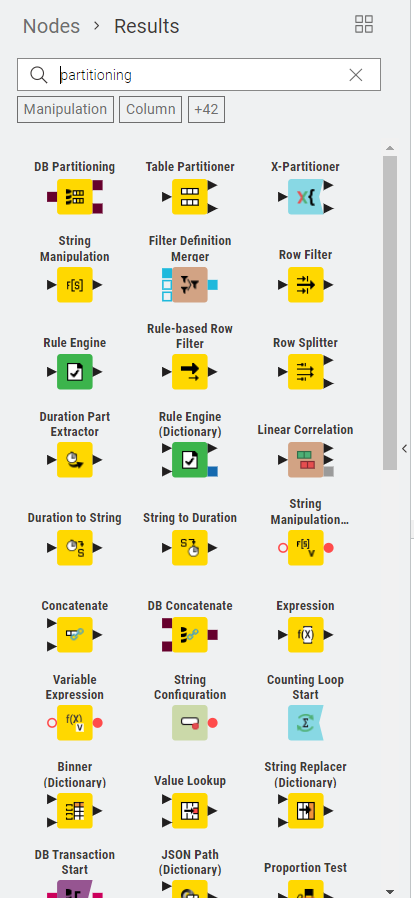
I think what you are after is the row sampling node:
I use it to split my datasets into train / test and it has different options - one of them being to specify a %-split as you suggested.
Update:
I am a bit confused now as well - there used to be a Partitioning Node and I can find it in 5.4.2.
Maybe it got update to Table Partitioning?
1 Like
Hi @MartinDDDD - Just checked my 5.4.2 and I see Row Sampling Node but also the Partitioning node ( Manipulation - Row - Transform )
1 Like
I checked 5.4.2 again for Table Partitioner and it is not there - I conclude that the node was renamed…
1 Like
hi @MartinDDDD and @mgirdwood thank you for your valuable suggestions. I’m
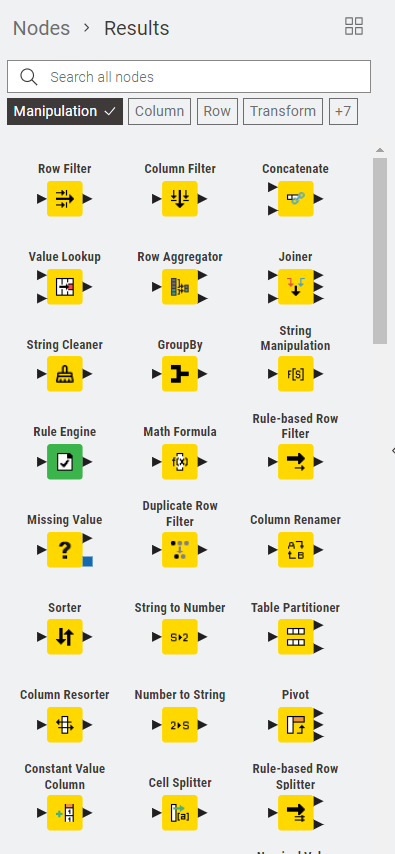
currently using the versions 5.5 and I cannot find partitioning node. here I’m attaching my manipulation screen for your reference. can you please help me what exactly the partitioning used to do and where I can do the exact same functionality in the modern node available in the updated version.
Search for:
Table Partitioner
I believe this is the node that includes functionality of previous Partitioner Node.
4 Likes
This topic was automatically closed 90 days after the last reply. New replies are no longer allowed.