FWIW, I really like the Modern UI. There are a few little things that need fixing but overall a great improvement.
Happy Holidays KNIME team!
FWIW, I really like the Modern UI. There are a few little things that need fixing but overall a great improvement.
Happy Holidays KNIME team!
Hey @KunalB86,
we are currently working on a fix for the slow dialogs but I would be very interested in the exact problem you are seeing. Would you be up for a quick call to show me the problem?
Greetings and thanks,
Daniel
+1 to this !
Exactly how I felt the first time I tried the modern version.
Hello, I have been reading your comments, and as a KNIME user since 2016, I have witnessed its evolution—the evolution of nodes and how they have gained functionality over the years.
From my perspective, I see two issues with the Modern UI.
First, you are taking away both visual and technical functionalities from the nodes. The best example is the Column Rename node. Previously, with the Column Rename node, you could not only change the name of a column but also its data type. The data type was visually displayed next to the column name with a letter (something very important when performing a join or concatenate). The Output Data Viewer is another problem. The classic version not only displays the data types with a letter but also includes a tab with the best data QA a program can provide—comparable to Visual Studio’s Data Wrangler or Power BI’s Data Transformer. It allows sorting by two columns and offers a variety of formats for the columns, ranging from scientific notation to percentages. In Modern UI, you have to wait for it to load (“Loading data”) just to view the statistics.
Second, there’s the issue of the visualization or node loading speed in Modern UI. Long-time KNIME users know that the speed of analysis is what makes KNIME special—not the speed of data processing (many tools outperform KNIME in that regard)—but rather the speed at which you can take data, do a pivot or group by, filter what interests you, add color to highlight differences, and graph the results. With Java Swing, a native Java interface, analyses were lightning-fast. Modern UI takes longer to load a configuration, longer to visualize a node, it’s already slow before you even press execute.
I admit I don’t use Modern UI for these reasons. I would need to use a GPU to enjoy the interface. The problem is that Modern UI is slowly consuming the classic version, leaving no option to use the old nodes (unless you save a workflow with all of them XD). The day will come when version 6 or something similar will only have Modern UI, and we’ll be left with no choice but to buy a better PC or migrate to code or another similar program.
Positive aspects: K-AI, although it should be able to interact more with the XML of the nodes. This would allow it to generate SQL, Python, R, or other code that sometimes work in production environments on other platforms or services.
In summary, version 4.7 is and will be the best.
Carlos.
Hey Carlos,
Thanks for the detailed feedback. There are a lot of interesting points in there.
The Column Renamer is one of the nodes that get mentioned a lot. While I agree that it was convenient to do a renaming and type cast in one node, you loose the automatic documentation of your workflow. Usually we try to have modular nodes that you can understand from looking at the workflow, but seeing a Column Renamer that also changes the type of the columns can be unexpected. I assume the underlying problem is that you now need to insert two nodes instead of one? We are currently exploring ways to make the creation of these manipulations much faster while still keeping the documentation/understandability aspect of it. It is currently still in a very early stage but I am looking forward to share more about at as soon as we have a better idea about it.
The type indication is something we are already working on bringing back 
As for the table renderers, you should have the same ones enabled in modern ui as you had in classic ui? What are you missing? Or are you talking about the statistics tab in modern UI? For that we will enable sorting and renderers as well soon. Sorting by two columns is a good idea and I will create a ticket for that.
When you say you now only see the loading message in the table view, are you talking about the actual table or are you talking about the Statistics tab? I could reproduce for the latter and I agree that this can take some time. Just to be sure, this is something that did not exist in classic ui, in classic ui you could only access the domain of that table with very limited information. What information are you interested in?
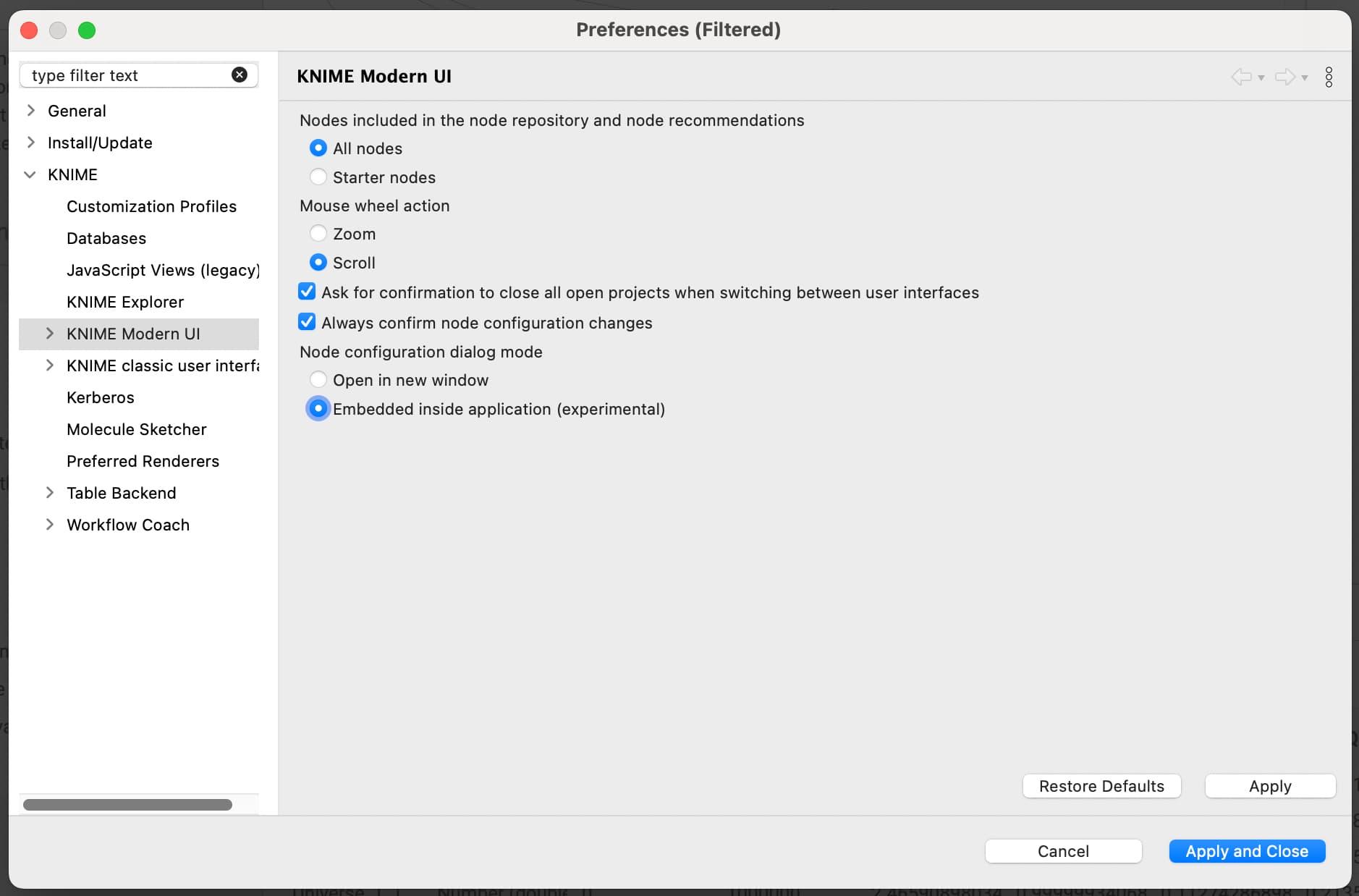
Regarding the longer loading times of the dialogs in modern UI, we are aware of an issue and are still investigating what causes this performance problem. Rest assured that this is something we will improve in the future. With KNIME Analytics Platform 5.4 we released a new embedded mode of the dialogs that should boost the performance of the dialogs by a lot already. I would be very interested if you see the same performance limitations with this mode turned on and on your feedback in general about this new mode. (You can enable it in the preferences as shown in the attached screenshot, “Embedded inside application”)
As I might have missed some things or misunderstood some of your points, I would be happy to jump on a quick call to discuss the relevant points. Let me know if you would be up for that.
Greetings and thanks,
Daniel
This had some problems so maybe it is and was best not to use it.
Maybe a bit off topic, but I just want to say that I do love the new UI.
I understand that some long-time users might be frustrated by the bugs and lack of features. However, as a light KNIME user since 2020, I find these drawbacks acceptable, considering the smoother and more user-friendly daily experience it offers. It’s much more than a skin change.
Debugging and Runtime: I miss viewing all my variables, settings, error messages, console outputs, node monitoring, etc. in realtime and on one screen. I like it to configure all my needed information like I want it.
Node Configuration: I like it having and modify all Informations and setting of a node inside one configuration-dialog with tabs. So I there is no need to search around and / or use several dialogs at all.
I like it in classic mode if KNIME will give me information about missing fields and giving me the possibility to chose values in dialog-boxes with drop-down-fields as well. The configuration of variable settings in both directions (define and use) in classic-mode is nearby perfect, as the possibility to configure dialogs with extended settings from plugins like serveral job managers for example too.
Internal ticket ID: UIEXT-1630
Summary: Web UI for Column Name Replacer (aka Column Rename (Regex))
Fix version(s): 5.5.0
Other related open ticket(s):
UIEXT-1678: Add UI to use flow variables easier in Text View