Mac OS Sequoia 15.6
KNIME 5.5.1 (no updates found for me, so I assume this is the latest)
If I click in the small side-view of the node, or if I expand it to a ‘more advanced’ view where it gets bigger, any sort of right click (such as if I want to copy/paste something) results in the node crashing and I have to exit out, and re-open the node (sometimes losing progress on what I did).
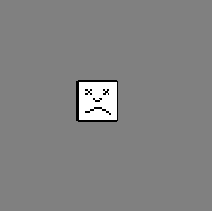
The screen goes grey and I see this sad face icon below.
The only ‘fix’ for now is to do ctrl/command + c or v instead of right clicking.
5.7 is the latest. Maybe you can update.
Ok thank you, but I’m confused as to why clicking Check For Updates it tells me there’s no updates.
I see it’s possible to directly download 5.7.0 of course, where it installs separately and beside 5.5.1, although I noticed I then have to re-install any extensions that were on 5.5.1 that were part of my workflow. Is this normal or should there have been a prompt to update?
I think this issue is related to Right click kills the Expression node which should be fixed with 5.5.2 and 5.8.0. Version 5.5.2 was just announced a few hours ago, so maybe you can now update it directly from 5.5.1? 5.5 is the current stable version which will get bug fixes, but will not automatically update to 5.7 (the latest version, which will get the latest features every 6 weeks). See KNIME Analytics Platform Now Releases Every 6 Weeks on the recent changes on the update frequency, where this is explained in more detail.