I have spent the Sunday, so far, trying to create a numeric range with the help of Java Snippet. I know there is “Create Numeric Range” node made in 2023, that works but I hesitate - what if it somehow becomes obsolete?!
I have tested like 20 different suggested methods by using K-AI and CoPilot, but even if I state it is for KNIME AP 5.5.0 (it didnt work yesterday with a previous version released a few months ago) - however the directions are misleading and ends in red wavy-underlining.
In the latest code provided by K-AI, underneath there are some strange comments in K-AI:
In the “Output” section, declare a
variable named yourStringOutput
of type Object or Collection.
Use the same name in your code
to assign the list
The problem lies in that there is no option for Object or Collection in the dropdown list. So I just choose List and checked array. Test Java Snippet.knwf (3.5 KB)
However, I am still curious about how bad the instructions were with K-AI and all. For future reference I’d like to have someone commenting my WF. If it was empty I’ll drop it back in another attempt to get a clearer understanding of how Java Snippet node works. I know that it was much easier the first time I used it, maybe 8 years ago!?
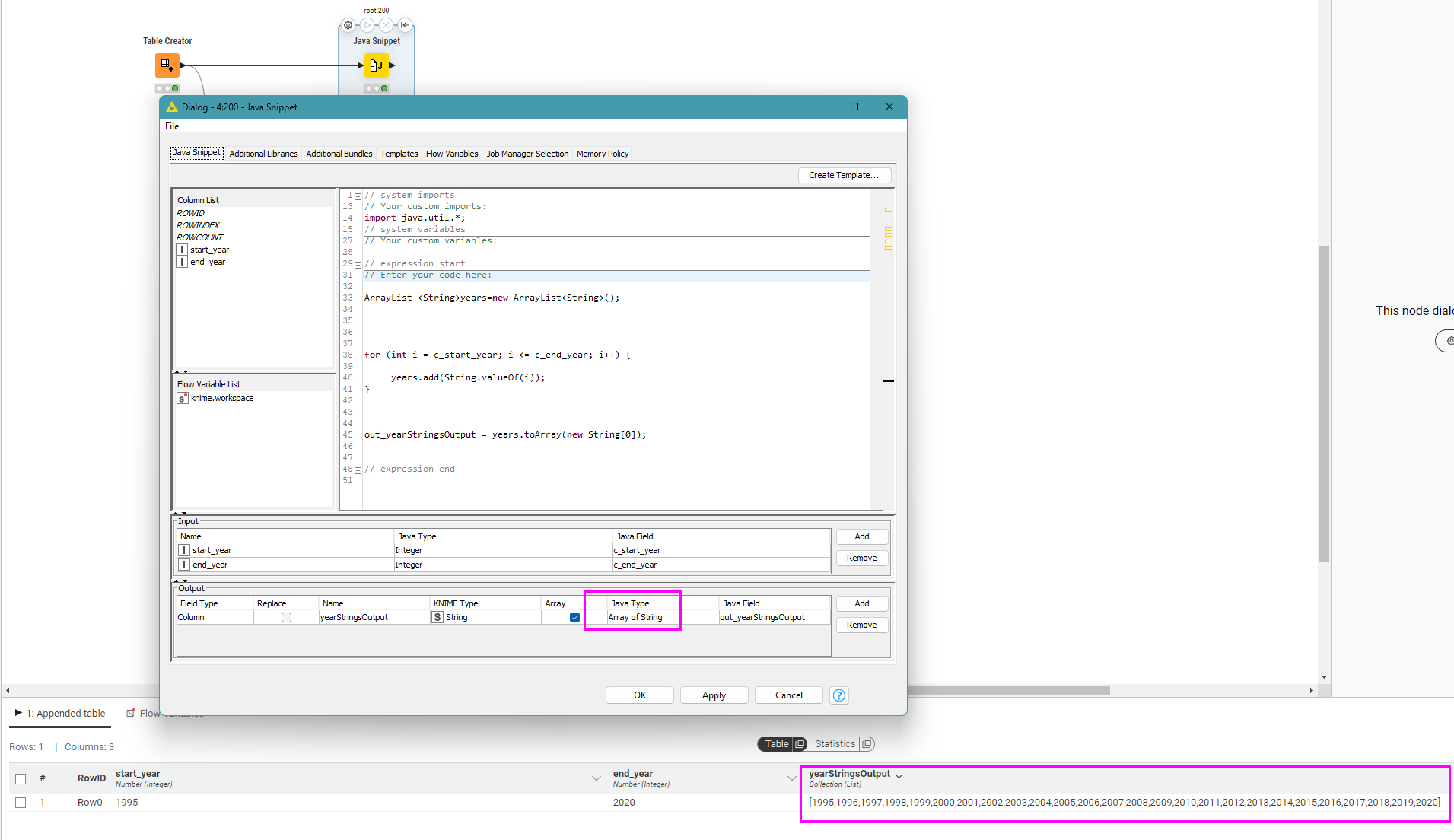
Note that in your Output section, the output had become “Array of Reader (string)”. I’ve never fully understood that one, but you can double-click on it and then change it in the dropdown:
In your code, you actually want your output to be a String [] but in your code you were starting with an int[] then turning this into a List but you’d have to then convert that back to a String[].
In the code above, I could have started with a String[] and not used any collection object at all, but this then requires you to create an array of the required size, and populate it using subscripts like you were doing with the int[] array.
int numberOfYears = c_end_year - c_start_year + 1;
String[] years=new String[numberOfYears];


for (int i = 0; i < numberOfYears; i++) {

	years[i] = String.valueOf(c_start_year+i);
}


out_yearStringsOutput = years;
However, I find it easier (less prone to error in calculation ) to use an ArrayList of String initially so I don’t have to bother myself with defining the size upfront, and then convert that to the required String[] at the end.
Conversion from ArrayList to String array uses the following boilerplate code:
arrayListObject.toArray(new String[0]);
which tells it to create it as an array of Strings.
That is an elegant way of doing it - all in one iteration!
Well I do not know my ways around in Java, I do not do much programming at all nowadays, but was fluent in C++ and C#. And also the suggestions from K-AI and CoPilot took the longer route…
It is a bit distressing to not understand what’s in the output section and found no easy documentation to understand it. My interest of having this Java Snippet working and understand it, is for eventual future need of more direct approach than lots of nodes to work around a gap in the nodes.
You’re welcome @Batjesen . I’m getting a bit rusty on my java these days although used to be a java developer, so I am often heading to chatGPT for “reminders” (e.g. how to convert a ArrayList into a String[] which imho is more convoluted than it should be!)


 ) to use an