I’m doing a join of two sets of data, and struggling for the following reason:
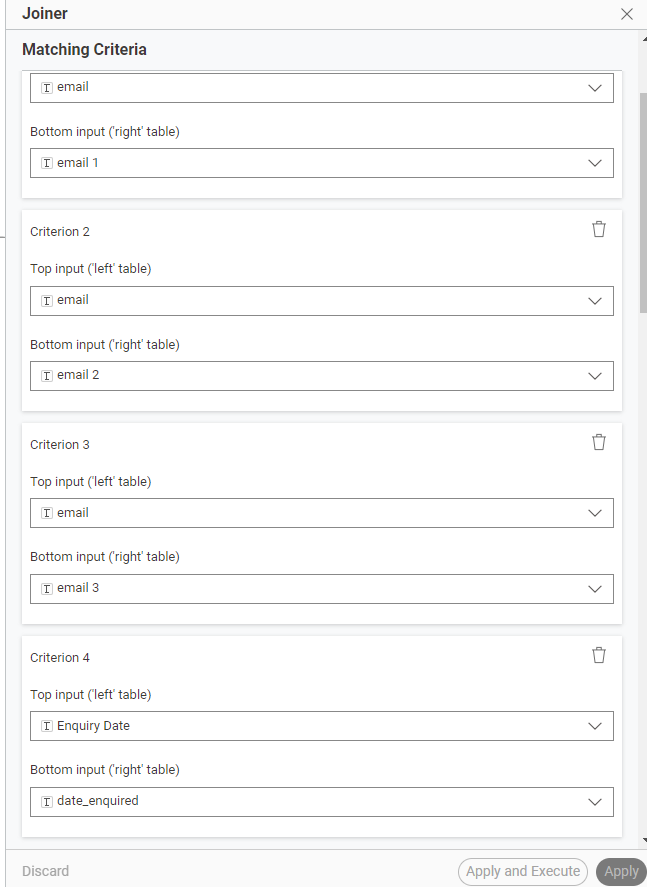
There are three points of contact which can be connected in data set, so data set 1 ‘email’ is set to match ‘any’ of data set 2s ‘email 1’, ‘email 2’, or ‘email 3’.
However, in that same join I need to connect DS 1 ‘Enquiry Date’ to DS 2 ‘date_enquired’, but as I have selected ‘Any of the following’ to cater for the emails, this means it’s not working with the enquiry date. Is there a way to have the joiner’s matching criteria set to have ‘any’ with the emails, but ‘all’ with the dates?
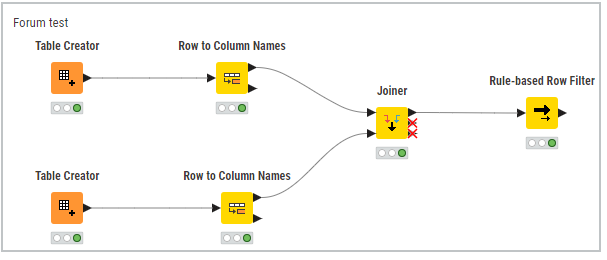
don’t think this is possible inside Joiner node but workaround can be to use Joiner node only with email columns followed by Rule-based Row Filter node where you’ll remove rows where enquiry dates are not equal.
Thank you. I’m not sure that will work in this case though, as it contains repeat customers - so email addresses will appear multiple times with different dates. For example:
DS 1
email@example .com Enquiry Date is 10/10/2020
email@example .com Enquiry Date is 01/08/2022
email@example .com Enquiry Date is 05/06/2025
DS2:
email@example .com date_enquired is 10/10/2020
email@example .com date_enquired is 01/08/2022
email@example .com date_enquired is 05/06/2025
And there are of course many other emails with similar. So I am hoping to connect the email addresses together, along with their corresponding dates.
A bit lazy currently for doing an example (or better say data sets) to check my idea but should work. At least in my head. You can either give it a try on your data sets or if you create two sample (dummy) data set I can create workflow to check and share if it works.
This is workflow design. I used Row to Column Names just to have proper column names from your data set. Otherwise you won’t need them. And her is workflow attached.
It works! Thank you so very much. May I ask one further thing… is there a way, to de-duplicate when a row matches both email and date… so it will leave the enquiries made by the same person on different dates, but reduce to one enquiry if one person made multiple on the same date?