Hello everyone,
I have a few questions regarding the capabilities and limits of K-AI and its integration with external tools:
-
K-AI Interaction Limits: I am currently seeing a limit of 20 interactions per month on the free tier. If my organization uses the KNIME Business Hub (Standard version), how many interactions are included? Is it still limited to 20/month, or do we get a higher quota (e.g., 500+ or unlimited)?
-
Claude Code Integration: Is it possible to use Claude Code (the CLI tool) to build or manipulate workflows directly within KNIME? I am interested in knowing if it can interact with the local workspace to generate nodes or connections.
-
Custom Model Configuration: If I have my own API key for a specific model (like Anthropic Claude or OpenAI), is it possible to switch the backend of K-AI to use my model instead of the default one? If so, where can this be configured within the Business Hub settings?
Thank you in advance for your help!
These are all reasonable questions.
-
20 per month is for KNIME Analytics Platform (KAP) users who are not the designated 5 users of a KNIME Business Hub (Basic or Standard). For the 5 licensed users, the service is not limited by KNIME. Further information is available here: KAP users access to KAI.
-
Claude Code (CLI) is not currently suitable for use within KAP. Here is the information that relates to this question and the next: KBH AI: LLM Backend
-
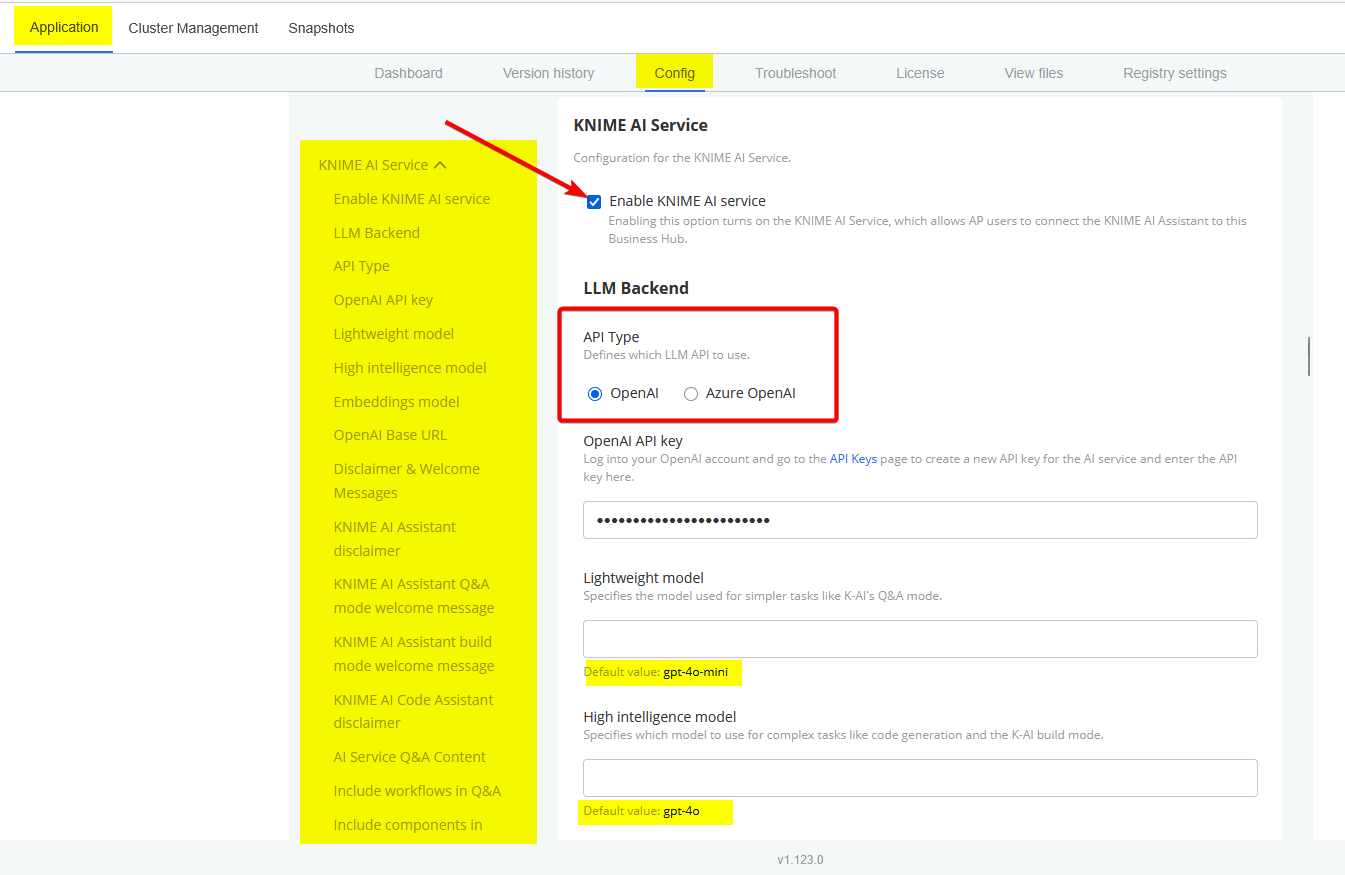
OpenAI keys (or Azure OpenAI keys) are, indeed, necessary for KNIME Business Hub (KBH) to provide AI Service. The models used are set in the KOTS Admin Console > Configure tab. The beginning of that section of the configuration looks like this:
2 Likes
Thank you for your reply. Based on the screenshot, it appears only OpenAI and Azure OpenAI are supported as LLM backends. Is the system restricted to these two providers only, or is it possible to use Anthropic as well?
You are correct. You can remake a request on the Ideas page: Feedback & Ideas
1 Like