Hello Everyone,
A new patch release of KNIME Analytics Platform 5.8.2 is now available for download .
The AP 5.8.2 changelogs list all changes in detail.
Please update and share your valuable feedback. Happy KNIMEing.
The KNIME Team.
Hello Everyone,
A new patch release of KNIME Analytics Platform 5.8.2 is now available for download .
The AP 5.8.2 changelogs list all changes in detail.
Please update and share your valuable feedback. Happy KNIMEing.
The KNIME Team.
Hi, I have encountered a very serious issue when updating the KNIME Business Hub executor to 5.8.2. Every Python Script (the current version, not the legacy one) failed with this error message:
Python Script - Execute failed: ValueError: Data type 'large_string' in column '<RowID>' is not supported in KNIME Python. Please use a different data type.
It works locally but not remotely, and I have no idea how to fix that. Python is version 3.11 (latest minor) handled by Anaconda. As most of our workflows use a Python Script at some point, I have no choice but to rollback the executor (and reinstall KAP entirely on my side  ).
).
Even if I could somehow change the type of the RowID column (which I’m pretty sure I can’t), fixing every single node in our 600+ workflows is not a realistic solution.
Do you have any clue regarding this?
Thanks
Hi @Vonwen,
we just noticed the same thing… Pandas just released a new (API breaking) major version 3.0 a couple of days ago, and we did not prevent our system from using that.
I just checked, the bundled environment that KNIME ships still contains Pandas 2.0.3, so that is not affected. The knime-python-base and knime-python-scripting conda packages that we suggest to use to set up Python environments also have compatible Pandas versions pinned, and will not use Pandas 3.0.
Thus, I assume you are setting up the Python environment yourself?
There’s a very simple fix: in your environment definition, make sure that pandas stays in version 2.X by setting an upper version bound <3.
Does that help? Best,
Carsten
EDIT: changed wording around our knime-python-base and knime-python-scripting packages, as these are not affected either.
Hey, thanks for the answer. I just came to the same conclusion and specified the pandas version to 2.0.3 and pyarrow to 16.1.0 and it works again. And yes the conda environment is created manually in the Dockerfile.
Shame on me for not having restricted lib versions more closely. Thanks for confirming my suspicions.
Thanks for the quick verification! It’s unfortunate that the new Pandas version doesn’t work with the KNIME AP yet, because there will probably more users running into the same issue as you did. We’ll see what we can do to prevent this from happening in the future.
Yeah, in the meantime maybe add a warning to the release notes about this ^^
@Vonwen you could try and use a YAML file to set up your environment and define the restrictions so as to prevent the installation of Pandas 3.0.
@carstenhaubold will the setting:
- knime-python-base<=5.9
take care of that? I have not tried (yet).
@mlauber71 I was not aware of that knime-python-base dependency, right now the yaml is configured to specify the lib version as much as possible. Right now the only channel listed is conda-forge and knime-python-base is not listed in the dependencies, all the necessary libs are listed.
If I understand correctly, the knime-python-base would install the required libs such as pyarrow and pandas?
In any case, for our production environment it’s probably best to stick with the current way and keep complete control over what’s installed (now that I stopped being lazy and actually added version requirements).
Yes exactly, knime-python-base will take care of that upper bound, and yes @Vonwen it installs the required libs that KNIME needs to talk to Python. See also the docs page that I linked in my message above.
Agreed, we should do that 
Note that we just posted an announcement describing the incompatibility with pandas 3.0. Thank you for letting us know!
Dear KNIME Team,
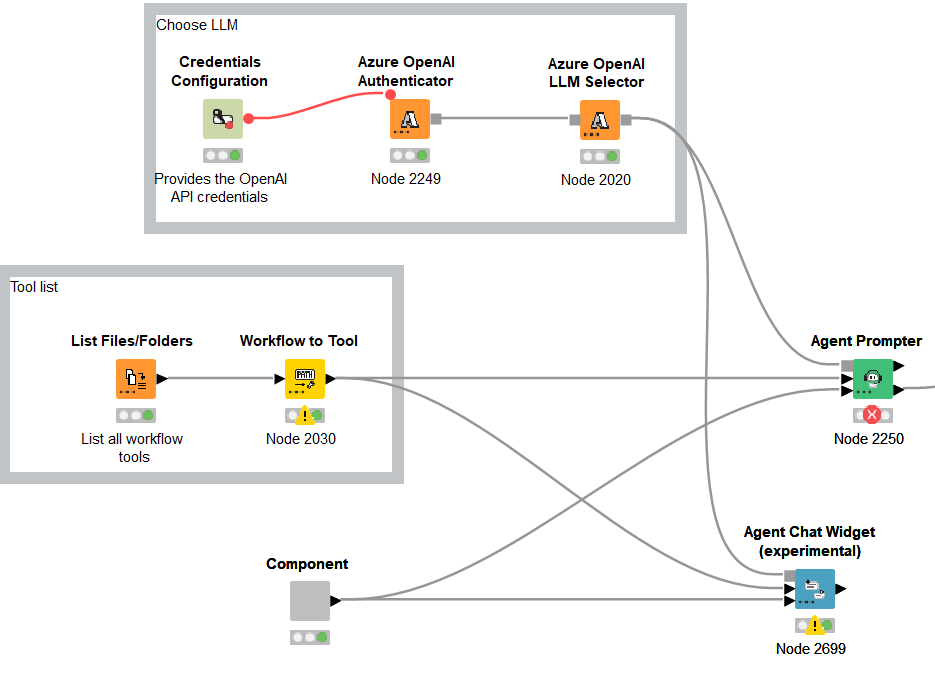
I updated KNIME from 5.8.1 to 5.8.2 and also updated the KNIME AI Extension, but now some nodes in this extension such as the agent prompter node, LLM Prompter, and Agent Chat widget (experimental) no longer work properly.
I’m using the Azure OpenAI API, and authentication and model selection are possible without any issues, but the KNIME AI Extension nodes don’t seem to be able to use that information correctly.
A typical workflow is below.
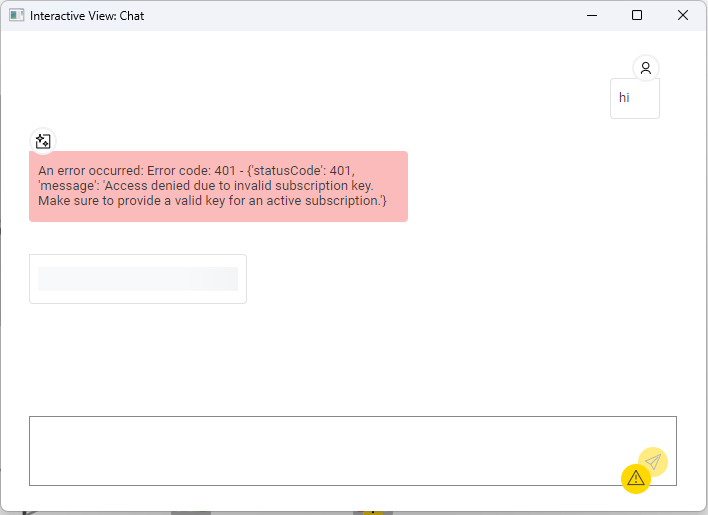
An error occurred: Error code: 401 - {‘statusCode’: 401, ‘message’: ‘Access denied due to invalid subscription key. Make sure to provide a valid key for an active subscription.’}
The Agent Chat Widget (experimental) node may appear to be working properly, but in actual interactions I only get the same error message below.
I’ve set up a new separate KNIME 5.8.1 environment and have confirmed that the above workflow works without any issues.
I think there might be a bug in the KNIME AI Extension. Would it be possible for you to fix it?
Hi Tos, thanks for reporting!
I just gave reproducing this a try:

Couldn’t run into any funky behaviour, unfortunately (or fortunately). I also checked whether we released anything that could affect this in 5.8.2 (see Changelog (KNIME Analytics Platform 5.8) | KNIME Documentation), and it doesn’t seem so.
I know it’s not super helpful, but could it be that this is related to something with your Azure configuration? I assume you used exactly the same auth configuration when reproducing this.
Let me know if there’s anything else I could check,
Ivan
Hi Tos, just a quick follow up. We still haven’t been able to reproduce this behaviour internally, but have had reports of this occurring from a few more people. We’ve most likely identified the culprit and will be back in touch as soon as there’s more info.
Thanks for reporting again!
Ivan
Hi Ivan, Sorry for late reply.
Thanks for sharing your current situation. I look forward to this issue being resolved!
This topic was automatically closed 90 days after the last reply. New replies are no longer allowed.