KNIME_Demo Simple XML Generator DEMO 3

Hi @takbb very, very big thangs for amazing job.

Blockquote
When you say “adapt the xml into one line, or without the structure” you mean get rid of all the additional “pretty printing” whitespace between elements? It doesn’t do that at the moment, but I can add that as an option.

Yes exactly, remove all “pretty printing” and write everything in one line to reduce the size of the output file. An option in the XML generator would be the best solution.

Greetings
Lukas

Hi @takbb
I would need to change one parent tag, but change parent node changes all occurrences.

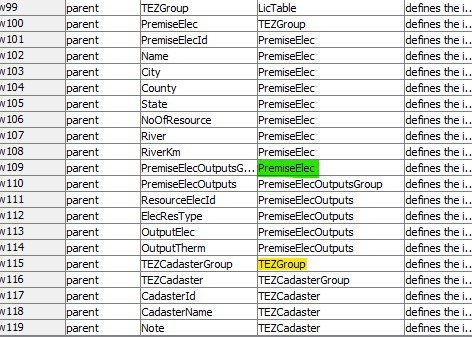
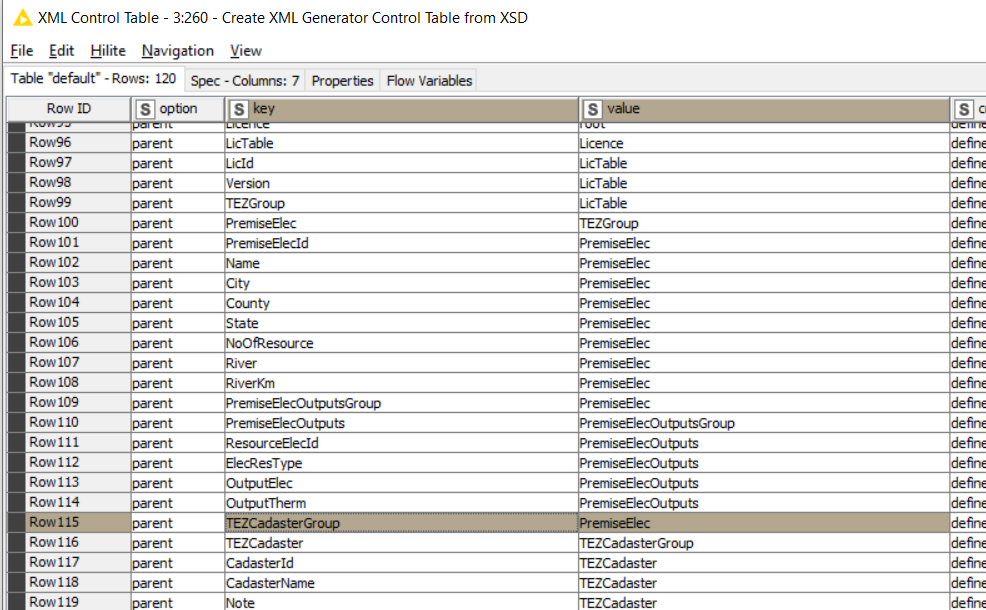
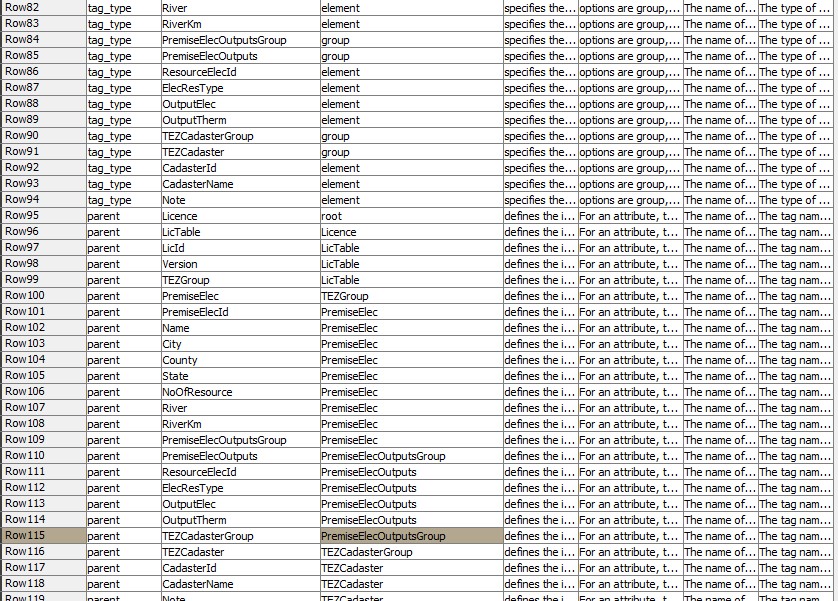
My problem is that Create XML generator Control Table from XSD put TEZCadasterGroup in PremiseElecOutputsGroup instead of PremiseElec as you can see from the picture.

XSD
vzor-11-2.txt (4.3 KB)
xml schema
Sk-11_schema.xml (1.4 KB)

Thank you very much for the advice on how to solve this.

Greetings
Lukas

1 Like

Hi @Lukasbrezina , there is second component for changing parents called Change Specific Parent XML tag. Hopefully that should do what you need but let me know if not.

@Lukasbrezina,

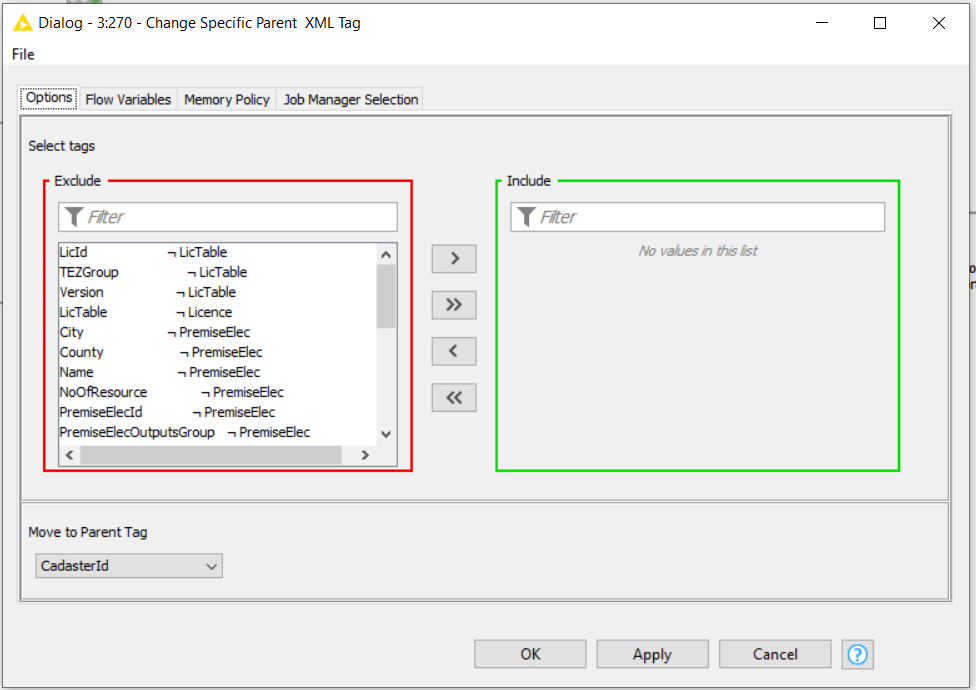
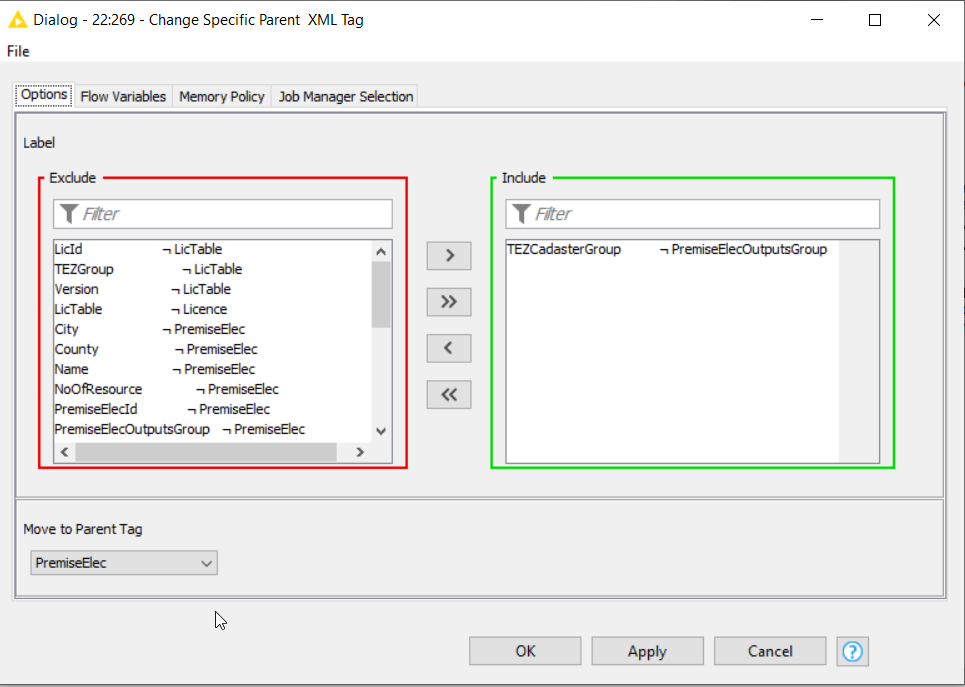
I’ll investigate further why the parsing of the XSD is putting the wrong parent element out, but to clarify my previous comment, I think the workaround for the moment would be to place a Change Specific Parent XML Tag component just prior to the XML Control Table Finalizer and give it the following configuration:

(Assuming I am correct in thinking that PremiseElec is the correct parent?)

Would you be able to upload a sample demo data file with data that matches your new files so that I can do some tests?

Thank you very much for the advice, it helped me. Below I am sending sample data for your test.
sample-data-sk-11.xlsx (13.9 KB)

For all nodes, the data is not loaded immediately, but if I use execute, I can then change the data. It’s not classic node behavior like basic nodes. You can still look into this strange behavior,
thanks Lukas

Hi @Lukasbrezina ,

The Create XML Generator Control Table from XSD component should now be fixed re the “incorrect parent” issue. There was a simple bug in my code in a Java snippet, so assuming you haven’t “Disconnected” the component from the hub, if you right click on it and update it, you should update it to the new version. Then you shouldn’t need to change the parent for TEZCadasterGroup. I will periodically update the components if bugs are found, so I recommend leaving them “connected” so that they can be automatically updated.

Concerning the “strange behaviour” of components for config (data not loaded immediately)… if a component contains simple configuration such as requesting a text value to be input then you wouldn’t notice this behaviour. However, these components are dynamically configured using data from the workflow (i.e. the “control table” ), so they need to be pre-run in order to populate the config panels)

Unlike a standard node, a “component” is really nothing more than an additional set of nodes included in the workflow, and this includes the “configuration nodes” that a component uses. Because I am dynamically populating them, these configuration nodes do not have any “prior knowledge” of what you are configuring and so they have to be executed once in order that they pick up the config values from the input data.

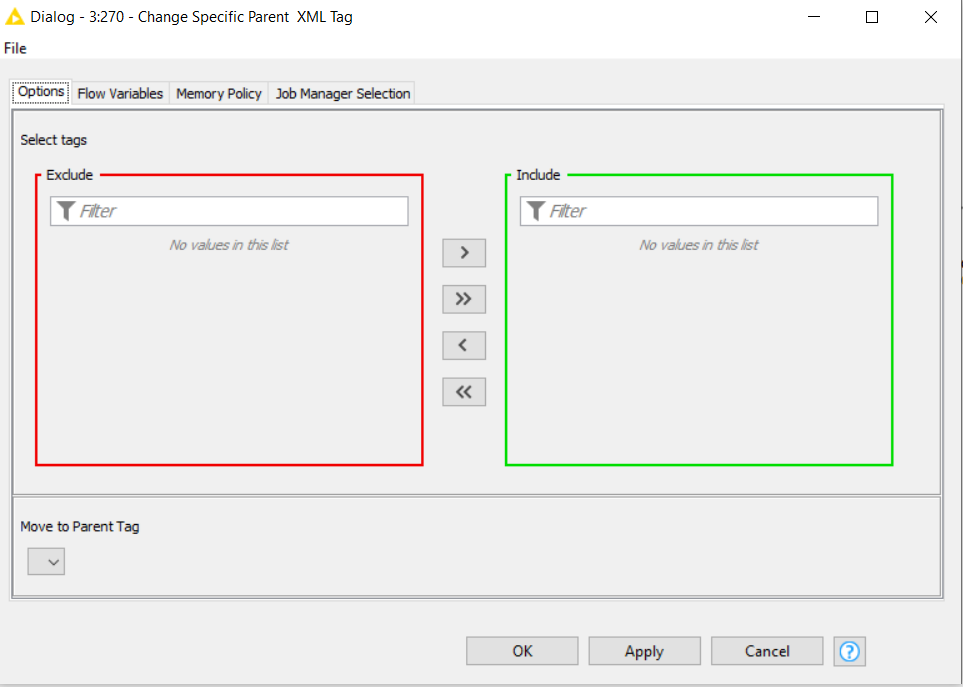
For example, consider the Change Specific Parent XML Tag component. When first added to the workflow, and awaiting execution it’s config dialog looks like this:

But if you execute it (it gives an error because it is still not configured), but you can then configure it:
image

This is what you were describing. I agree it’s not intuitive but I’m afraid it’s just how it is.

So why does it behave like this? Well… it’s because those config panels on the component are created from Configuration nodes within the component, and if you inspect the internals of this specific component, you would see those configuration nodes which I have highlighted here in orange boxes:

If the configuration were merely static (i.e. a simple pre-built list of entries for you to choose from), then the config panels could be populated without first executing the component because the values they use would already be known, but in this case, as you can see in the above image, there is actually quite a lot of processing required to give you the “simple” dynamic lists that appear as configuration on the component. Therefore the component has to be executed in order that the configuration be populated.

I hope that bit of background is useful but ultimately this behaviour is just the way it is when components have dynamic configuration. Hopefully you will agree it is a small price to pay for the work they are doing. I found it odd at first too, and it can feel awkward at times, but once you realise why they behave that way you start to get used to the “execute-then-configure” action… :wink:

Thank you for the sample data. That made it easier for me to test.

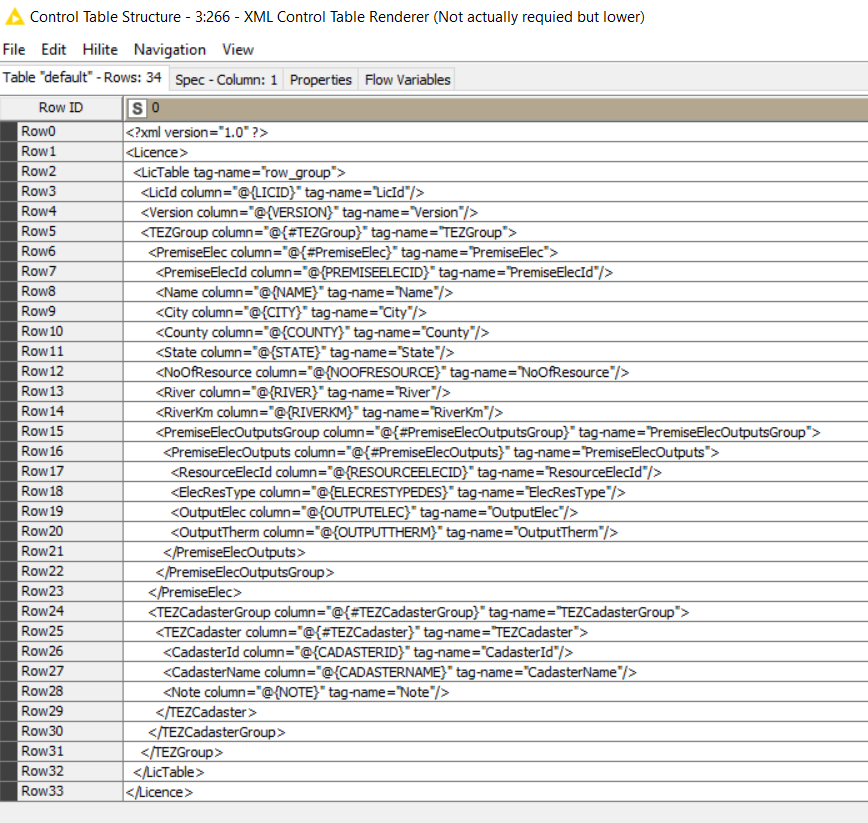
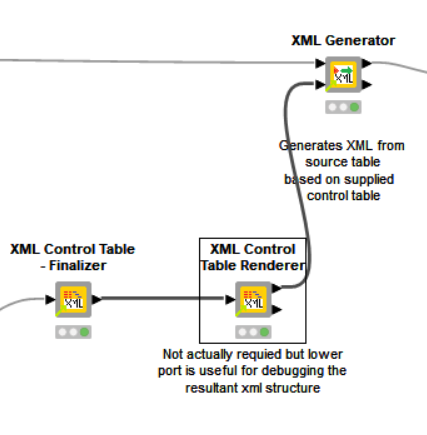
If you have an XML Control Table Renderer component included after the Finalizer,
image
execute it and then view the output of the lower “Control Table Structure” data port. You may already have seen this, but if not I thought I’d mention it as you may find this useful for seeing how the Generator component will see the “structure” of the XML. With the updated XSD component, the structure now looks like this which I think is what you were wanting:

For yours it might look slightly different, as you may have different configuration to me.

btw, I am continuing to investigate a way of optionally switching off the “pretty printing”. I thought it would be relatively simple in that I would tell the generator not to add the additional whitespace. However, even if I do that, when subsequently using the XML Writer node there is no such option, and it puts the “pretty printing” back in again. So I will need to look at alternative options for this which is a shame as I’d prefer to make use of existing functionality where possible.
thank you for the explanation, I don’t mind this way of working, since I already know how node works correctly.

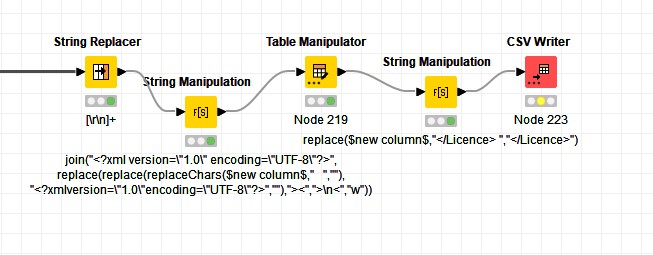
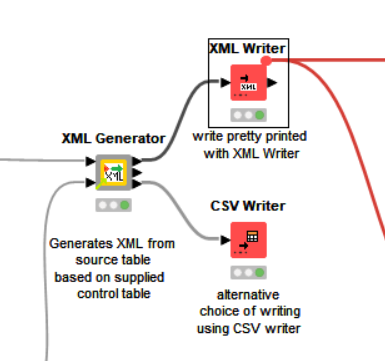
XML nodes always use “pretty printing”, so I used this modification with CSV Writer.
removing pretty printing

Everyone can do this modification themselves or have another output port from the XML Generator. I’ll leave it up to you, the current functionality is sufficient.

1 Like

Hi @takbb after updating CreateXML Generator Control Table from XSD, TEZCadasterGroup parent should have PremiseElec instead of TEZGroup.
TezCadasterGroup

Hi @Lukasbrezina, I think my eyes need replacing, lol. I misread the XSD and thought that it had found the correct parent. Update the Create XML Generator Control Table from XSD component again and try again. Third time lucky? :slight_smile:

There is now an updated version of the XML Generator component with a third port. It makes it flexible so you can do what you want with the generated xml, without having to have lots of additional transformations.

image

This port returns each “line” of the pretty printed xml as an individual row with surrounding white space stripped. So that can be sent to a CSV Writer directly (remembering to turn off “quotes” and “write header”), or if you really want to remove all the carriage returns, you could first apply a Group By (with concatenate) prior to writing to csv, thus saving approx 1KB for every thousand rows written.

I think it is useful though as it allows you to view the whole generated xml in KNIME, which isn’t so easy when it is held as an XML data table.

1 Like

Great job, the XML generator works perfectly, thank you very much for your time spent editing.

Greetings
Lukas

2 Likes

Hi @Lukasbrezina ,

Thank you for your ideas, support and testing! I’d be interested to know how it performs in “real world” scenarios with large amounts of data, so please feel free to provide further feedback, bug reports or suggestions for improvement, and who knows one day maybe this “suite” of components could become real nodes!

Hi @takbb
The XML Generator runs great in the real world, it can handle approx. 40,000 lines in 3:45. Generating with XML nodes is a little more, but a lot of preparation and thinking beforehand. XML Generator with XSD and XML Schema is a more elegant solution. Nice job :clap: :+1:

1 Like

That’s great. Thanks for the feedback @Lukasbrezina. It’s been a pleasure.

1 Like