I have a few questions regarding usage and licensing of KNIME Hub (Online).
On the KNIME web site the KNIME Business Hub(Online) is presented as an limited alternative to KNIME Business Hub to extend the capabilities of KNIME Analytical Platform. Furthermore it’s available under a Personal / Pro / Team Plan license, with monthly subscription fee.
Under what infrastructure is KNIME Business Hub(Online) made available, is it through devoted VM-ware on the marketplace? Or is the access through the KNIME Community Hub \ private channels?
Not 100% sure on the technicalities, but as I have access to both Pro and Team plan:
with Pro plan you get a dedicated Pro-space for your username. On this space you have additional functionality available - e.g. deploying workflows on a schedule / as a data app / as a REST service. Execution is paid for PAYG (subscription includes ~120 execution credits per month, PAYG after)
with Team Plan you get your own team where you can create multiple spaces. You have in total three seats to allocate to additional users - functionality is similar to Pro with additional collaboration features. Execution is PAYG - unsure if by now there are some credits included per month or not
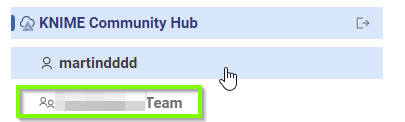
Given that both options are hosted in Community Hub all you need is a community hub account, use that to subscribe and when you then connect to community hub from AP, you will see the additional team / space:
as @MartinDDDD described Personal / Pro / Team Plan are hosted on Community Hub. If you are interested in a single-tenant SaaS Business Hub, please, contact us and we will find a solution for your requirements.
I just want to understand first fully the option of KNIME Hub (Online) if it is hosted on community hub how is the security settled?
When I make a connection form Analytical Platform to KNIME Business hub I see a public and a private space. So I guess accessed would be granted through the private space? However security wise as KNIME Business Hub is public space that would mean some compromise to the security?
On Community Hub, the access control infrastructure of Community Hub is used to keep your content secure on the Hub, as well as when accessing it from the Analytics Platform. You would store your content in private spaces. For Teams, those private spaces are owned by the teams.
If you want to, you can still use public spaces to share some of your content with the global community. As the name suggests everyone on the internet can read the content of public spaces and only write access is limited by the access control. If you don’t want this, you can keep all your content private by not creating public spaces.
A single tenant Business Hub, whether as SaaS, self-hosted in the cloud or on premise, adds an additional layer of security as you have a separate instance and can control the (virtual) network it is part of. So this enables to meet more strict security requirements.
I hope this answers your question,
nan
P.S. There are free trials for Pro and Team. If you want to, you can have a look and test using a different account/email address.
resuming this conversation as it incurred to me while reading the comments that it might be of help if more details about the Knime Community Hub (KCH) would be provided.
The primary goal would be to answer questions like:
Where (geo-locationwise) is the KCH hosted? I suspect EU and in particular Frankfurt (AWS eu-central-1)
Which hoster is used? I suspect Amazon AWS
How is the data secured?
Can I encrypt the data using my own key?
(How) Can I get an get a copy of my data?
Has Knime access to my data?
How to regain access if I lost access or encryption keys?
What Service-Level-Agreements (SLA) like guaranteed uptime are provided?