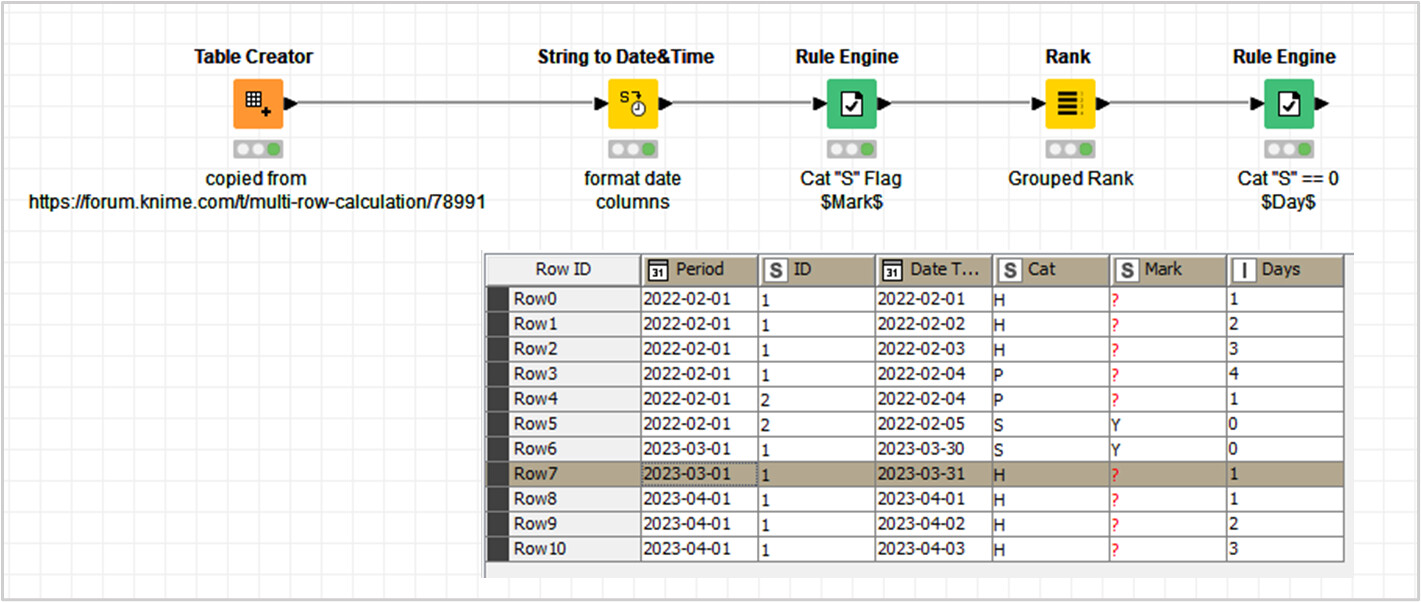
I would like to count how many consecutive leave per id. When Leave Categories (Cat) are H or P I would count toward the consecutive leave, when S, it will not be considered.
‘Days’ column is for how many consecutive leaves are taken.
‘Mark’ column is for, if cat S happened 1 day before cat H or P, will be marked ‘Y’.
Desired output:
Period
ID
Date Taken
Cat
Days
Mark
1/02/2022
1
1/02/2022
H
1
1/02/2022
1
2/02/2022
H
2
1/02/2022
1
3/02/2022
H
3
1/02/2022
1
4/02/2022
P
4
1/02/2022
2
4/02/2022
P
1
1/02/2022
2
5/02/2022
S
0
Y
1/03/2023
1
30/03/2023
S
0
Y
1/03/2023
1
31/03/2023
H
1
1/04/2023
1
1/04/2023
H
2
1/04/2023
1
2/04/2023
H
3
1/04/2023
1
3/04/2023
H
4
As you can see, from 1 Feb to 4 Feb, ID 1 took 4 days (Cat are H or P), so ‘days’ range from 1 to 4. ID 2 took 1 on the 4 of Feb, and S on the 5 of Feb, so he has 1 and 0 (S won’t be counted toward ‘days’). But on the period Mar 2023, ID 1 took leave (cat C) on the 30th Mar and leave (cat H) from 31 to 3 of Apr. I would like to count only from the 31 to the 4 together, skip the 30 of Mar as it was cat S.
And the column ‘Mark’ the logic will be, that if cat S happened 1 day right before or after cat P or H will be marked ‘Y’. You can see ID 2 has 1 cat S right after the 4th of Feb, and ID 1 has 1 cat S right before cat H on the 30 of Mar
Hello @4nak1n
This $Days$ column is a product, that you can achieve with ‘Rank’ node; by using ‘Grouping Attributes’ configuration + Ordinal ‘Ranking Mode’ and Retaining Row Order.
The zero values for S Cat, an Marks; they can be built with the help of ‘Rule Engine’ nodes.
Hello @rfeigel
I gave just an answer solution without testing it. Now, I’m trying to address your question and I think that you are right.
The Rank Node would be valid only for sample data, however it will fail on change $Period$ consecutive $Date Taken$. Furthermore, it will further fail for a worker with more than one group of consecutive $Date Taken$ in the same period.
Said so. The logical solution would be more complex… requiring a complex conditional workflow, based in ‘Column Expressions’ with Offset function. Something similar to the discussion in the following post:
I can work out a custom solution workflow, I’ll try to deliver along the day (I can’t promise it). You can also share, if you have a valid solution ready.
Hello @4nak1n , @rfeigel
I’ve found a possible solution based in ‘Rank’ node. Then, no ‘Column Expressions’ coding is needed.
This solution generates ranged counts based in consecutive $Date Taken$, with the help of ‘Moving Aggregation’ node. It doesn’t look up to $Period$ anymore.