New (KNIME 5.3) Expression node "integers"

Using the new Expression node in 5.3 (which is looking very promising) is it the intention that it treats Long and Integer datatypes the same?

I noted that when presented with both Integer and Long column data, it sees both of them as “Integer”, buy it actually treats them as “Long”, and from what I can see can only output “Long” for integer data:
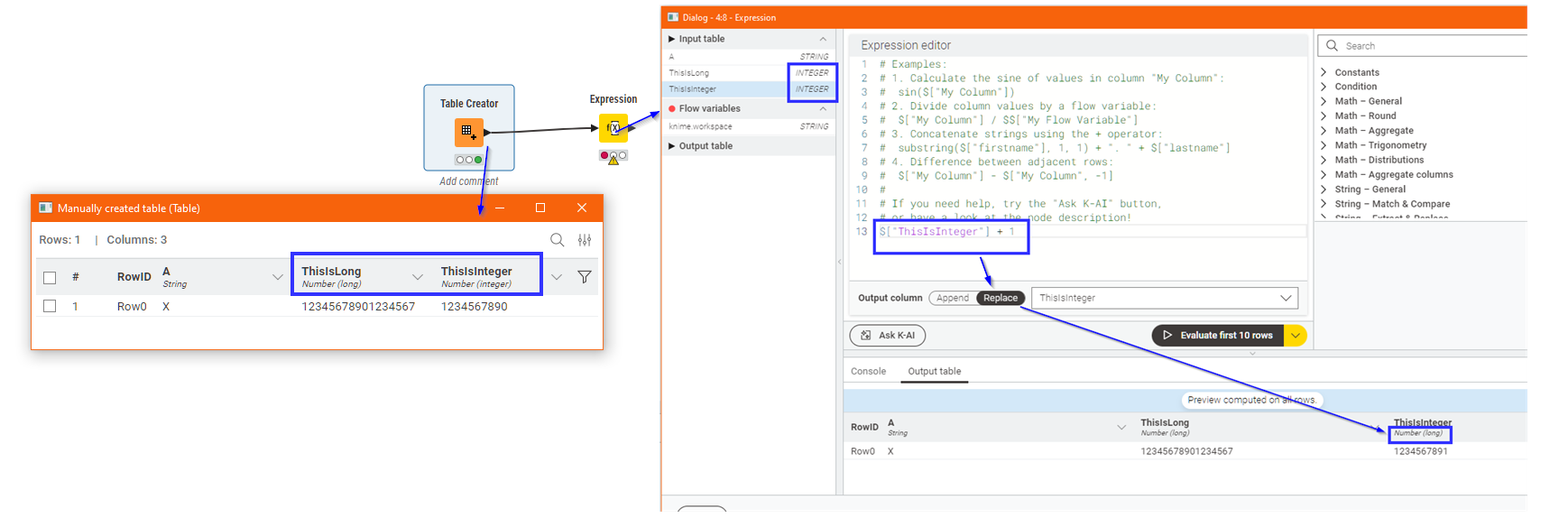
I haven’t yet found a “toInt” converter built into that node, so currently with respect to integer data:

  • Expression can only output Long (64 bit) integers
  • Math Formula can only output Integer (32 bit) integers

Is that how it is intended to be, or is this just a transient situation with this first release of the Expression node?

Should we read into this, for example, that the expectation for future-KNIME is that 32 bit integer data is destined to be phased out?
Or alternatively, have I just missed something with the new node? :wink:

I can understand that there may be technical reasons why the preference was to use Long internally (to avoid loss of precision), but perhaps it would still make sense to allow the user to specify the output datatype that they require and perform a conversion if necessary.

The idea that simply adding 1 to an Integer always generates a Long feels wrong to me.

This is causing issues with my workflows. A “toInt” is needed!

1 Like

When using the Expression node it is converting an integer to long causing an error in a loop.


Exp2

Using parse_int gives an error.

Using parse_int and string avoids an error message but does not change the result.
Exp4
Exp5

The Long datatype has for some time been the “poor cousin” of the datatypes within KNIME and neglected in many of the scripting-based nodes.

The new Expression node goes the other way and neglects Integer in favour of Long. I see the point for the future, but the implementation is in my view neglecting the “now”, and ignoring the other nodes that people will be using. I too had considered that the main problem node was Math Formula but on further investigation, the issue is a little more widespread.

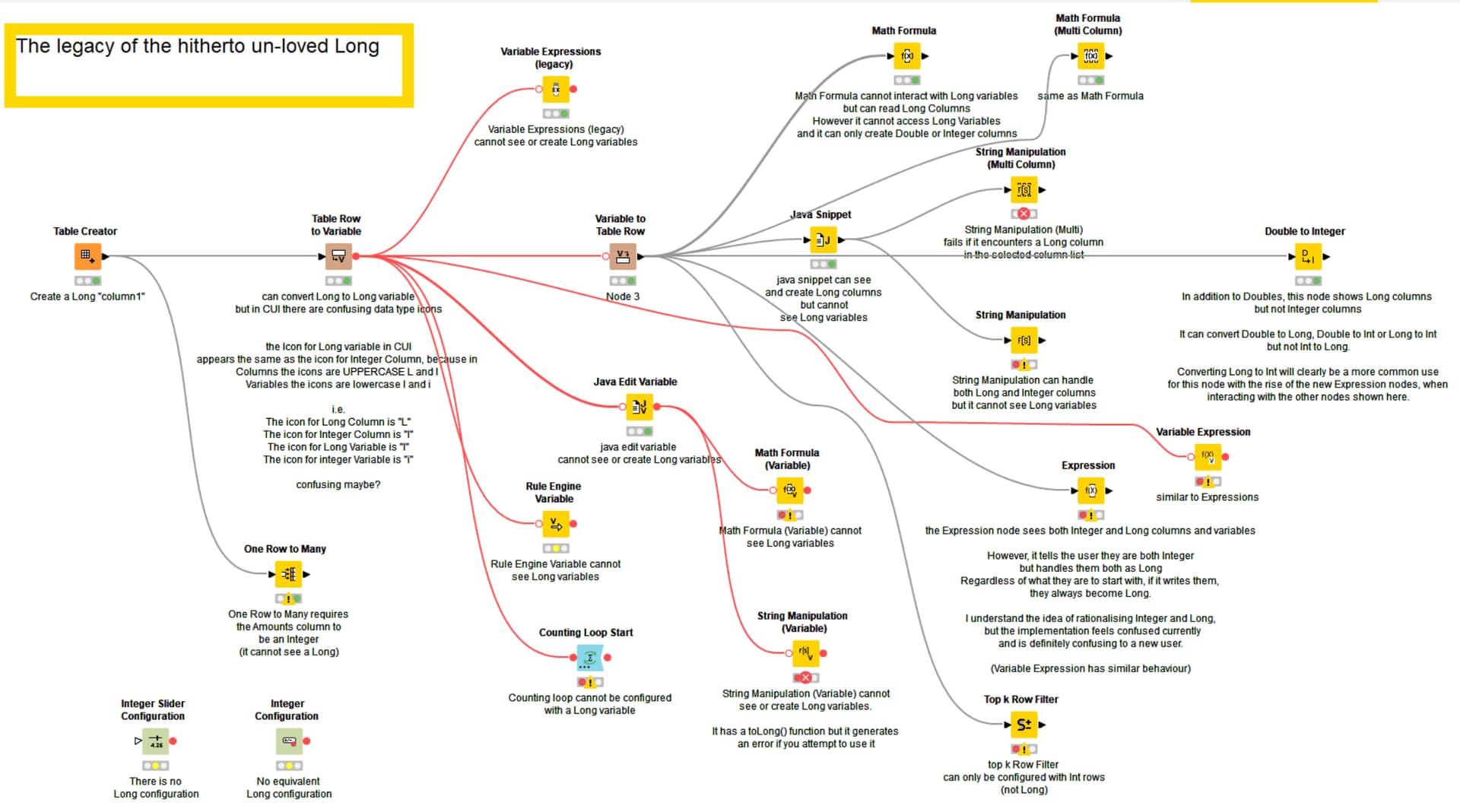
I have created the following image to annotate the primary inconsistencies that I have found with a move to only creating the Long data type and not creating Integer.

Mostly you will see that the “problem nodes” fall into two camps:

  1. Nodes that cannot see Long Variables and/or Long Columns

  2. Nodes that can only be configured using Integer Variables (if configuring with variables)

I am sure my screenshot is not exhaustive. I hope to have captured the major affected nodes that I can think of.

To me, it isn’t that the removal of the distinction between Integer and Long is necessarily a bad thing going forward, but either the Expression (and Variable Expression) nodes should be given the ability to create Integer output, or all of the existing nodes ought to be (at last) modified to be able to handle Long; especially Long variables which are really out of favour in the older nodes :wink: .

Without that there is going to be a need to add lots of additional Double to Int nodes to convert Long to Int just to be able to use the new nodes alongside the old.

EDIT 24 April 2025

Another node that can be included in the above diagram:

DB Query Reader
(and possibly other DB Nodes)
This node cannot see LONG flow variables, so to include them in a query, they need to be converted to String. Would not recommend converting them to Double or Integer for inclusion in a SQL Query because of potential (likely) loss of precision.

4 Likes

honestly good finds.
I really hope the staff has that in their bugtracker - but we dont have a linked report here yet…

1 Like

Hi guys,

Thanks for raising your concerns! We’re totally with you, but unfortunately had to focus on other important topics for the 5.5 release.

  1. The Variable Expression node already has an output type selector for integral results, where you can select “Int” or “Long”, because we also encountered the many nodes that allow being configured via integer, but not via long flow variables.
  2. For the Expression node we’d like to add an output type selector that can do even more than just int vs long, but can also say that the string that is produced by the expression should be interpreted as HTML, XML, JSON, you name it. To give a rough estimate on when we’ll work on that: I hope that happens in late summer or fall. Our internal ticket reference is AP-23799.

Please keep all the feedback coming! Thanks :slight_smile:
Carsten

7 Likes

This seems not to be solved, so the autumn timeframe was a bit optimistic :face_with_raised_eyebrow:

The Expressions node still creates “long” integers which do not work with a lot of the variable inputs, making it basically impossible for some very standard operations to be used as a flow variable later on.

Any update on when this will be released / changed?

2 Likes

Is there any update on this?

It’s just disappointing that we have the “parse int” functionality in the Expression node, but it’s basically useless because it always makes Long type, and Long cannot be joined with regular integer… Having to make workarounds with extra nodes just for column types feels very unnecessary.

@carstenhaubold

As far as I know in newer versions than 5.3 you can choose long or int in expression node. Saw it in 5.8.1 recently, but probably has changed earlier.

overall, the focus on this expression node seems just so wildly out of place.

Knime became liked for the no-code / low-code approach with

  1. dedicated nodes for all the steps
  2. clear separation

And instead of fixing known major shortcomings or gaps, the last 3 years we get the webui pushed and Expression nodes, which

  1. are making it less trivial to understand workflows from just looking at them because they hide their operation = less implicit documentation
  2. can combine multiple transformations
  3. are still far worse than just programming because they are restricted in scope, data types, connections and functions

The Column Expression node was bad in many ways, too. But, at least it was introduced with a lot larger scope, actually solved some issues (array handling, path handling, usage of temporal periods) - all in a very short timeframe (and it remains superior with dynamic column access, array handling and path handling so far)

3 Likes

Have to admit I have started to come to like Expressions. I agree that it’s not yet possible to fully replace Column Expressions primarily due to path handling and I’d also like to see the ability to define expression-internal variables for ease of readability, but overall after some time I feel like I am no quite proficient with it.

The other day I helped a beginner and he was mind-blown how relatable the Expression language is to Excel and how you can built step by step by replacing the same column muliple times in different expressions…

I don’t think all the changes are geared towards super users / power users that have been using KNIME for a long time, but for the “average Joe” that wants to get started…

3 Likes

but shouldnt the average joe that opted to go the unpopular route (especially now given all the KI “autocompletion”) of an low-code / no-code tool, be greeted with no-code nodes first?

and on the other end of the spectrum, you have people that use Knime but can code: those people usually feel restricted by the nodes (Expression node does not support many things a power-user typically utilizes like loops, index-based access, variables, half the data types, custom functions)

If the average Joe has a corporate background and is used to Excel then maybe it should be both? Step-by-step low code nodes and in addition Expression language that resembles what they know from Excel formulas.

On the other end of the spectrum - yes - I’d also like to see more of that, hence I cannot yet use it to replace all my column expressions. Next leap from my perspective surely is Path support.

4 Likes