Hey there,
let me have a go here - I get what you want to do.
I take that the csv reader reads a full table (e.g. multiple rows) and not just one row. Correct?
If that is the case then looking at your workflow above, your logic will ever only apply to the very first row (table row to variable converts the top row to variables, everything else is discarded). So unless there is some looping mechanic that is not visible to us your rule will only apply to the first row and my best guess is that this row is not missing or empty.
There are different ways on how to address this - in the screenshot below I used a Table Row to Variable Loop Start to iterate over every row and to turn the contents of each row into variables:
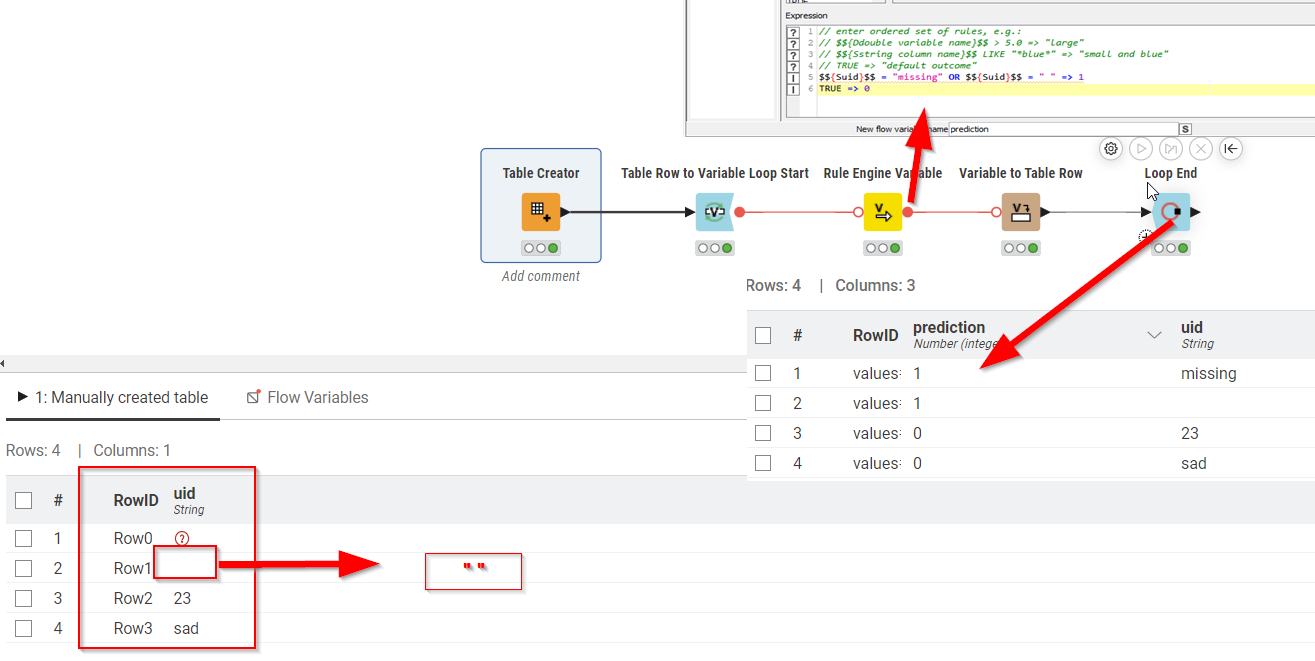
You’ll notice that my rule captures two scenarios: if something is missing (red question mark) it will show up as a string “missing” once turned into a variable. I also capture the scenario where there’s an empty string (" "). If any of those are true then the variable is 1 in any other case 0.
In this minimal example I then turn all variables into a table row and collect them with loop end which allows inspecting all the results and at least from my perspective it is showing up correctly.
Here’s the workflow…
switchnodes.knwf (79.0 KB)
If you are looping already or if there’s only ever one row in the file that is read then my apologies :-).
Best is always for you to provide a minimal, anonymised example which showcases your issues - if that does not happen there’s always some guessing involved when trying to help.