The new node UI’s are terrible. What are you thinking? How is this better?
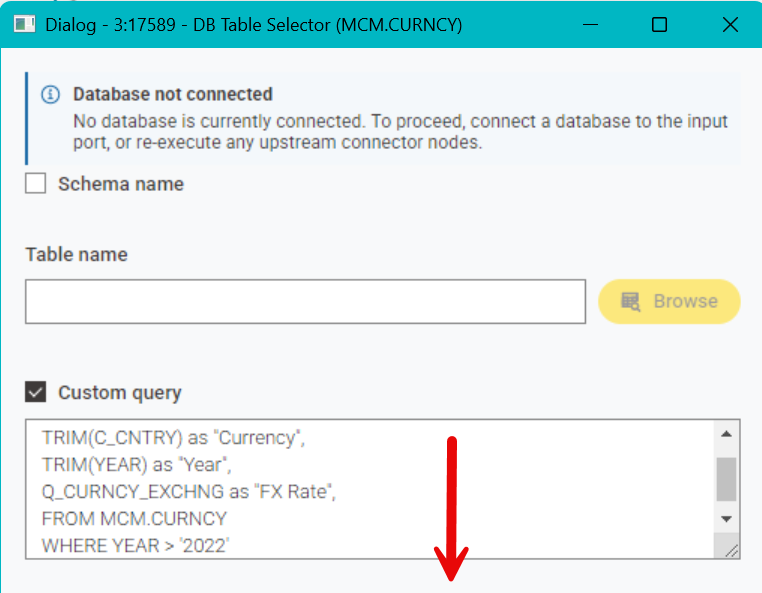
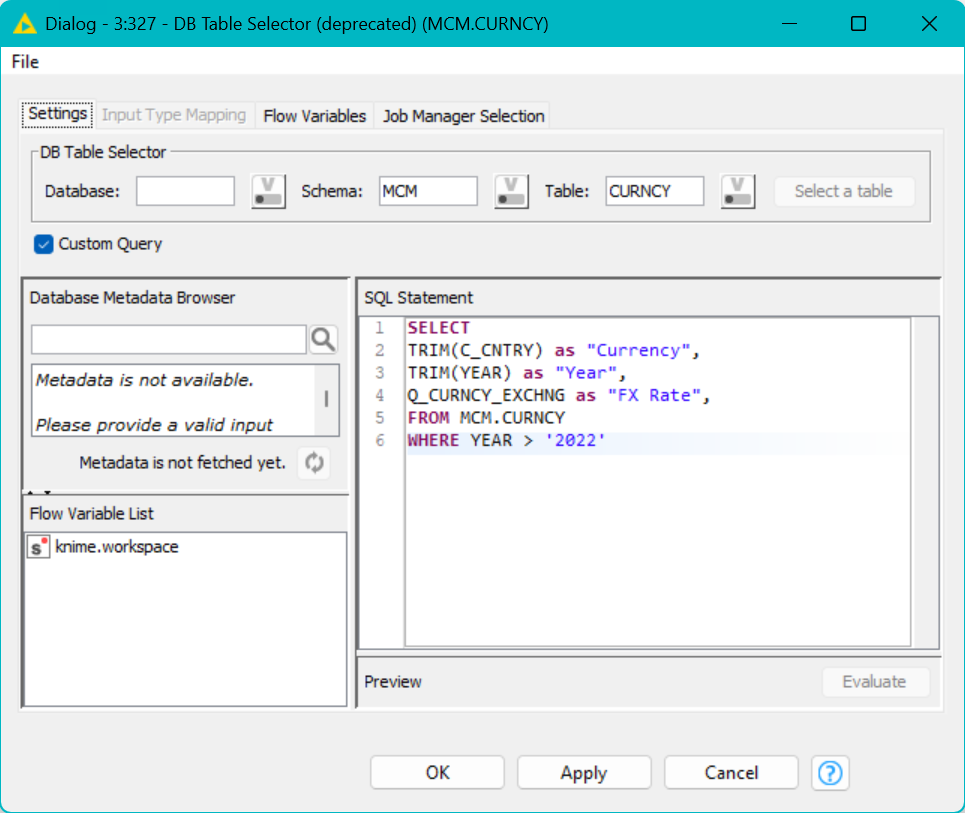
common theme for the last 2-3 years:
stuff gets ported and functionality gets cut / lost / dropped.
The power users aren’t there focus any longer. Everything is centered around the subscriptions and AI.
and to complete the complaint for everyone missing it:
- no more syntax highlighting
- custom query field is smaller and not auto-expanding
- no more metadata browser (at least on the screen, might be due to the missing connection)
- and my personal opinion: a MAJOR downgrade in the font, readability and contrast of the text entered (and given this is default, it affects essentially everything ported to the new ui)
6 Likes
If it’s not broken don’t fix it. The font used is a bad choice and the UI is going downhill. WebGL doesn’t work, can’t open metanodes. They are going to loose me as a user if they don’t overhaul this new UI in a major way.
3 Likes
Hey folks,
and Merry Christmas. I, and many more Knimers, can feel your pain. During each Community Hacking days and on several ocassions since introduction of Modern UI (MUI) this has been brought to the attention of Knime by many community members.
Through personal experience I can assure you that this will be addressed soon. Albeit not being a justification nor an apology for the perceived “lazyness”, the Knimes Dev-Team has taken leaps and bounds to modernize Knime all while ensuring backwards compatibility. A tremendous endevor which accumulated in the recently published web-based UI.
In 2026, though, it was mentioned in a conversation with thte dev-team during the DataHop in Stuttgart that at least one quality of life update round will be conducted. I participated in pretty much all prev. commuinity hacking days and will continue to push on that subject. Certainly other attendees will too.
But maybe @christian.birkhold or @DanielBog (apologize for dragging you in on Christmas Eve) want to chime in … or, understandably, not bcs. it is 


Cheers
Mike
14 Likes
Hello all,
We absolutely care about our power users - and we’re not “only focused on AI and subscriptions.” I get why it can feel different from the outside (as nicely put by Mike “perceived reality”), but that doesn’t reflect our intent or priorities. Power users matter a lot to us, and so do casual and new users.
So yes: we hear you, and we’re on it. In 2026, we’ll dedicate a significant amount of time specifically to UI/UX across both Hub and AP (see also e.g. Basic Functionalities in 2026 - #2 by christian.birkhold ). That includes visual polish (e.g., contrast), closing gaps where capabilities got lost in the move to the modern UI, creating more working space for workflows, and a bunch of other quality-of-life improvements. Many of these details were necessarily deprioritized while we modernized the tech stack - but they’re front and center now.
@Christopher41 let’s make sure in 2026 we don’t loose you as a user. Please keep the feedback coming - it genuinely helps us prioritize what we tackle in 2026. Keep pushing us.
Merry Christmas everyone. Hope to meet some of you at a DataHop (or similar) in person and talk over a beer or Apfelsaftschorle.
Best,
Christian
12 Likes
as you are anyway designing stuff for the web browser, you can check your design ideas against
to catch the greatest flaws in terms of accessibility (ranging from contrasts, functionality and logical design, …)
which is derived mostly from the WCAG https://en.wikipedia.org/wiki/Web_Content_Accessibility_Guidelines
2 Likes
Some of the new nodes should not have been released, they were unfinished. DB Table Selector and Column Resorter are examples of something new that was not as good as the legacy nodes.
Why would someone design a node UI where you waste time scrolling up and down instead of having tabs like in the legacy nodes. It gives the impression that the developer never used KNIME in a real world environment. Change doesn’t mean it’s better.
WebGL - I can’t open metanodes. Is there a fix other than using SVG?
Show heap status - I need to unselect and Apply then reselect and Apply and Close each time I use KNIME to get it to work.
Legacy text - Please have the text appear underneath the label. Appending to the end overlaps onto the next node label.
Node text - Add type colors. I used to use red for nodes that needed an annual code change.
Expression nodes - Great addition though it doesn’t work with text dates like the rule engine. I wish you used standard terms like “left” and “right” instead of “starts_with” and “ends_with”. If you want to help the transition of Excel users use the common function names in Excel and SQL.
I feel better now that I have vented! 
5 Likes
just because the world is moving mobile (and so do the web frameworks), Knime isnt. I also do not see a justification for this up and down trend, when 99% of the business users work in landscape mode.
raw string to string comparison should work nevertheless (and that is what you did in the Rule Engine). Enforcing proper datatypes is a good thing. Its just bad if the support for those datatypes misses 50-80% of the functions Java offers because its deemed not needed to be made available in the Expression node.
using default Java function names should go first (just because you can then also use Java documentation). But offering ALIAS to Excel or SQL functions (as long as there is no overlap, or with a postfix) would add a lot of value to people transitioning to Knime.
The new node UI needs to be scrapped and a new approach using a tabbed interface like the legacy nodes have. I’m guessing the mobile phone UI of scrolling up and down is what the developer(s) where taught in school. It’s affecting my productivity using what I think is a degradation of the interface. If all they do is tweak what has been broken I need to begin the process of converting the KNIME workflows I have developed at Stellantis to Power BI and have a dozen users make the transition.
Hey,
Hope you all had a nice start into the year. As @christian.birkhold already mentioned 2026 will be the year to clean up a lot of these problems and we are taking all of them very serious.
But in order to achieve that it is super important to us to know about these things, which makes threads like this so important to us. Although I agree that the table selector is one of these things that was not entirely ready. We are currently looking into how to get it on par and I am sorry for the inconvinience.
Whats wrong with the column renamer? 
Whats wrong with metanodes in WebGL? How does it express that you can’t open it?
When you say heap status you mean the little bar at the bottom that is only available in classic?
Can you post an example for the Legacy text issue?
Please keep the feedback coming. I hope we can convince you in 2026 that the modern UI has many advantages over the classic UI 
Greetings,
Daniel
4 Likes
Hi @DanielBog , yes the heap status is the status bar that you mentioned, but it is actually available in MUI as well as Classic, but only by following the steps that @Christopher41 mentioned.
Here it is in 5.8:

I also find this memory status very useful at times, but it doesn’t “stick” in MUI, and has to be “turned off and on again” when reloading KNIME. I’m guessing from what you say that its availability in MUI is possibly “unexpected” or potentially “unsupported”, which would be a real shame if true, but given that it is actually available, it would be great if this need to re-apply it each time could be investigated. This can make a real difference to spotting excessive memory usage/retention in long running workflows, especially those with loops.
5 Likes
Happy new year everyone, and thank you for all the valuable feedback!
I’m also curious to hear more about the issues with the expression node, because we’d like to make it’s use as enjoyable as possible.
I agree that using proper type-based comparisons is better than string comparisons, but if you want to, you could use format_date or format_time to convert your date to a string and then compare these.
But when using date and time types… We have already made plenty of useful methods for working with dates and times available (see screenshot below). And you can use arithmetic as well as comparison operators on date and time types (see docs). What exactly are you lacking?

Best,
Carsten
1 Like
Can you post an example for the Legacy text issue?
Correction “Deprecated” text. Please place it beneath the node name.

1 Like


My mistake, I had the toggle pan mode selected. Please add scroll bars and the ability to dock the Pan Mode/Percentage toolbar at the top grey area so people look in one area to find things. Keep everything like that at the top or the left of the screen.
the text box at least has an option to drag it larger at the bottom right, but not auto-growing isn’t “modern” either
Thanks for pointing that out in the DB Table Selector. I have never seen that before, it should resize with the window. It’s not available in the Column Resorter node. Please rename it to Column Sort, Resorter in not a proper word.
What is probably most frustrating for many users is that key features from the old UI are still missing. And when updates to the new UI do arrive, they often feel like a downgrade — offering no real benefits (not even a better-looking interface), while features from the old UI remains unavailable.
To name a few examples of missing key features in the new UI:
-
Why is it not possible to open two workflows / components side by side? Comparing workflows, copying nodes from one workflow to the other is really troublesome with this. The new UI has a lot of missing customization generally and therefore feels unflexible.
-
Automatic backup of workflows / creating versions in the Knime Hub: I still have to jump to the Web UI and create a version manually
-
This might be a personal issue, but I experience performance problems when working with tables that have many columns in the new table view (I opened a thread about this some time ago). I also frequently run into small lags — likely when new elements need to be rendered — which makes the UI feel less smooth.
Operations like sorting or searching also feel noticeably slower in the new UI.
Overall, the old UI often feels more functional, more responsive, and provides better feedback when something needs to load.
I really enjoy working with KNIME and think it is a great product. But unfortunately, when it comes to recent enhancements, I can’t help but feel that things are moving backwards. On top of that, I haven’t yet had the chance to properly test K-AI — where a lot of development effort seems to have gone — due to company restrictions in regards to GenAI.
Best regards
David
1 Like