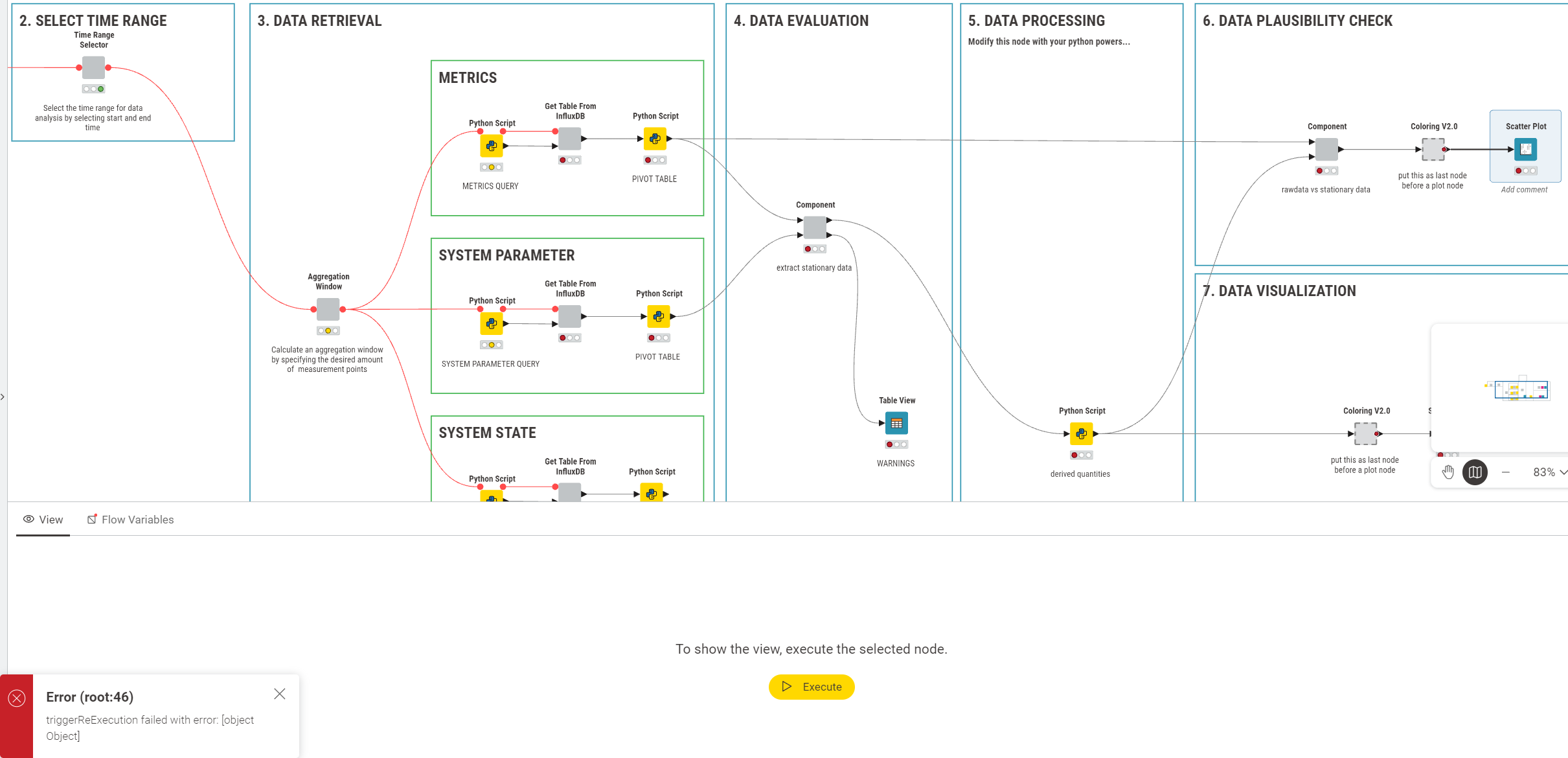
when im executing the top rightmost view node (the selected node) in the workflow below, the tree gets executed inclusive the view node (all green). Then, double clicking on the view node triggers the (error) state you can see in the screenshot.
There is a popup in the bottom left: Error (root:46) and errors ‘backpropagation’ until the Query Python nodes. It states that some triggered execution failed but until i want to open the view node, every node is showing green lights.
I can solve this problem by re-executing the view node a second time and then double clicking it to open it.
This is somehow a solved issue but its annoying, can you help me with this error?
Thanks for the detailed description of the problem - but I’m afraid (maybe it’s just me?) that I still don’t fully understand what’s going on. Would you be able to do one of the following?
Hey @ScottF many thanks for your response. A minimal example is hard but here is a screen capture: In the beginning im executing the nodes and when i want to open the view all nodes get unexecuted again.
That’s clearer! Thank you. Let me see if I can get the attention of someone on the dev team to investigate. To me this seems particularly strange (and therefore interesting)…
would you be able to share the relevant lines in your log?(<workspace>/.metadata/knime/knime.log)
And I assume it only happens when you open the dialog of the node but not the view itself (i.e. when clicking the magnifier-glass instead of double-click), right? Which is still unexpected but it would give you a ‘workaround’.
Thanks @ScottF for passing the ball on. Hello @hornm, thank you for your response. Attached the relevant log.
Your assumption is right, when i open the view instead of clicking the node, the view opens but shows no data (only named axes labels).
Here is a bit more context regarding the attached error log: The first two components in the workflow above contain- amongst others - Time Range Selector Widgets.
Seemingly, it was a problem with the version since i could fix it (until now) by updateing to the 5.11 version. Now the error does not occur anymore.
Unfortunately i never could produce a minimal example. I experienced it with version 5.8. The problem occured reliably every time. Since i am using the new version now i cannot answer the id question. If it is of interst, i can do a rollback to 5.8 next week and answer this.
@MagnoChris you can have several knime versions in parallel. Just use the zip archive on windows. On Mac you can just extract different versions to the programs folder.
Just remember there is downwards but not upwards compatibility. Newer versions can open older ones but not the other way round.
Hi, thanks for coming back to this. While I would love to understand the problem, it is probably most economic to continue with 5.11 (unless you have a hard reason to stay on 5.8) and see whether the issue comes up again. Issue reference: NXT-4453.