I’ve already learned quite a bit about Knime Analytics (version 5.4.5), but now I’m at my wit’s end and I can’t find any information that helps me. I want to delete duplicate records that have the same value in the “BELEGNUMMER” column, but different values in the “CPU_DATE” and “CPU_TIME” columns. It doesn’t matter which duplicate record remains. For other deletions, I use the “Rule bases Row Filter” where I have direct information about what should be deleted.
This, for example, doesn’t work with the “Rule bases Row Filter”:
$BELEGNUMMER$ = $BELEGNUMMER$ AND NOT $CPU_DATE$ = $CPU_DATE$ AND NOT $CPU_TIME$ = $CPU_TIME$ => TRUE
because, like my other attempts, it returns an empty table.
Can anyone help me with this?
Thanks and best regards,
Holger
I think with the rule-based row filter you will struggle to achieve your desired outcome as to the best of my knowledge you cannot reference a previous or next row. And for this task you also want to avoid looping.
If I get it right, you want to have an output which only contains each BELEGNUMMER once and you do not care about which CPU_DATE or CPU_TIME is kept for the same BELEGNUMMER.
@HolgerKleinert you first will have to define the exact rule that will define a duplicate. And then you can see if the Duplicate Row Filter can help or if you might want to use WINDOW functions with the help of H2 database.
Also you might take a look at this approach by @takbb
Hello @HolgerKleinert
From my understanding what you are describing is a ‘GroupBy’() function with aggregate ‘first’ for those fields/columns that you don’t care.
Hi Martin, thanks for the help!
It works, but I have seen now that one “BELEGNUMMER” can have more positions with the same CPU-Date and -Time. One of them have 20 Positions and now 19 where lost.
I think the Duplicate-Row-Filter is not the node I can use here
@HolgerKleinert maybe you can provide a real world example with dummy data and explain what records you would want to keep and what the rules are for that.
Hi mlauber71, thanks for the tip! I’ve looked into it, and SQL seems a bit more complex. But I’d like to learn more, although I won’t have time until after my vacation in April. Until then, I’ll have to continue removing duplicates manually
in addition to @mlauber71 I highly recommend to provide some more context and data.
The most efficient way would be to create a table with dummy data and show or describe precisely the targeted table.
As I described above, I “simply” need to delete duplicate records in the existing table before the next processing steps in Kinme.
Or do you mean that I should create a new table with all the data but without the duplicate records using a filter? But what kind of filter can I use?
One more thing: The table has 38 columns and, depending on how many transactions are in the source system, up to 5,000 rows, and these must not be grouped or modified.
Hi Gon,
I’ve already tried using “group by”, but I can’t specify (for example):
“DOCUMENTNUMBER” = “DOCUMENTNUMBER” and “CPU_DATE” <> “CPU_DATE”
Or am I just being dense, or is there a special “group by” function in Knime?
@HolgerKleinert obviously you do not want to just delete duplicates because other conditions should apply. I think we currently do not understand these requirements. Maybe a clear example would make sense.
Of course it is possible that we are not smart enough to understand your requirement but more often than not key to finding a solution is a clear definition of what should happen to which entry.
Maybe Im lost in translation therefor I write now in german:
Hi Holger,
ich würde dir gerne helfen, jedoch verstehe ich nicht ganz was das Problem ist. Du hast eine Tabelle mit Duplikaten, die Du nach einer gewissen Regel entfernen möchtest. Die ersten Antworten in diesem Thread waren anscheinend nicht ausreichend, um das Problem zu lösen. Daher wäre es wichtig, wenn Du genau beschreibst, was deine Eingangsdaten sind und wie deine Ausgangsdaten aussehen sollen.
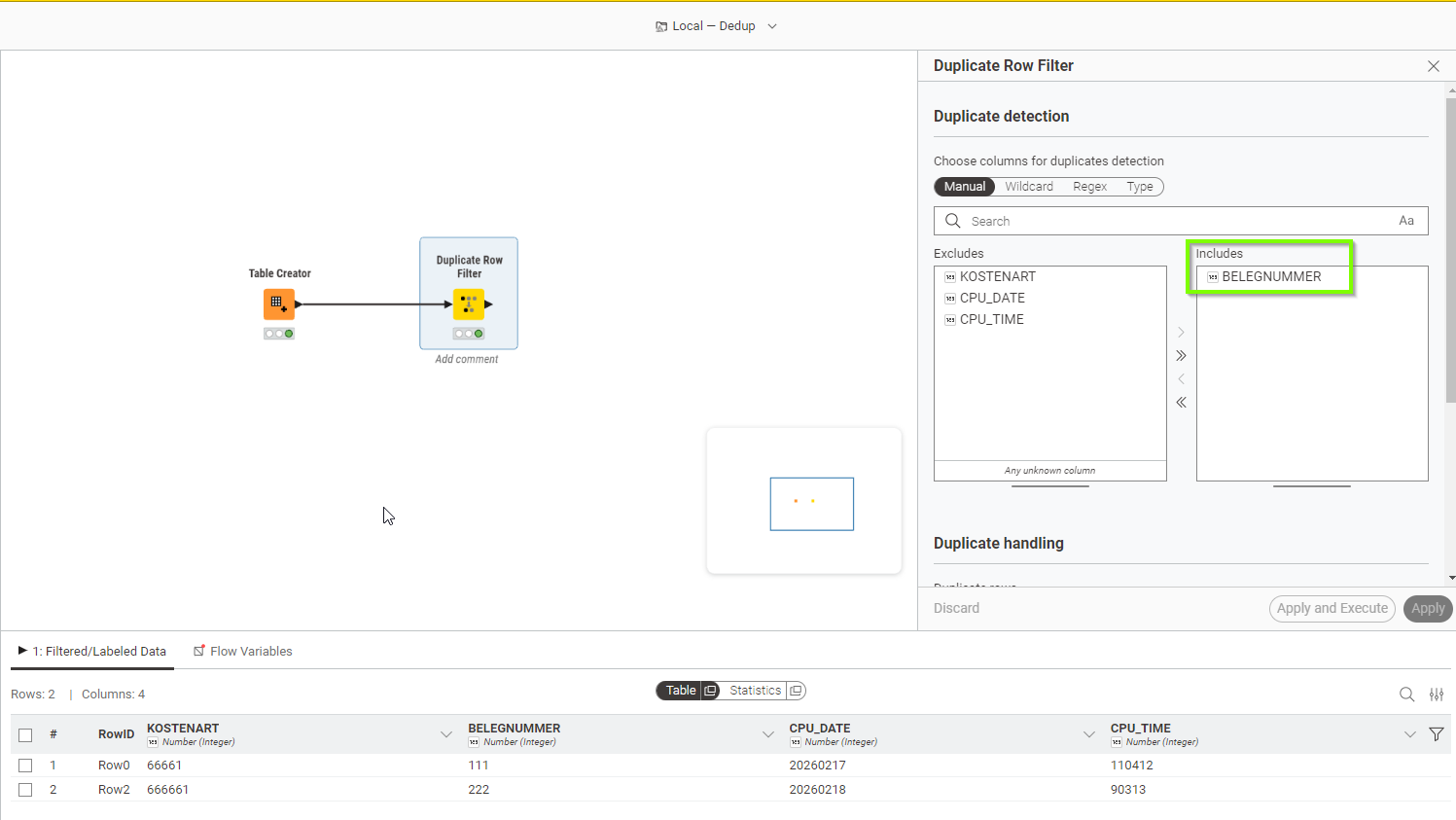
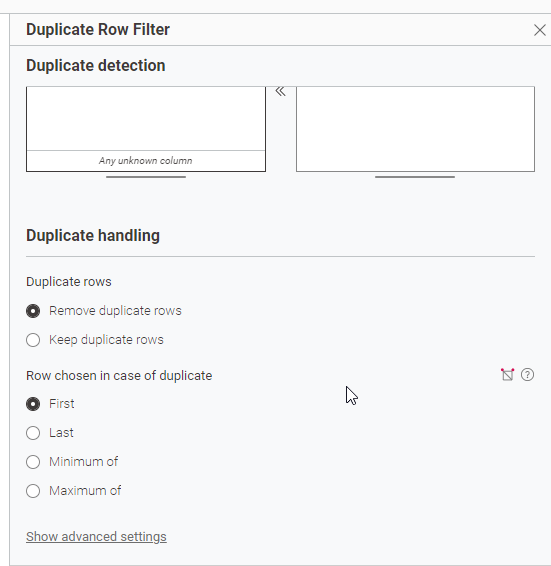
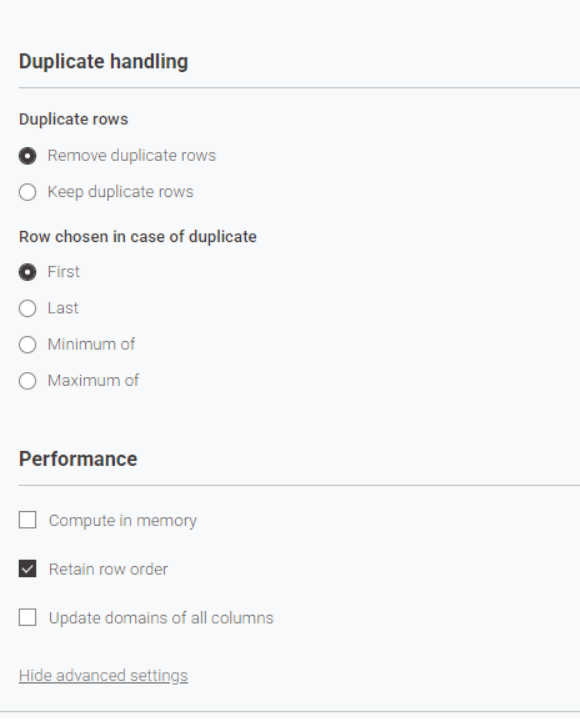
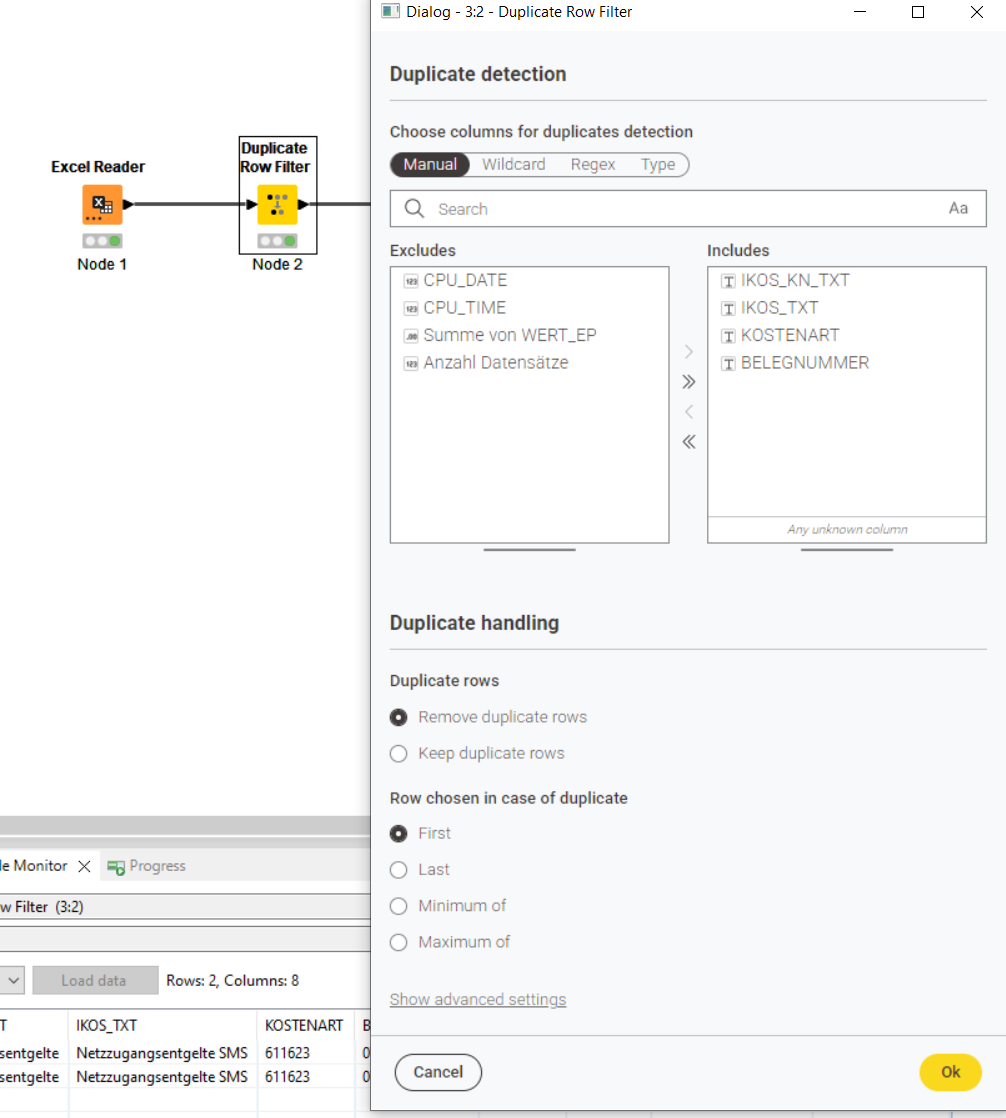
Wenn es nur darum geht Duplikate zu entfernen, nimm den “Duplicate Row Filter”. Dort kannst Du auch einstellen, wie mit Duplikaten umgegangen werden soll:
Use the Duplicate Row Filter node in KNIME, select BELEGNUMMER to remove duplicates, and it will keep one row per BELEGNUMMER—CPU_DATE and CPU_TIME don’t matter.
Hallo Andi,
danke dass ich dir das Problem in Deutsch erklären kann. Das macht es mir einfacher, da mein Englisch nicht so gut ist.
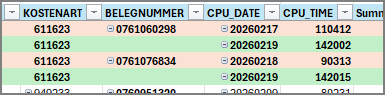
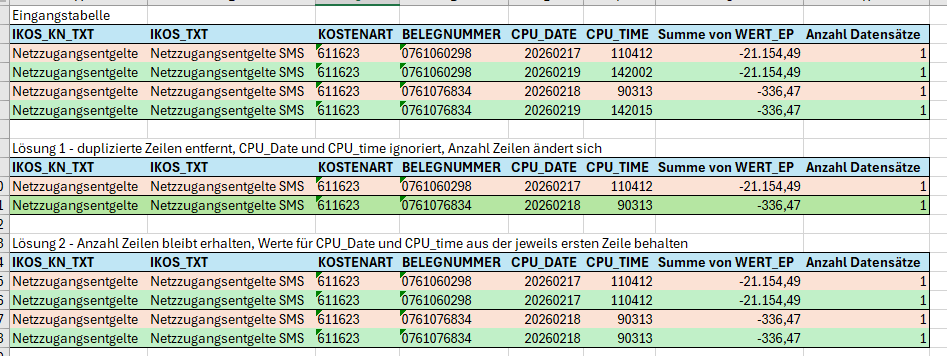
Ich habe aus buchhalterischen Einzelposten z.B. diese zwei Fälle, die doppelt in meiner Knime-Verarbeitung stehen. Das kommt immer mal wieder vor und ich bekomme leider die IT-Schnittstelle für die Datenlieferung nicht angepasst, muss also in Knime eine maschinelle Lösung für das Problem finden. Ich schreibe mal etwas ausführlicher:
Die BELEGNUMMER ist bei beiden gleich, nur bei beiden sind CPU_DATE und CPU_TIME unterschiedlich. Das wäre dann auch die (meine) Logik für das Löschen des doppelten Datensatzes. Also BELEGNUMMER ist identisch, aber wenn CPU_DATE und CPU_TIME unterschiedlich sind, lösche den doppelten Datensatz und behalte einen Datensatz. So wollte ich eigentlich vorgehen, aber ich bekomme das nicht hin. Es ist übrigens egal welcher Datensatz stehen bleibt, da für die Weiterverarbeitung die Info CPU_DATE und CPU_TIME nicht unbedingt nötig ist, da eine Identifizierung des Datensatzes im Quellsystem über die BELEGNUMMER stattfindet.
Ich kann hier aber auch nicht einfach nach BELEGNUMMER gruppieren, da ein Beleg mehrere Zeilen haben kann, in meinem Prozess teilweise bis zu 200 Zeilen, und die dürfen nicht gelöscht bzw. zusammengefasst werden. Hier sind dann aber auch bei der BELEGNUMMER in den einzelnen Datensätzen CPU_DATE und CPU_TIME identisch.
Derzeit mache ich mir in Knime mit einen Zwischenschritt einen Excel-Export, mache in Excel eine Pivot-Tabelle (Ergebnis als kleine Excel-Datei anbei), suche mir die Row-Nummer der doppelten Datensätze raus und lösche die Datensätze mit diesen Row-Nummern über einen „Rule-based Row Filter“. Leider ändern sich mit einer aktuellen Datenlieferung aus dem Quellsystem die Row-Nummern in Knime wieder, da neue Buchungen/Datensätze dazu kommen.
Das zu automatisieren wäre klasse und ich hoffe Du kannst mir jetzt hier weiterhelfen.
Noch eine Zusatzinfo: die Tabelle in Knime hat 38 Spalten und je nachdem wie viele Buchungen im Quellsystem vorhanden sind, bis zu 5.000 Zeilen. Diese dürfen nicht gruppiert oder verändert werden.
from your source system. Every other solution is guess work and will potentially result in an error in the short or long run.
If you do not get the POSITION information, your best / only real option is:
Groupby BELEGNUMMER + DATE + TIME, and aggregate: MAX (ANZAHL DATENSÄTZE), and COUNT(ANZAHL DATENSÄTZE).
then Rule-based Row filter for MAX = COUNT.
After that duplicate Row Filter on BELEGNUMMER + DATE + TIME.
then join your original dataset (the full dataset) with the new table generated on BELEGNUMMER, DATE and TIME.
that should leave you only those “rows” that have the same BELEGNUMMER, matching DATE and TIME, and are “complete” according to your ANZAHL DATENSÄTZE.
BUT, if DATE or TIME varies within sets (think about 1 second difference in the source system), it will discard the whole dataset.
tldr: get the BELEGPOSITION from your source system, everything else is irresponsible.
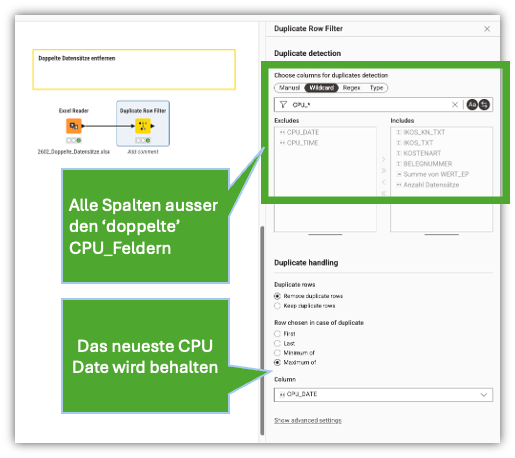
@HolgerKleinert also ist es so dass die Dubletten entstehen aus den CPU Spalten weil davon nur eine Zeile stehen bleiben soll während die anderen Spalten die Informationen enthalten bestehen bleiben sollen. OK darüber kann ich nachdenken.
Einfach Mal versucht die beiden CPU spalten auszuschließen und dann alle restlichen Spalten zu deduplizieren?
Ein Beispiel mit mehr Zeilen kann evt die Komplexität besser darstellen.
Vielen Dank! Ich hätte nicht gedacht dass die Lösung so einfach ist. Man muss es nur wissen
Ich mag diese Community, in der immer eine Problemlösung gefunden wird.
Gruß Holger