@mlauber71 I hope you don’t mind me tagging you but I found your very helpful post Copy & Rename a file diffrent directory - #5 by mlauber71
Unfortunately, the file that I am trying to re-save has been downloaded from a URL so is called Content Server but has no file type. I am trying to keep the same name but rename the file with the extension .pdf.
I have replicated your workflow but made a couple of tweaks that I was hoping would add the file extension PDF to my original file.

After the URL to File Path node I can see that the File extension is indeed empty so i’ve used a constant value column to add the extension PDF.
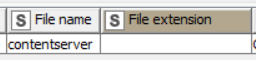

I’ve updated the snippet nodes to create my new file and new file path.

Using the Transfer File node, I transfer from the original file path (without extension) to my new path (with extension).
Unfortunately, the Transfer File node is recognising my new file name ‘contentserver.PDF’ as a new folder that needs to be created (even though i’ve left the create missing folder checkbook unticked) and then just re-saving the original contentserver file without the extension into this folder (as per below screenshots)


Do you happen to know why this may be happening? And also how I can go about adding an extension to file?
I thought I had it with the help of your great workflow and although i feel i’m close to success, I can’t quite get across the line.
Any help would be greatly appreciated.
Thanks.
Pete